Adjusting Assignments in the Team Planner View

Hi,

I will show you how you can easily adjust assignments and reschedule your tasks in the project.

First I will add four tasks to my project and they will be in manually scheduled mode, and I will not schedule them for the moment:

image

I will add 3 resources through the Resource sheet (John, Paul, and Mary):

image

I will now start the Team Planner View:

image

You can see that John Paul and Mary don’t have any tasks assigned, and that all tasks are unscheduled (because I left them in manually scheduled mode)

I will assign John to the Task 1 , Paul to the Task 2, and Mary to the Task 3. I will get:

image

You can see that those Tasks are assigned but not scheduled. Now I will drag and drop Task 1 and put it to start on Wednesday 11.05.2011:

image

and I will get:

image

You can see that the task is still in manual schedule mode, but it has estimated duration of 1 day.

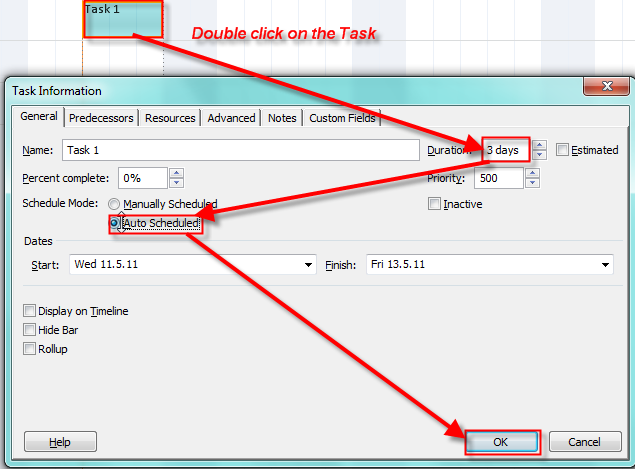
I will now double click on Task 1 and put 3 day duration in the duration field:

image

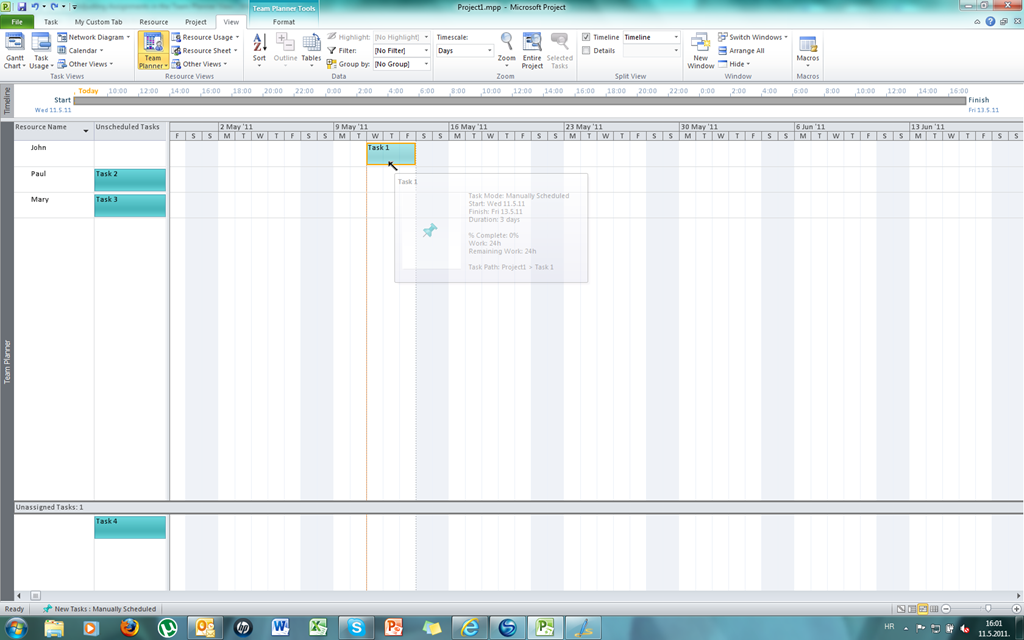
and I will get:

image

Now John is assigned to the Task 1 and it is scheduled

I will drag and drop Task 2 from Paul to John and put it to start on Wednesday 11.05.2011 as well, and I will change its duration to 3 days (automatic scheduled). After that I will get:

image

You can see that John appears in a red color, and it means he is “over allocated”. Now I will simply drag and drop Task 2 from John to Paul and I will get:

image

You can see that John is not “over allocated” anymore.

Now I will double click on Task 4 and I will set 3 duration days (automatic scheduled):

image

and I will get:

image

You can see that Task 4 is now scheduled but not assigned.

So, generally you can play with Team Planner View to assign and reassign the Task however you want. You must remember that there are 4 areas in Team Planner View:

image

Finally, if you move a scheduled task (assigned or unassigned) to unscheduled area (assigned e.g. to someone) or unassigned you will actually delete actual work on that task. I will move Task 2 from assigned (to Paul) and scheduled (from 11.05.2011 to 13.05.2011) to unassigned and unscheduled area and I will get a warning:

image

And last, but not least, Tem Planner View is available only in MS PROJECT 2010 PROFESSIONAL VERSION!

In my next blog I will make the scenario more complicated because I will make a relationship between the tasks and THEN I will move them around!

See you,

Posted in Microsoft PRoject 2010, MS PROJECT 2010, PMI, PRoject Management | Tagged , , , | Leave a comment

Resolving over allocation in MS PROJECT 2010

Hi,

I have received request for help from one reader of my blog. The request is:

“Hi,
I’m trying to create a new schedule for 1 person. I’d like to find a way to use automatic scheduling that will fill the day and spread the task without spreading it in a crazy way.

For example, if I have a 1 hour recurring meeting every day, and a task that will take 24 hours, I’d like it to schedule the task to finish as soon as possible, with a break down of 7/7/7/3. Instead, it over allocates and does 9/9/9.

Are there any settings I can use to make it limit the allocation to 8 hours per day?

Thanks for your help.”

In this blog I will focus on resolving this particular problem. In the future I will explain problems with over allocation in detail.

I am going to setup the environment exactly the same as this gentleman has.

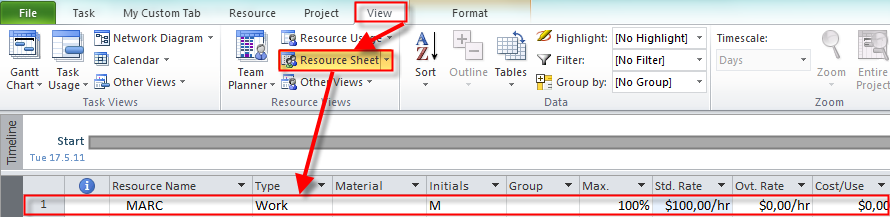
I will add one work resource with name MARC:

image

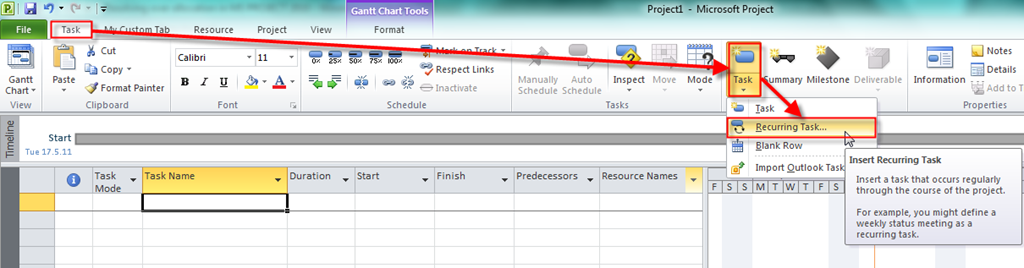
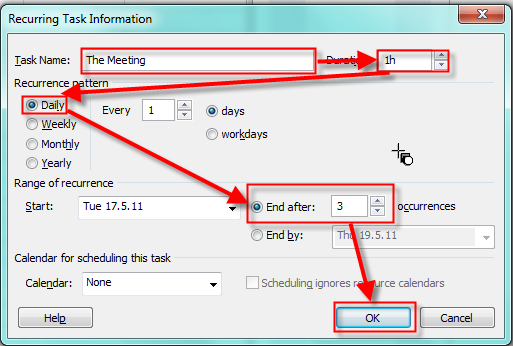
Now I will add a 1-hour recurring meeting:

image

image

and I will get:

image

Now I will add the second Task with a 3 day duration and I will get:

image

And finally I will assign my resource MARC to both tasks:

image

and I will get:

image

Marc is supposed to work 8 hours per day, and since he has a one hour meeting every day he is over allocated, and he will work 9 hours per day.

How can I make Marc to work only 7 hours per day on The Task, an let The Task to last 24 hours (3 days X 8 hours = 24 hours)?

Now I will choose Resource Usage View:

image

The easiest (but not the best) way to resolve over allocation is to insert (in work field): 7 hours per day for The Task at Tuesday, Wednesday, and Thursday, and 3 hours at Friday (see the picture below):

image

Now I will choose the Gantt Chart and you can see that Marc is not over allocated any more:

image

Another way of resolving over allocation for MARC is to add the Assignment Units column in the Resource usage View:

image

and I will get:

image

I want Marc to work 7 hours per day at The Task. If he works 8 hours per The Task it is 100% of Assignment Units. 7 Hours is 87,5 Assignment Units (7/8= 0,875 and it means 87,5%). I will insert 87,5 in the Assignment Units field:

image

and after I press Enter I will get:

image

You can see that I got what I wanted.

Those two types of over allocation resolutions are very simple if you have one resource, one recurring and one simple task, as I have. But if you have a lot of tasks, a lot of resources, and a lot of over allocations it will be almost impossible to resolve those over allocations manually.

I will show you a brief example of how to automatically resolve the over allocation conflict in my example. I will do it for a single resource (MARC).

First I will show the Resource Usage View again:

image

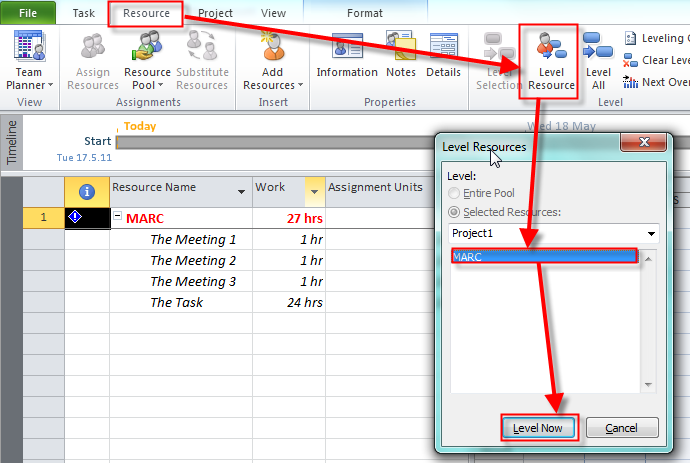
Now I will level single resource (MARC):

image

and I will get:

image

You can see that I got what I wanted.

There are other ways to resolve over allocation for more tasks, or resources, or entire project, but I will write a blog for these methods in a future.

When I was writing this blog I found a bug. But I will write about it next week.

I hope I helped my blog reader who sent me a request for help.

See you,

Posted in Microsoft PRoject 2010, MS PROJECT 2010, PMI, PRoject Management | Tagged , , , | 3 Comments

Task Relationships

There are four different task dependencies (relationships):

Finish to Start (FS): The finish date of predecessor task determines the start date of the successor task

Start to Start (SS): The start date of the predecessor task determines the start date of the successor task

Finish to Finish (FF): The finish date of the predecessor task determines the finish date of the successor task

Start to Finish (SF): The start date of the predecessor task determines the finish date of the successor task

When you link two tasks then the default relationship is Finish to start.

I will now add five tasks and assign a predecessor to Task 2,3,4 and 5 (default: FS):

image

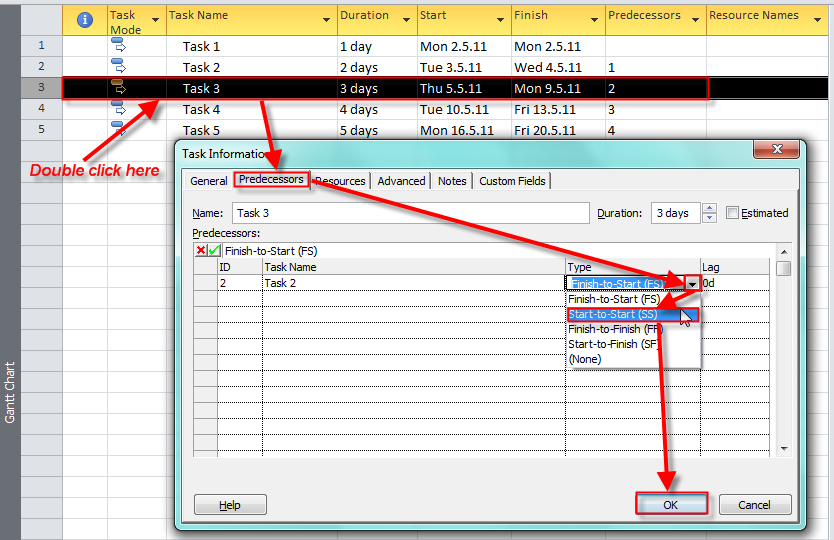
Now I will change the type of relationship between Task 3 and Task 2.

image

and I will get:

image

You can see that the Start Date of Task 3 is now the same as a Start date of Task 2, and the End date of Task 3 changed accordingly. And in the Predecessor field of Task 3 you will find 2SS (which means: Task 3 has Task 2 as predecessor, and the relationship is SS – Start to Start)

Now I will change the relationship between Task 3 and Task 4 in the same way, but I will establish Finish to Finish Relationship instead. And I will get:

image

You can see that the End Date of Task 4 is now the same as the End date of Task 3, and the Start date of Task 4 changed accordingly. And in the Predecessor field of Task 4 you will find 3FF (which means: Task 4 has Task 3 as predecessor, and the relationship is FF – Finish to Finish)

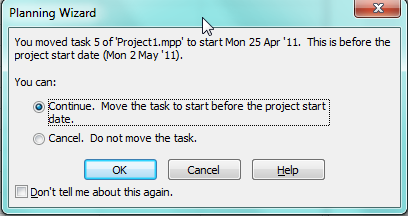
Now I will change the relationship between Task 4 and Task 5 in the same way, but I will establish Start to Finish Relationship instead. Notice that project start date is Monday, 02.05.2011 (this is Start date of Task 1). When I choose Start to Finish relationship and I click the OK button I will get:

image

MS Project warns me that if I choose Start to Finish relationship Task 5 will be moved to start date 25.04.2011 which is earlier than project start date (02.05.2011). This happens because in Start to Finish relationship Start date of Task 4 is Finish date of Task 5. Start date of Task 4 is 02.05.2011 and because Finish date of Task 5 is the same and the duration of the Task 5 is 5 days, Start date of Task 5 must be moved 5 days earlier than 02.05.2011 which is 25.04.2011 and it is before the Project start date (02.05.2011). I will choose OK and I will get:

image


See you,

Posted in Microsoft PRoject 2010, PMI, PRoject Management | Tagged , , , , | 8 Comments

Customizing the Ribbon in MS PROJECT 2010–Part II

In this Blog I will make my own Tab, Groups and Commands.

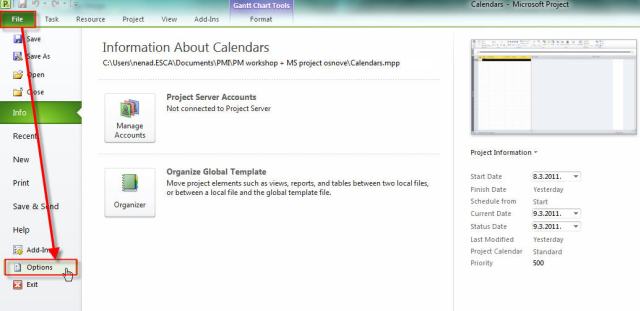
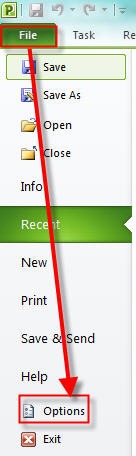
I will go to Backstage view:

Primjer 1 02.05.2011

and then:

Primjer 2 02.05.2011


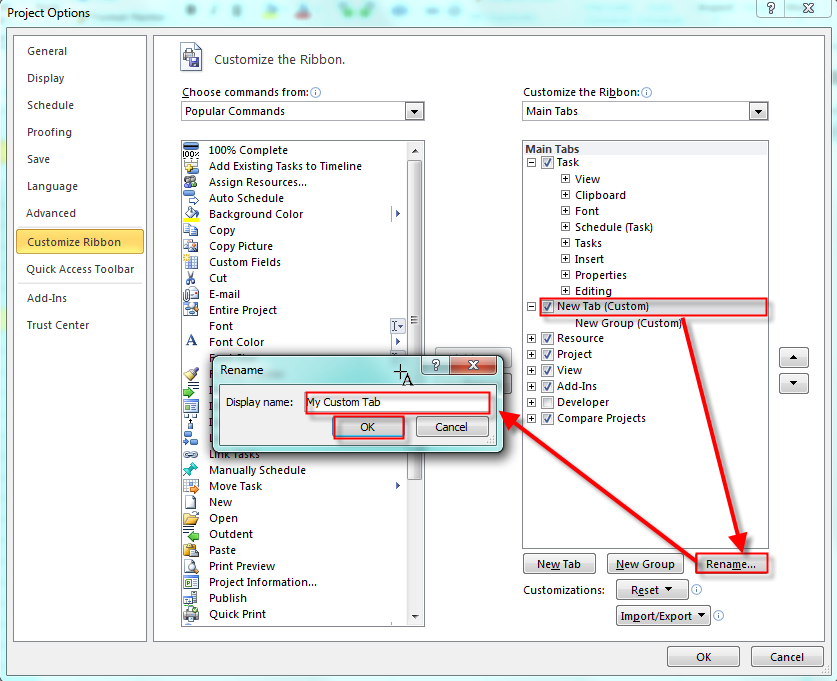
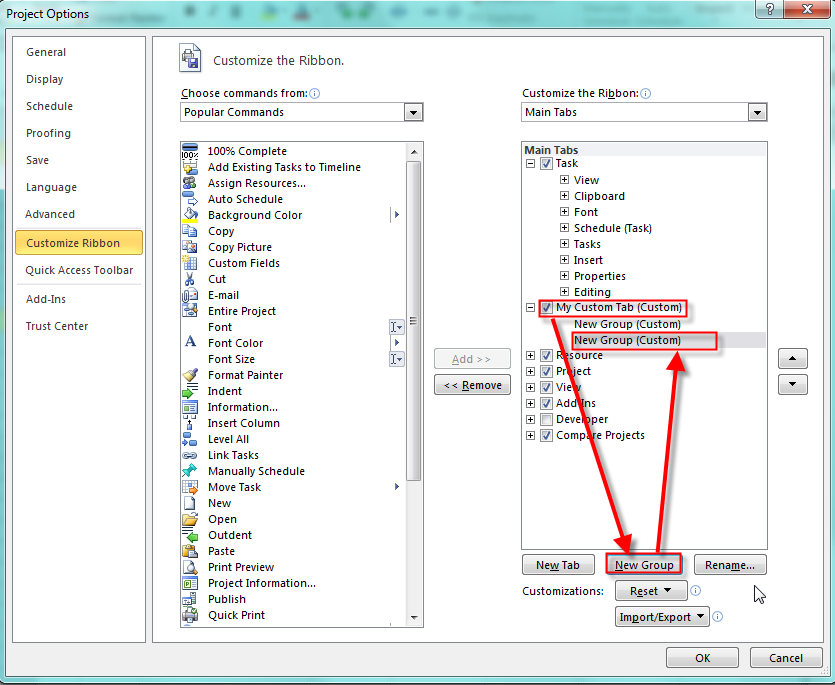
I will add a brand new Tab and I will call it “My Custom Tab”

image

Now I have a new tab. I will rename it:

image

I will add a new group:

image

I will select those two new groups and I will rename them. First group will have a “Schedule” name, and second “Resources”. For the “Schedule” group I will choose smiley, and for “Resources” a dollar sign:

image

Finally I will add Gant Chart, Task usage and Task Form to Schedule Group and Resource Sheet, Resource Usage and Resource Name Form. I will show you how to put only one command in one group because it is the same principle for all:

image

When I finish I will get:

image

And when I close this window (I will click on OK button) I will get

image


See you,

Posted in Microsoft PRoject 2010, MS PROJECT 2010, PMI | Tagged , , | Leave a comment

Customizing the Ribbon in MS PROJECT 2010

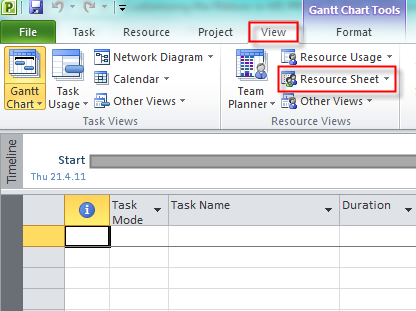
In this blog I will write about customizing the Ribbon. Let me start with an example. If you want to define your resources on a project you can do it on the View Tab:

image

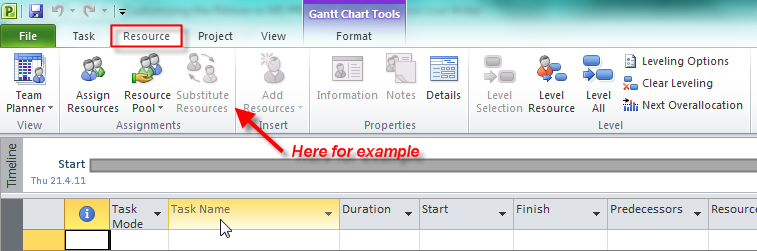
I will prefer that everything about resources stays in resource tab:

image

Now I will customize my Ribbon:

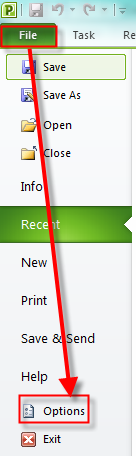
1. I will go to Backstage view:

image

and then:

image

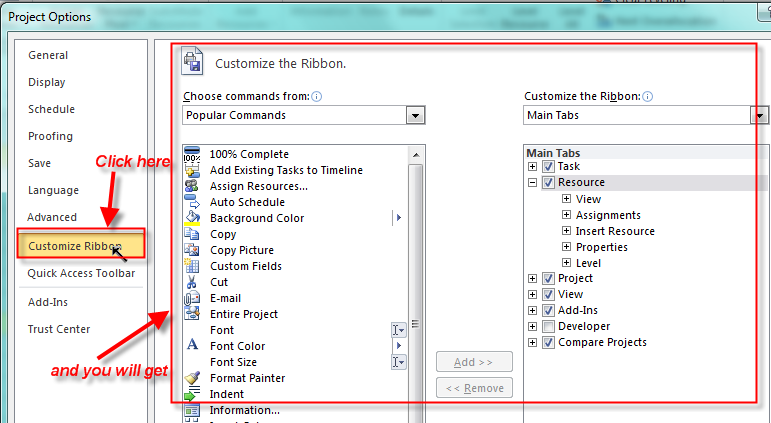
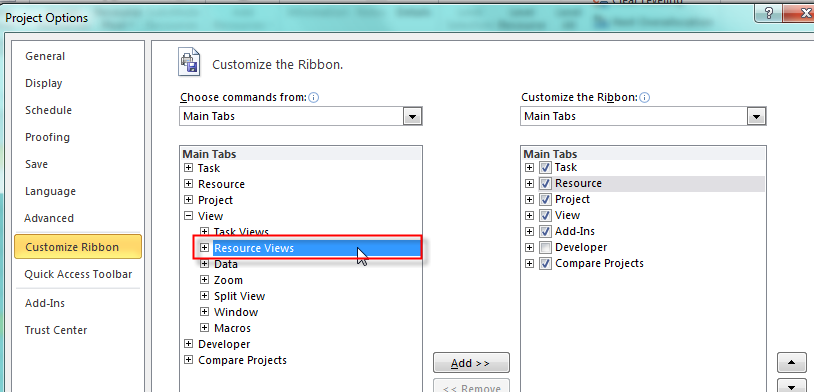
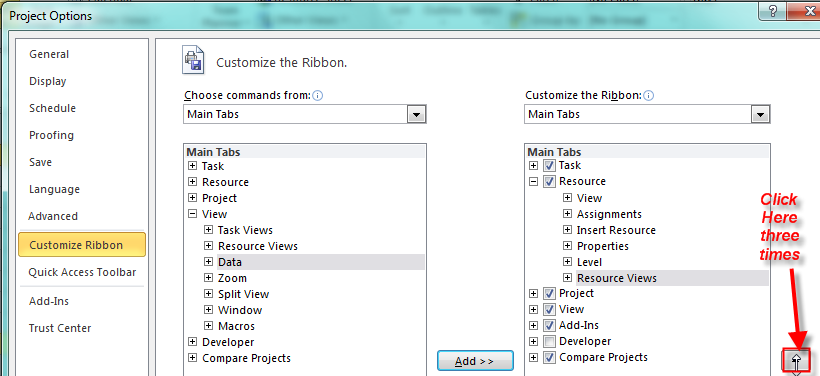
I want the whole Resource group (from the View Tab) to be inserted into Resource Tab. I will choose View group from the left column first:

image

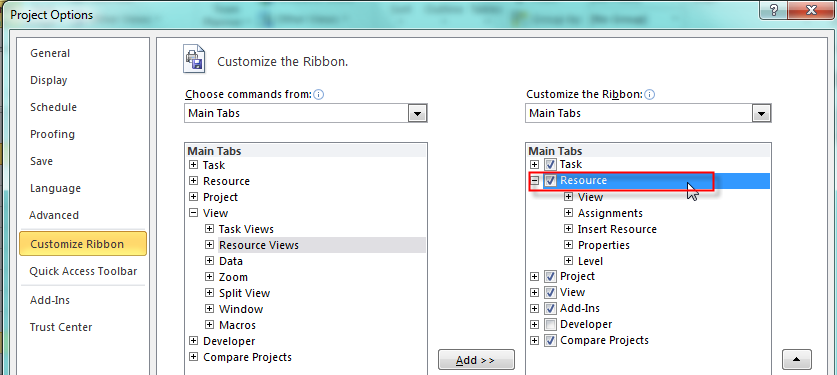
Then I will choose Resource group from the right column (click on the + sign):

image

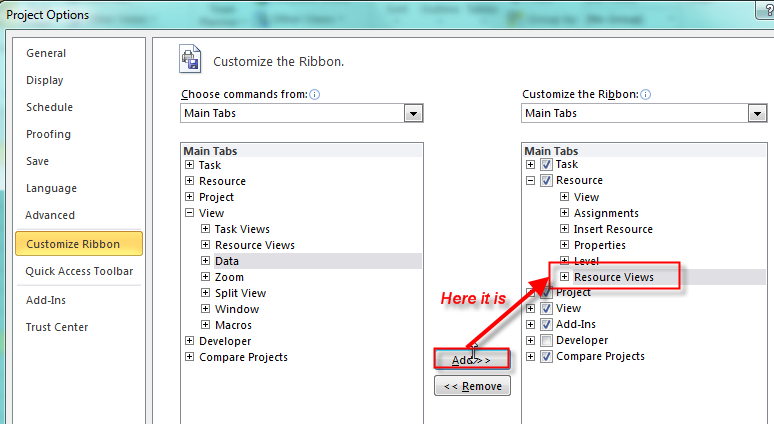
and then I will click on the Add button and I will get:

image

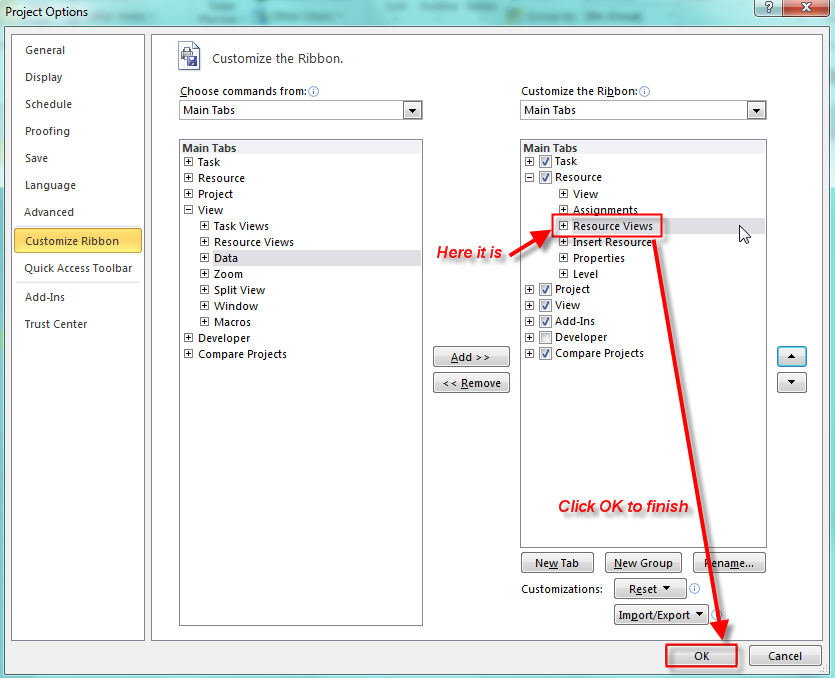
Finally, I want my new group to be placed right behind Insert resource group so I must move newly added group up a few times and place it below Insert Resource group and below Assignment group:

image

and I will get:

image

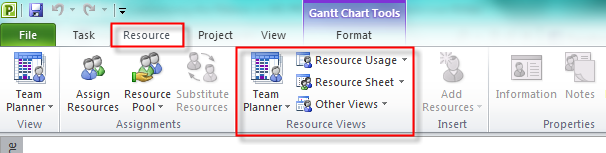
When you click on OK button on the Resource tab you can find just added Resource view Group:

image

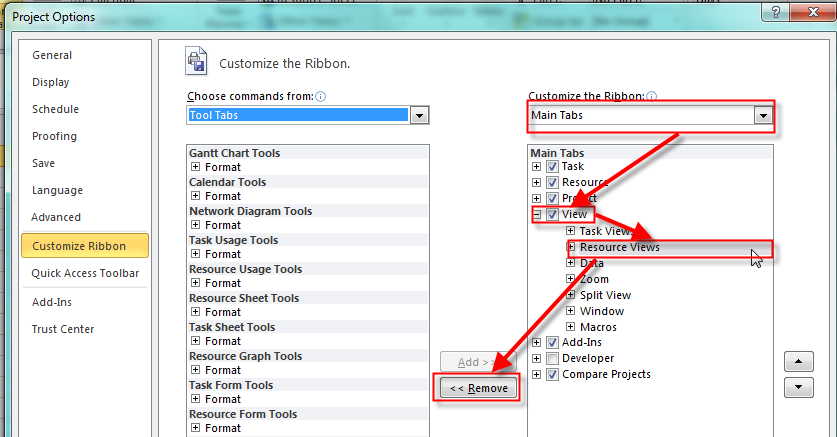
OK. But now I don’t need this group under View Tab, so I will remove it. In the backstage View, under Customize Ribbon choose Main tab in the right column, then under View tab select Resource Views and finally click on remove button and then on OK button:

image

Now, you can see that there is no longer Resource Views group in the View Tab.

OOOOPS! Now click on the Resource Tab again. The Resource Views group has disappeared. And this is bug. You should add it again, and then it will be shown under the Resource Tab.

You can avoid this situation if you do both (adding Resource View group to the Resource tab and removing Resource View group from the View tab) without leaving the Backstage View.

See you,

Posted in MS PROJECT 2010, PMI, PRoject Management | Tagged | Leave a comment

How to split tasks in MS PROJECT 2010

Hi,

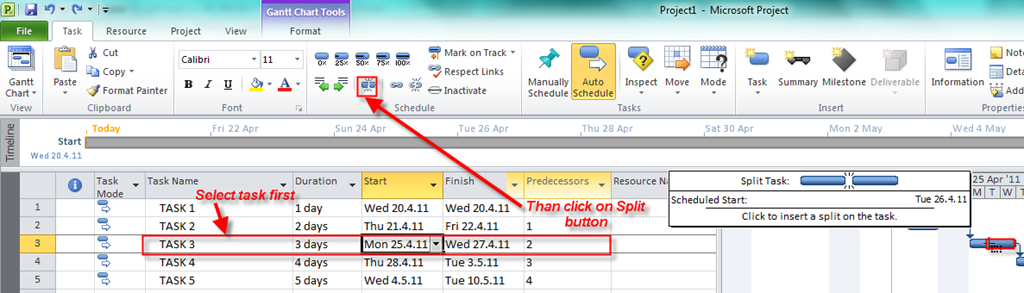
Suppose that you have a project with 5 tasks as is shown in the picture:

image

Task 3 has a 3-day duration, and will start on Monday, 25.04.2011 and finish on Wednesday, 27.04.2011. What if your task can be done in 3 days but it must (for any reason) be scheduled on Monday 25.04.2011 then Thursday 28.04.2011 and finally on Tuesday, 03.05.2011.? You can make three different tasks but this is not a good idea. A better approach is to split the task. Here is how it’s done:

image

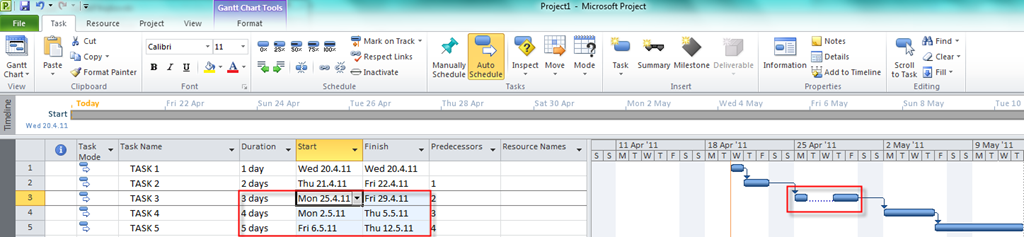
After you click on Split button move the cursor on the Gantt chart and click on Tuesday, 26.04.2011 and drag the task on Thursday 28.04.2011:

image

and you will get:

image

You can see that duration of task 3 is unchanged but the start date and end date was changed for Task 4 and 5 because Task 3 is predecessor of Task 4 and Task 4 is predecessor of Task 5.

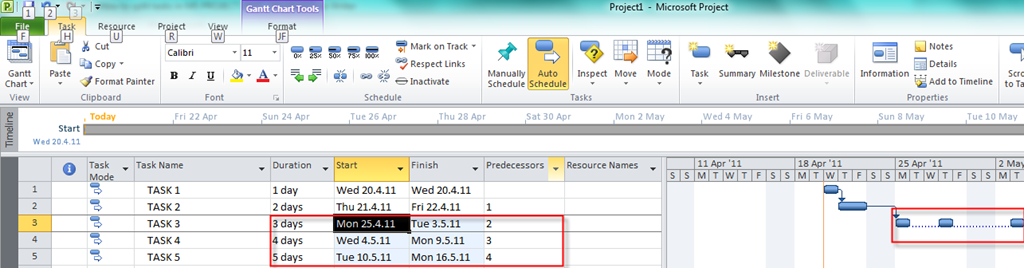
Now I will split the same task so the last day is Tuesday 03.05.2011 and I will get:

image

Again, duration of task 3 is unchanged but the start date and end date was changed for Task 4 and 5 because Task 3 is predecessor of Task 4 and Task 4 is predecessor of Task 5

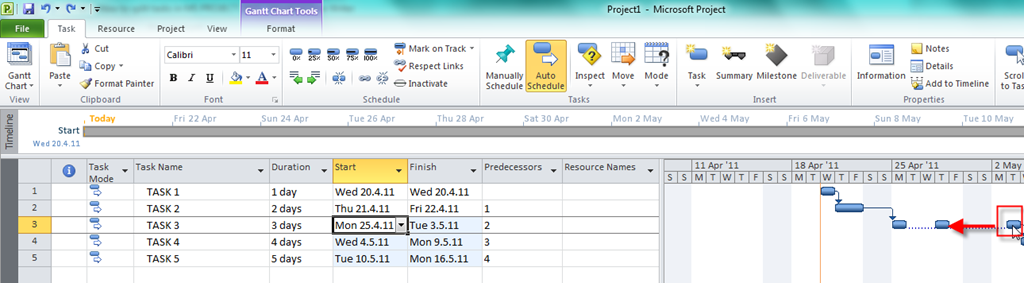
What if you change your mind? You can “resplit” the task in the same way. Click on the split task back until it is connected again (drag from right to the left):

image

And the task is joined again.

Remember that a dotted line does not represent duration. Nothing is happening in the dotted line period. If you want to remove dotted line you can do it like this:

image

and you will get:

image

You can see that a dotted line is removed. This picture on the Gantt chart is little confusing because you have a task with a 3-day duration that will start on Monday 25.04.2011 and finish on Friday 29.04.2011. Without a dotted line you can think that this is an error, so I strongly suggest: Leave a dotted line in your Gantt chart.

See you,

See you,

Posted in Microsoft PRoject 2010, MS PROJECT 2010, PMI, PRoject Management | Tagged , , | 6 Comments

Inactiving tasks

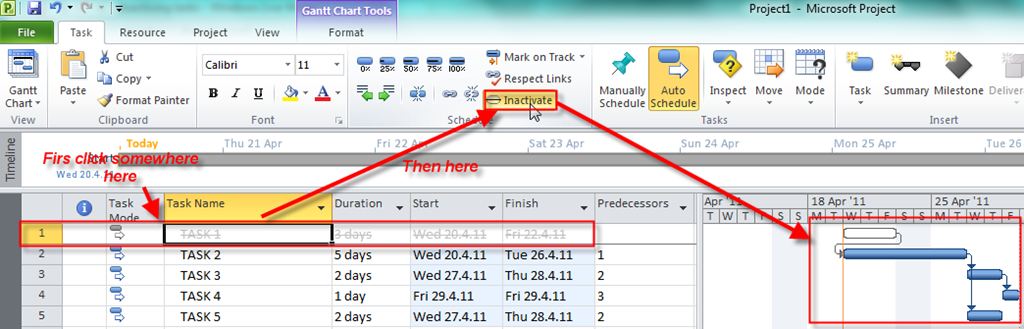
A great new feature in MS PROJECT 2010 is Inactive task command. In previous versions if you had a task which you decided not to do (because you didn’t have resources, or simply you just didn’t need it) you had to delete it. And when you deleted a task it was gone forever. Now you don’t have to delete it but you can just make it inactive. This feature gives you a possibility of making inactive task active again if you change your mind. You can also see all the inactive tasks for a project review.

Here is an example:

image

I have five tasks:

Task 1 has a 3-day duration, Task 2 has a 5-day duration and can start when Task 1 is finished, Task 3 has a 2-day duration and can start when Task 2 is finished, Task 4 has a 1-day duration and can start when Task 3 is finished and Task 5 has a 2-day duration and can start when Task 2 is finished.

First I will make Task 1 inactive:

image

You can see that Tasks 2, 3, 4, and 5 are rescheduled to start on 20.04.2010 (start date of Task 1). This happened because Task 1 is no more active, and Task 2 has no predecessor, so it can start as the first task of the project when the project starts.

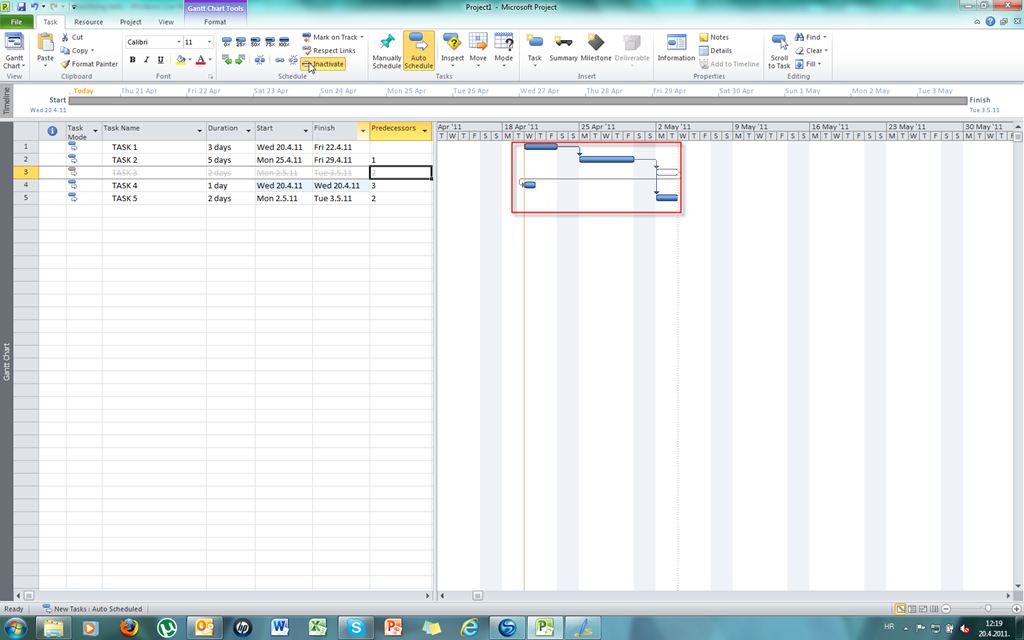
Now I will leave Task 1 active but I will make Task 2 inactive (Btw, if you want to make a task active again just click on Inactive button):

image

You can see that Task 1 remains as it was, but Tasks 3,4, and 5 are rescheduled to start on 20.04.2010 (start date of the project). This happened because Task 2 is no more active. Task 2 had Task 1 as predecessor but when I made it inactive Task 3 and Task 5 did not change their predecessor to Task 1 automatically. You must make Task 1 as a predecessor of Task 3 and Task 5 by your own:

image

Now I will leave Task 2 active but I will make Task 3 inactive:

image

You can see that Task 4 is rescheduled to start on 20.04.2010 (start date of the project). This happened because Task 3 was only predecessor of Task 4. So again, if you want to make Task 2 as a predecessor of Task 4, do it manually.

Finally I will make Task 4 and Task 5 inactive (respectively):

image

image

Since Task 4 and Task 5 are not predecessors to any task they are just inactive and nothing happens to the other tasks.

Regards,

Posted in Microsoft PRoject 2010, MS PROJECT 2010, PRoject Management | Tagged , , | 2 Comments

Assigning and removing resource to tasks–BUG


In this blog I will show you a bug that I found when removing resource from the task

First, I will add two resources to the Project:

Primjer 1 22.04.2011

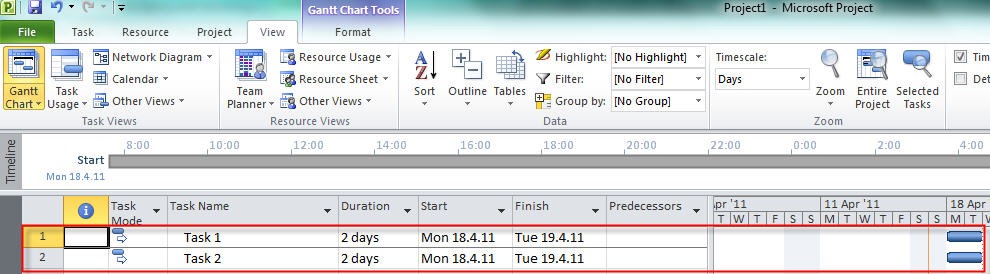
Then I will add two tasks to the Project with same duration –> 2 days:

Primjer 2 22.04.2011

Now, on the View tab, in the Split View I will click Details and I will get Task form in the lower part of the screen:

Primjer 3 22.04.2011

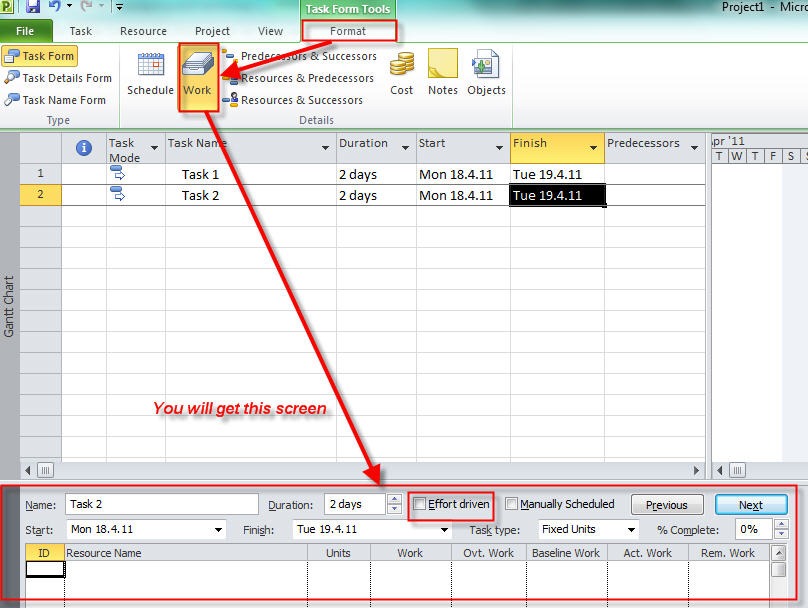
I will click anywhere in the Task Form and I will choose Work in the format Tab:

Primjer 4 22.04.2011

For the bug it is irrelevant whether the task is effort driven or not

Now, I will assign John and Mary to the Task 1 and Task 2:

Primjer 5 20.04.2011

Primjer 6 20.04.2011

O.K. Now I will, for example, remove John from the Task 2:

Primjer 7 20.04.2011

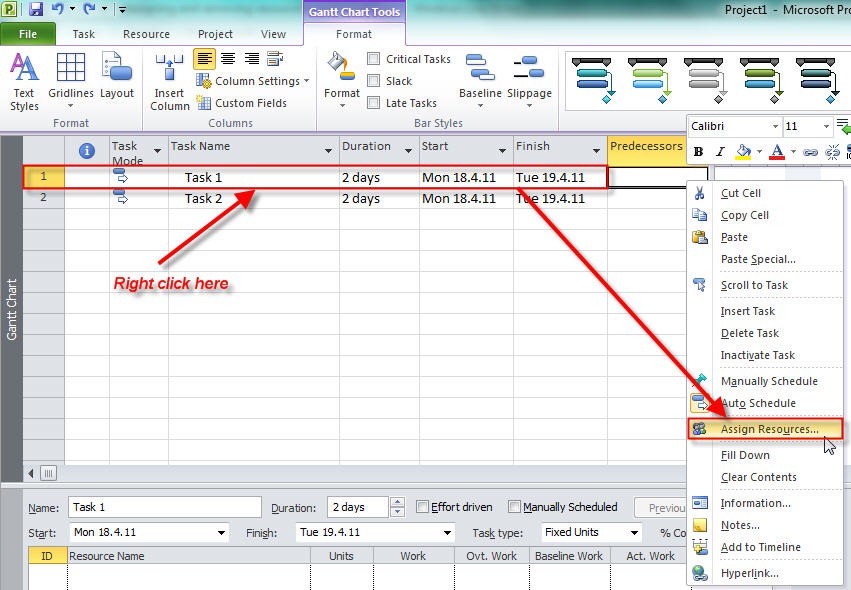
You can see that John has disappeared from the Task Form. But I decided to use the action button and to choose: “Increase total work because the task requires more person-hours. Keep duration constant” or “Increase the hours that resources work per day. Keep duration and work the same”.

Primjer 8 20.04.2011

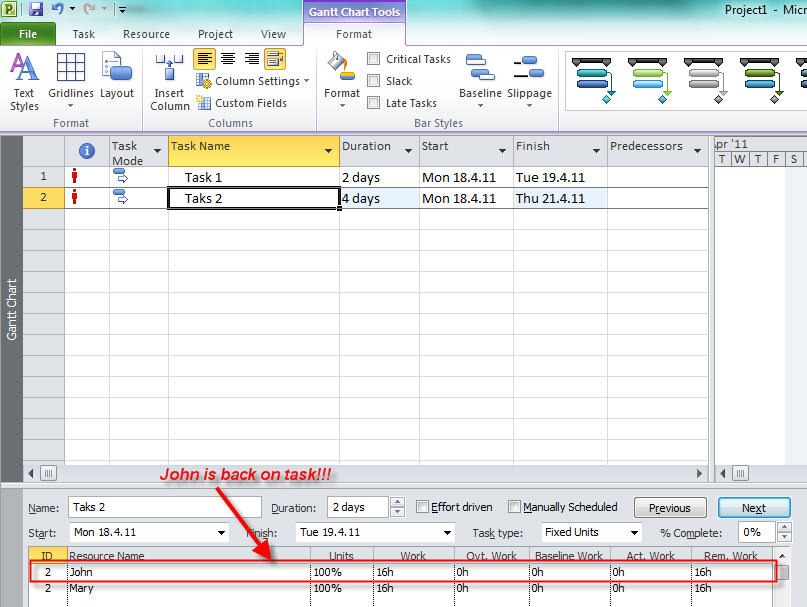
After that you will get:

Primjer 9 20.04.2011

And John is back again. This is a bug. But it is only so called: “Display bug”. John is actually removed from the task but he is displayed in the Task form. I will remove him by clicking on Previous and then Next button.

When I click on the Previous button I will have cursor moved on the Task 1 and John and Mary displayed on the Task form (assigned to the Task 1):

Primjer 10 20.04.2011

When I click on the Next button I will have cursor moved on the Task 2 again and only Mary displayed on the Task form (assigned to the Task 2):

Primjer 11 20.04.2011 

This was just one example of bug when removing resource from the task. There are several more occasions when this type of bug appears. So, be careful when you remove resource from tasks.

Regards,

Posted in Microsoft PRoject 2010, MS PROJECT 2010, PMI, PRoject Management | Tagged , , | 2 Comments

Scheduling problems in MS PROJECT 2010

One of the biggest problems in MS Project is to understand how to manage the time. A friend of mine told me that he is not using MS PROJECT because each time he would change the calendar or working time, the whole Project “crashed”. Well I will try to explain how to avoid this kind of problems.

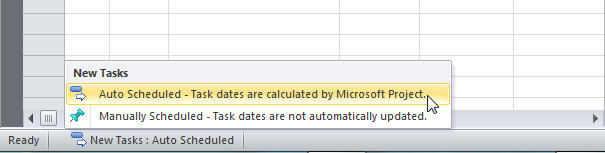
In MS Project 2010 you can choose between two types of scheduling: Manually or Automatic schedule. If you choose Manually you will have the whole control over the scheduling and you will not get the whole power of MS Project 2010. For my examples I’ve chosen Automatic mode and it is shown on picture below:
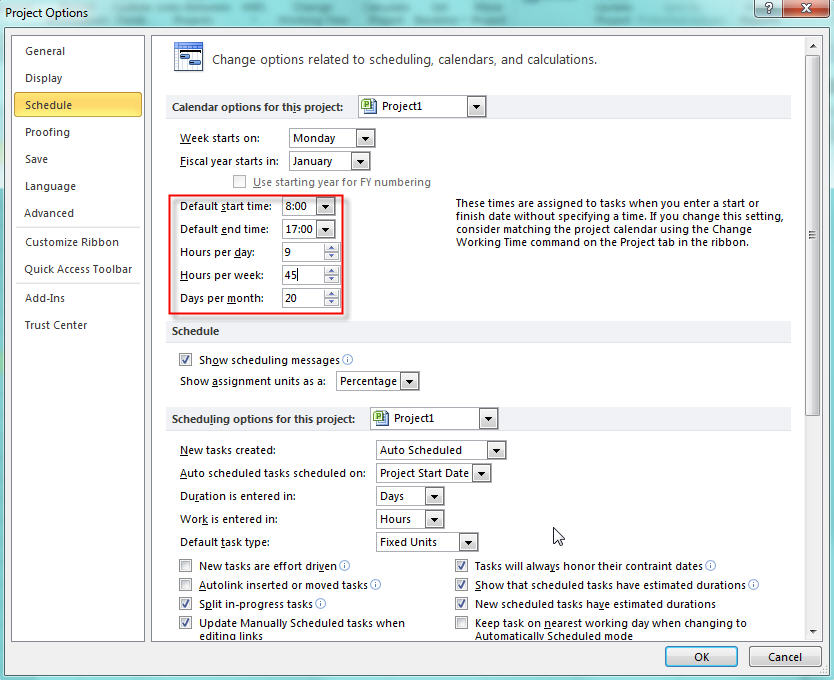
Next we will set up daily, weekly and monthly working time:
And then:
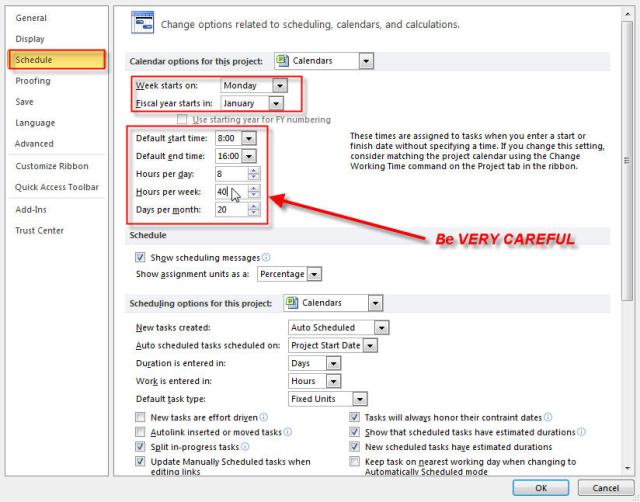
We have told to MS Project that regular working time will be Monday – Friday from 08:00 AM until 16:00 PM, 8 hours without lunch break.
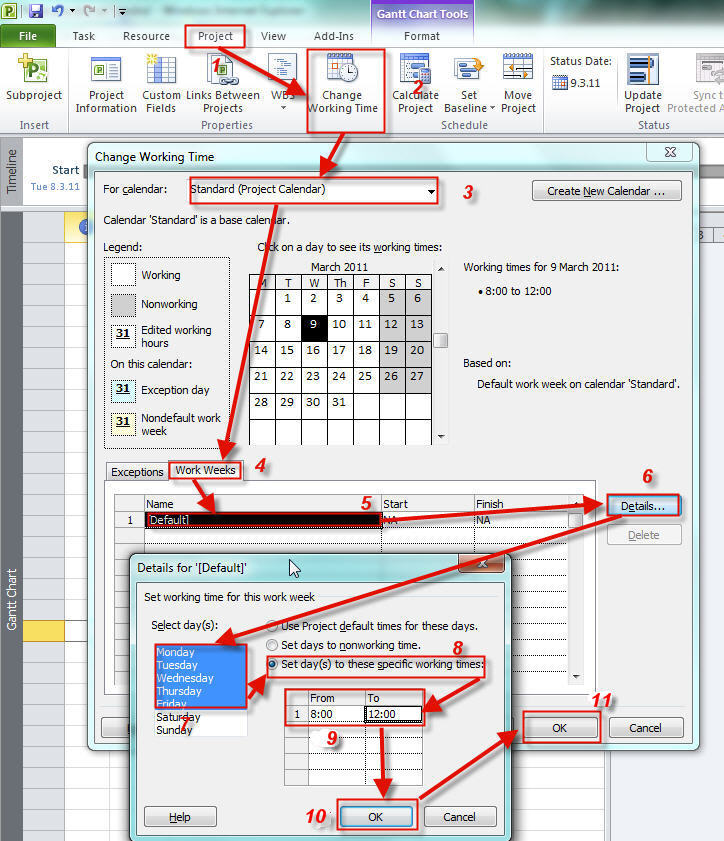
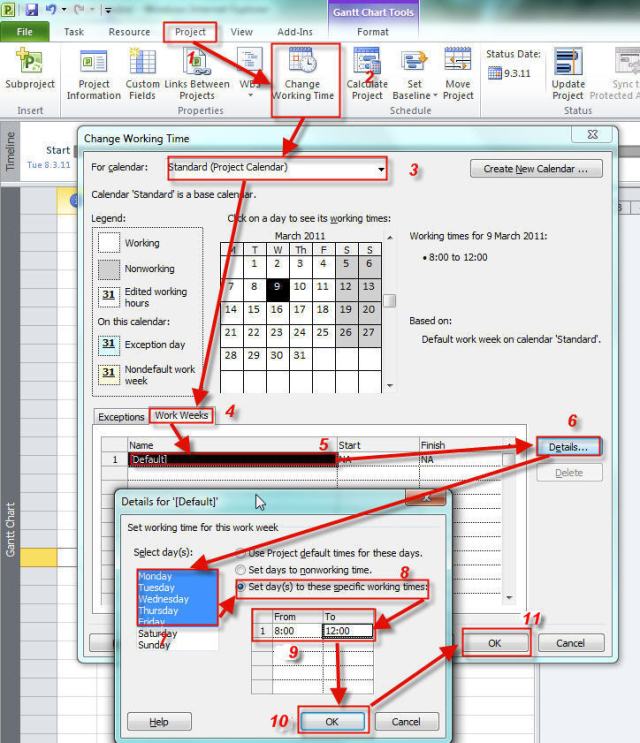
Now we will set up our standard calendar:

  1. Select Project TAB
  2. Click on Change Working Time
  3. On The For Calendar choose: Standard (Project) Calendar
  4. Click on Work Weeks
  5. Select Default
  6. Click on Details
  7. Select days: Monday – Friday
  8. Choose: Set day(s) to these specific work times
  9. Type 08:00 in From field and 16:00 in To field
  10. On the same form click OK button
  11. On the Change working time click OK button
Now you can enter two tasks: Task 1 with 1 day duration, and Task 2 with 2 day duration (type 1d and 2d respectively):
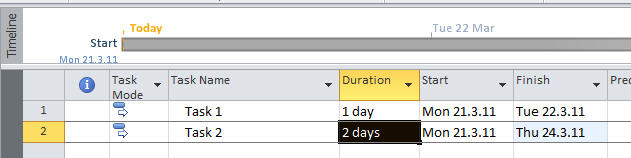


I have put the duration for Task 1 of 1 day and for Task 2 of 2 days. You can see that the start dates for both tasks are the same, but the Task 1 has end date 22.03.11. and Task 2 has end date 24.3.11. How is it possible? I said in duration field that I want for Task 1 duration of 1 day and for Task 2 duration of 2 day but it seems that those tasks will take much longer. WHY?
Well it is easy to explain. When I put (in duration field) that I want for Task 1 to have 1 day duration I said: “I want my task to last 8 working hours”. WHY? Well I told that in scheduling options:
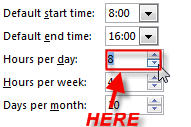
And because I have calendar with 4 working hours per day Task 1 will start at 21.3.11 and it will end at 22.3.11. Working time will be from 08:00 till 12:00 (4 hours), so it will be 2 days X 4 hours = 8 hours

When I said (in duration field) that I want for Task 2 to have 1 day duration I said: “I want my task to last 16 (2 days X 8 hours) working hours”. And because I have calendar with 4 working hours per day it will start at 21.3.11 and it will end at 24.3.11. Working time will be from 08:00 till 12:00 (4 hours), so it will be 4 days X 4 hours = 16 hours

Now, suppose that in my calendar I choose that working time will be from Monday till Friday from 08:00 – 15:00 (7 working hours). Duration of Task 1 and Task 2 will be:

Because I have calendar with 7 working hours per day, Task 1 will start at 21.3.11 and it will end at 22.3.11. Working time will be from 08:00 till 15:00 (7 hours) at 21.2.11, and from 8:00 till 09:00 (1 hour) at 22.3.11 so it will be 7+1 = 8 hours

Task 2 will start at 21.3.11 and it will end at 23.3.11. Working time will be from 08:00 till 15:00 (7 hours) at 21.03.11 and 22.03.11 and from 08:00 till 10:00 (2 hours) at 23.3.11, so it will be (7+7+2 = 16 hours)

Now, suppose that in my calendar I choose that working time will be from Monday till Friday from 08:00 – 17:00 (9 working hours). Duration of Task 1 and Task 2 will be:

Because I have calendar with 9 working hours per day Task 1 will start at 21.3.11 and it will end at 21.3.11. Working time will be from 08:00 till 16:00 (8 hours)

Task 2 will start at 21.3.11 and it will end at 22.3.11. Working time will be from 08:00 till 17:00 (9 hours) at 21.03.11 and 22.03.11 and from 08:00 till 15:00 (7 hours) at 23.3.11, so it will be (9+7 = 16 hours). You can see that the calendar working time is respected (9 hours not 8).

OK, now I will change working hours in the scheduling options.
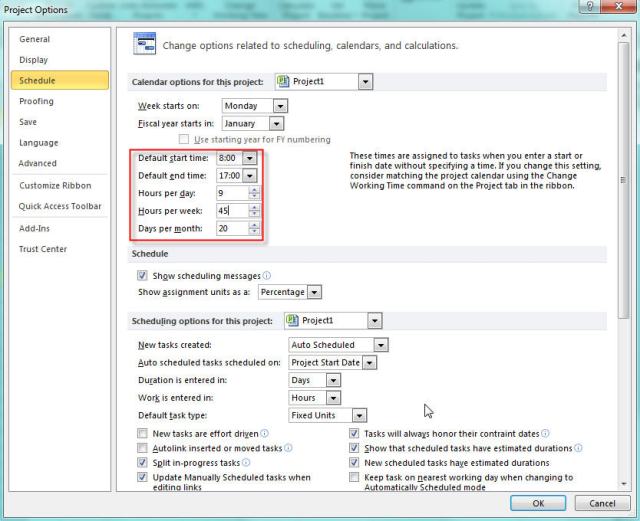
We have told to MS Project that regular working time will be Monday – Friday from 08:00 AM until 17:00 PM, 9 hours without lunch break.

Now, suppose that in my calendar I choose that working time will be from Monday till
Friday from 08:00 – 12:00 (7 working hours)
. Duration of Task 1 and Task 2 will be:


Because I have calendar with 4 working hours per day Task 1 will start at 21.3.11 and it will end at 23.3.11. Working time will be from 08:00 till 12:00 (4 hours) at 21.2.11 and 22.1.11, and from 8:00 till 09:00 (1 hour) at 23.3.11 so it will be 4+4+1 = 9 hours

Task 2 will start at 21.3.11 and it will end at 25.3.11. Working time will be from 08:00 till 12:00 (4 hours) at 21.03.11, 22.03.11, 23.03.11 and 24.03.11 and from 08:00 till 10:00 (2 hours) at 25.3.11, so it will be (4+4+4+4+2 = 18 hours)

Now, suppose that in my calendar I choose that working time will be from Monday till
Friday from 08:00 – 15:00 (7 working hours)
. Duration of Task 1 and Task 2 will be:

Because I have calendar with 7 working hours per day Task 1 will start at 21.3.11 and it will end at 22.3.11. Working time will be from 08:00 till 15:00 (7 hours) at 21.2.11, and from 8:00 till 10:00 (2 hours) at 22.3.11 so it will be 7+2 = 9 hours
Task 2 will start at 21.3.11 and it will end at 23.3.11. Working time will be from 08:00 till 15:00 (7 hours) at 21.03.11 and 22.03.11 and from 08:00 till 12:00 (4 hours) at 23.3.11, so it will be (7+7+4 = 18 hours)

Now, suppose that in my calendar I choose that working time will be from Monday till Friday from 08:00 – 17:00 (9 working hours). Duration of Task 1 and Task 2 will be:


Because I have calendar with 9 working hours per day Task 1 will start at 21.3.11 and it will end at 21.3.11. Working time will be from 08:00 till 17:00 (9 hours)
Task 2 will start at 21.3.11 and it will end at 22.3.11. Working time will be from 08:00 till
17:00 (9 hours)
at 21.03.11 and 22.03.11, so it will be (9+9 = 18 hours).

Because calendar working time matches schedule options, those times are exactly the same.

Next time I will work with start and end dates.

See you

Posted in Uncategorized | 57 Comments

Constraints and deadline in MS PROJECT

In this post I will write about constraints

There are three types of constraints:

  1. Flexible constraints. This is a default type of constraint in MS PROJECT. It means that a task can start As Soon As Possible
  2. Semi-flexible constraints. A task must begin or end no later than the defined date
  3. Inflexible constraint. A task must begin or end on a certain date.

Flexible
As Soon As Possible
Project will schedule a task to  occur as soon as it can occur.  This is the default constraint type applied to all new tasks when scheduling from the project start date. There is no constraint date for an ASAP constraint.

As Late As Possible
Project will schedule a task tooccur as late as it can occur. This  is the default constraint type applied to all new tasks when scheduling from the project finish date. There is no constraint date for an ALAP constraint.

Semi-flexible
Start No Earlier Than
Project will schedule a task to start on or after the constraint date that you specify. Use this  constraint type to ensure that a task will not start before a specific date.

Start No Later Than
Project will schedule a task to start on or before the constraint date that you specify. Use this constraint type to ensure that a task will not start after a specificdate.

Finish No Earlier Than
Project will schedule a task to finish on or after the constraint date that you specify. Use this constraint type to ensure that a task will not finish before a  specific date.

Finish No Later Than
Project will schedule a task to finish on or before the constraint date that you specify. Use this constraint type to ensure that a  task will not finish after a specific date.

Inflexible
Must Start On
Project will schedule a task to start on the constraint date that you specify. Use this constraint type to ensure that a task will start on an exact date.

Must Finish On
Project will schedule a task to finish on the constraint date that you specify. Use this constraint type to ensure that a task will finish on an exact date.

Which type to choose? Well, the best approach is to use Flexible constraint.

This type of constraint lets MS PROJECT to schedule task with only one limitation and that is, predecessor and successor relationship. In previous picture you can see that TASK 2 will start immediately after TASK 1 ends.

If you use semi-flexible constraint like, for example, Start no Earlier Than, task will start no earlier than date you have entered in the Constraint date field, but it can start later than this date if its predecessor ends later than given date.

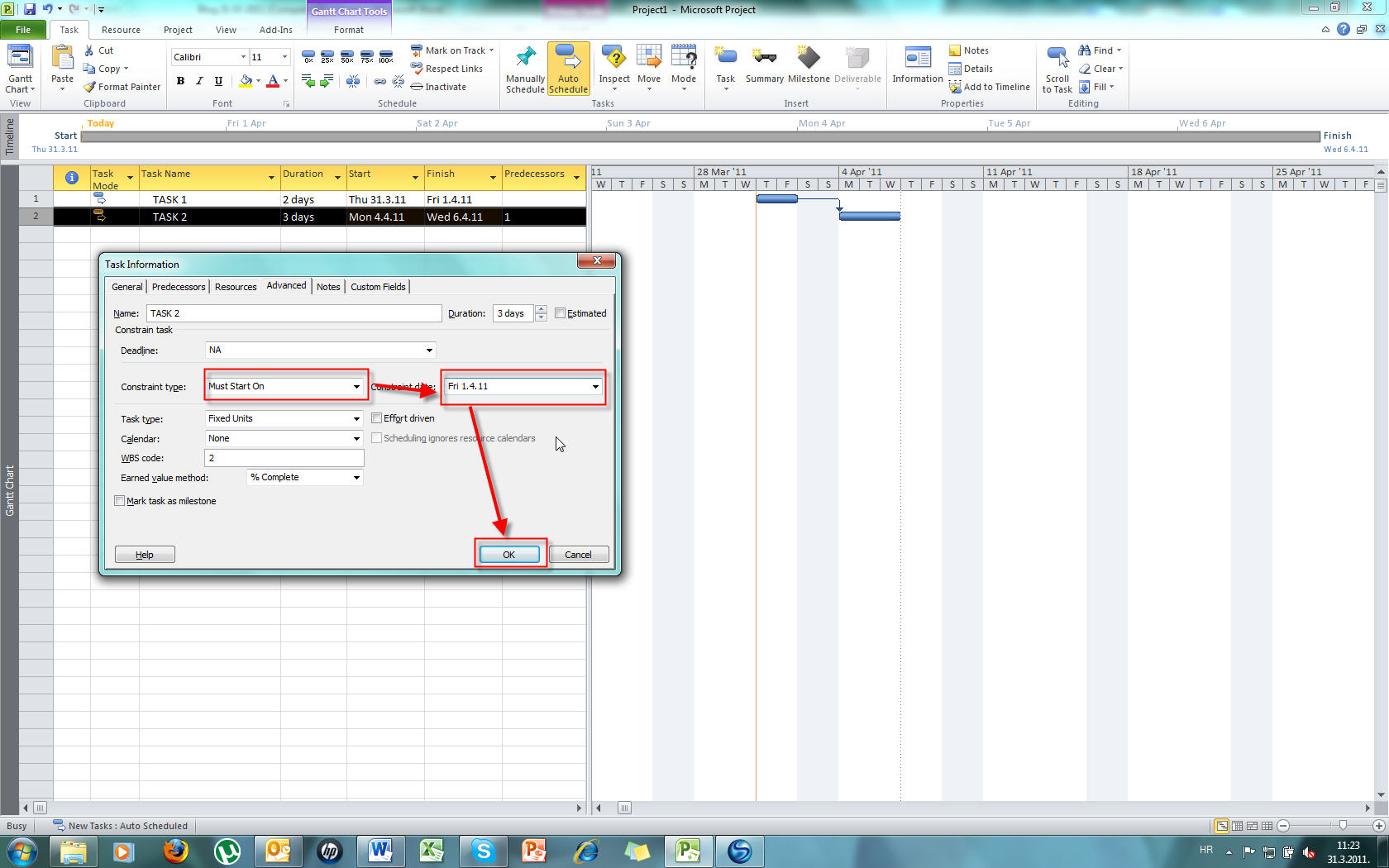
If you use inflexible constraint like, for example, Must start on, task will start on specific date (no prior and no later than given date). In my next example I have TASK 1 which will start on 31.03.2011 and finish on 01.04.2011 (2 day duration), and its successor TASK 2

which will start on 04.04.2011 and finish on 06.04.2011 (3 day duration). Now I
will put the inflexible constraint Must Start On and the constraint date will be 01.04.2011 (see the picture below):

When I click on OK button I get this:

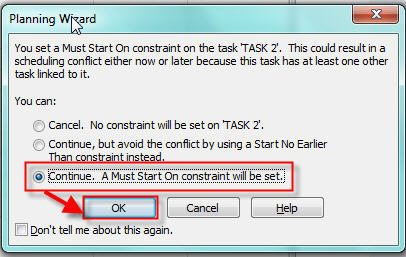
This is a warning screen. It asks you: “What do you want to do?”
If you choose: “Cancel. No constraint will be set on ‘TASK 2’” you are actually cancelling the whole thing
If you choose: “Continue, but avoid the conflict using a Start No Earlier Than constraint instead” the constraint will be changed from Inflexible->Must Start On to Semi-flexible-Start No Earlier than
If you choose: “Continue. A Must Star On constraint will be set.” You will get (from my example) this:


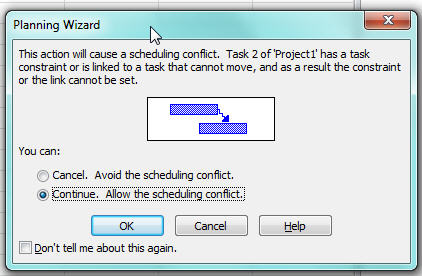
If you choose: “Cancel. Avoid the scheduling conflict” you are actually cancelling the whole thing
If you choose: “Continue. Allow the scheduling conflict” you will get negative slack (see
the picture below):

For a Task you can enter duration, start or finish date:


If you enter a Duration (and only duration) you are setting flexible constraint->As soon as possible (when scheduling from the project start date). If you enter a Start date you are applying a Start No Earlier constraint. If you enter a Finish date you are applying a Finish No Earlier constraint.
If you know that your task has a deadline one common mistake is to put inflexible constraint -> must finish on. Suppose that you have a task with 1 day duration and the deadline is 01.04.2011. If you put Must finish on constraint with 01.04.2011 you are increasing the risk for this task. Why? Because you are telling MS PROJECT that this task MUST finish on that date and NOT BEFORE.  What if your required resource is sick?Better approach is to let MS PROJECT to handle start date with As Soon As possible constraint and put the deadline information about the task.
Here is the example: We have the TASK with 3 day duration:

We have the deadline for this task and it is 05.04.2011.
We will put it here:


And we will get the Deadline indicator in our Gantt diagram:


See you!

Posted in Microsoft PRoject 2010, MS PROJECT 2010, PMI, PRoject Management | 22 Comments