Risks in Project! Importance of Risk Management!!–PART 3


Hi,

we have done Risk Identification, and after that, we have made Qualitative Risk Analysis. So we have Probability, Impact and Risk Exposure (or Risk Score) for our Risks. We have sorted our Risks in MS EXCEL by Risk Exposure.

Now we have to answer to the three questions:

  1. What will we do if a Risk occur (if it become a Fact)?
  2. Who will act if a Risk occur?
  3. How do we know that the Risk occur or is about to occur?

This is called RISK RESPONSE PLANNING

WHAT WILL WE DO IF A RISK OCCUR?

There are three levels of risk responses:

  • Do something before the risk happens
  • Do something if the risk happens (Contingency plan)
  • Do something if contingency plan didn’t work (Fallback plan)

When I am talking about “BAD” Risks (Threats), you can do:

AVOID THE RISK. That means that you will do something BEFORE RISK ACTUALLY OCCUR, so it Probability will become 0%! For example, in our “Wedding Project” we have a Risk that someone can get drunk and spoil the whole Party. We can choose that there will be NO ALCOHOL DRINKS at the wedding party. Now, the Probability is ZERO. Once again, even if Probability is zero DO NOT ERASE THIS RISK FROM RISK REGISTER. Instead of erasing, you should have two Probability and Impact in your Risk Register: Probability and Impact BEFORE RISK RESPONSE PLANNING, and Probability and Impact AFTER RISK RESPONSE PLANNING.

MITIGATE PROBABILITY OR/AND IMPACT. Mitigate means DECREASE. For example in our example you can invite people for who you know that they DO NOT drink SO MUCH ALCOHOL! So there is a less Probability for that Risk. Or you can have only Light beer (with low percentage of alcohol), so there is less Impact because it is hard to be VERY DRUNK with that kind of beverage.

TRANSFER THE RISK. Here is an example. You have bought very expensive wedding Rings (10.000$). You are afraid that someone can steal them from your house, and that is a Risk. You can hire a deposit box in you Bank and put your rings there. So, you have actually transfer that Risk to the Bank. Or, you can buy an insurance from Bank. The result is the same

ACCEPT THE RISK. It means If it happens, it happens. On the other words it means: DO NOTHING. You should choose that strategy if you do not have proper Risk response plan for that Risk (it means you do not have proper option to respond), and you can live with consequences. You should also use this strategy if your other response plan (for example, avoiding or mitigating) is much more costly than if you accept the Risk. Here is one example. It will be stupid one, but it will serve the purpose. Suppose that your wedding rings are very expensive ($10.000). You want to transfer the Risk of stealing the rings to the insurance company. But they will charge you for that insurance. How much? 15.000$. So, you have to pay for that insurance $5000 more than you will loose if someone will steal the Rings from your house. In that case you should accept the risk. Another example. You have very, and I mean VERY, good friend and you want him to be on your wedding. Sometimes he gets drunk! Because you love him too much, and you want to have alcohol at your party (for your other guests), you will accept this risk!


WHO WILL ACT IF A RISK OCCUR?

That means that you must have a person called “RISK OWNER”. This person is responsible for the risk. She or he has to track the risk, and when it occur he or she must act as it is planned in Risk response plan! After the Risk occur he or she must notify the Project Manager how successful was the Risk Response Plan, and what was a damage caused by that Risk.


HOW DO WE KNOW THAT THE RISK OCCUR OR IS ABOUT TO OCCUR?

This is called “RISK TRIGGER?” For example, Risk Trigger is, in our “GETTING DRUNK” Risk, if someone is take his fifth glass of Vodka in a less than an hour. That means that a person will be drunk very soon and Risk owner has to act! Remember, Risk trigger can be established by any team member, during the Risk Planning, but Risk Owner is responsible for tracking this Trigger!


Do you know what the word “WORKAROUND” means in a Project Management language?

  • Workaround is reactive process. It is something what you will do when you figure out a totally new risk for which you did not have a response plan
  • If you have a lot of workarounds in the project, YOUR PROJECT IS BADLY PLANNED
  • If you have a lot of workarounds in the project, project is in jeopardy and is often TERMINATED

As I told, you can NEVER, EVER found all the Risks in your Project. When a brand-new and unknown Risk occur, it is a FACT and you have to REACT RIGHT AWAY! This is workaround. Do you want an example? NO? I don’t care. Here it is! Suppose that your Project is “The Sailing”. You are in the middle of the ocean, on your boat.  And someone falls down in the ocean. And that person does not know how to swim. You have totally forgot about that Risk (that someone does not know how to swim). What will you do? Will you arrange a meeting with your project team to establish Risk Response strategy, Risk owner, and the Trigger? While someone is drowning?  NO! You will help that person right away! You will drop him a life-belt, and the best swimmer from the boat will jump in the ocean. YOU WILL SAVE THAT PERSON! After that, you should ask yourself and your team members: WHAT ELSE DID WE FORGET?, and you will try to identify more risks.

And last, but not the least important in the RISK MANAGEMENT is Risk Monitor and Control Process. Every team meeting starts with the subject: „RISKS”. Some of the questions on the meeting:

  • What additional risks have you uncovered since the last meeting?
  • Which of the triggers we have identified is no longer seem to be appropriate?
  • Are there any risks that no longer exist?
  • What’s new with the watch list?
  • Have you found out any new information of any risk?
  • And many other….

That’s all folks. Next time we are getting back to our MS PROJECT 2010 and the “Wedding” Project!


All the Best,

Posted in MICROSOFT PROJECT, Microsoft PRoject 2010, MS PROJECT 2010, PMI, PRoject Management | Tagged , , | 5 Comments

Risks in Project! Importance of Risk Management!!–PART 2


Hi!

After we have found the Risks in our Project, next step is to estimate the Risk Exposure for every risk. We must have “Probability and Impact Matrix”. Here is an example:

image

or:

Probability:

  • 1 = (5 – 10%)
  • 2 = (10 – 20%)
  • 3 = (20 – 40%)
  • 4 = (40 – 80%)
  • 5 = (>80%)

Impact Description:

  • 1 very low (insignificant time and cost overrun)
  • 2 low (up to 10% time and cost overrun)
  • 3 medium (10% – 20% time and cost overrun)
  • 4 high (over 20% time and cost overrun)
  • 5 the highest (PROJECT FAILURE)

Risk exposure or risk score = Probability x Impact

Very often different team members estimate different Probability and Impact for the same Risk. In such a case you should find out WHY someone thinks that probability is, for example 3, and some other person thinks that probability is, for example 1. Maybe one person is too optimistic, and the other is too pessimistic, or one person has more information then the other. However, after that procedure you should have only one estimation of probability and impact for each risk.

Another important thing is, that if you have risk with very high probability (for instance, more than 90%), you should consider that issue as a FACT, NOT AS A RISK. I will give you example. Suppose that you are working on a project which is: “BUILDING A HIGHWAY”. 15 kilometers (or miles, whichever you like) of that Highway will be built in the mountain which is at 3500 meters height above sea level. In the winter time there is a huge snow at that mountain. But, once in a century there is a winter without the snow. You have the risk that you will not be able to build this section of your highway in a winter, and a probability is 99%. What will you do? Will you start with your work in the mountain in October, and then, IF THE RISK OCCUR, you will stop with the work and start with saving your equipment, and spend a lot of money for that? NO, OF COURSE YOU WILL NOT. You will consider that risk as a fact, and you will make your project plan in a way that you will build this “Mountain section” only during Spring and Summer.

OK, we have probability,  Impact, and Risk Exposure for every Risk in our Project. No, we have to found the PROJECT RISK EXPOSURE. Here is an example:

  • RISK 1     Probability = 3, Impact = 2, Risk Exposure = 3X2 = 6
  • RISK 2     Probability = 4, Impact = 3, Risk Exposure = 4X3 = 12
  • RISK 1     Probability = 5, Impact = 4, Risk Exposure = 5X4 = 20
  • RISK 1     Probability = 1, Impact = 5, Risk Exposure = 1X5 = 5
  • RISK 1     Probability = 3, Impact = 4, Risk Exposure = 3X4 = 12

The Sum of risk exposures is: 6 + 12 + 20 + 5 + 12 = 55. We have 5 Risks. So, THE PROJECT RISK EXPOSURE IS 55 / 5 = 11.

In your company you should know THE TRESHOLD of the Project Risk Exposure. If it is, for example 15, than all Projects with Project Risk Exposure larger than 15 are not acceptable, and you will not work on them.  When you find PROJECT RISK EXPOSURE you are in the so called “GO / NO GO DECISION”

If you will continue to work on your Project you should put all the risks with a lower Risk exposure, to the “watch list”. For example, if Risk has a Risk exposure below 12 it will be on the watch list. DO NOT EVER DELETE RISK FROM RISK REGISTER OR WATCHLIST!!! Why? Because, during the Project lifecycle probability and/or impact can change! So, if you delete the risk, because it has got very small Risk Exposure (for example 1), and after one month the probability raises from 1 to 5, you will probably FORGET the deleted risk, and you will be very surprised if it happens!

Now, we have our Risk Register with Probabilities, Impacts, and Risk exposures, and they are sorted form biggest Risk Exposure to  the smallest. We, also have a Watch list. The best tool for the Risk register is the Microsoft Excel. (I hope that someone from Microsoft will read this post, and give me some money for this advertisement! Smile with tongue out I AM KIDDING, of course).

Next step in the Risk Management is RIKS RESPONSE PLANNING. What is that? That is something about you will read in my next Blog Post.

Until then,

Best Regards

Posted in MICROSOFT PROJECT, Microsoft PRoject 2010, MS PROJECT 2010, PMI, PRoject Management | Tagged , , | 1 Comment

Risks in Project! Importance of Risk Management!!–PART 1


Hi,

as I promised, in this post I will start to write about Project Risks.

PROJECT RISK IS ALWAYS IN A FUTURE. RISK IS AN UNCERTAIN EVENT OR CONDITION THAT, IF IT OCCURS, HAS AN EFFECT ON AT LEAST ONE PROJECT OBJECTIVE. PROBABILITY THAT RISK WILL OCCUR MUST BE GREATER THAN 0% AND LESS THAN 100%. If it is 100% then that is a FACT, not a RISK!

In my professional career, I have seen a lot of Projects, and I’ve met a lot of different Project Managers. Most of them have never did a RISK MANAGEMENT in their Projects. WHY? Because they thought that they knew EVERYTHING about their Projects, and that a Risk Management is a overhead! They also thought that with Risk Management they will need more money and resources! Money and Resources for the Risk Management is a PART OF PROJECT BUDGET, because with Risk Management you actually SAVE THE MONEY AND THE TIME with preventing or decreasing the damage!!!

I will write about “negative risks” or “threats”. They can hurt your project badly. First what you have to do is to find the Risks! Find them as many as you can! Do not stop when you find, for example 10,20 or 100 risks if you know that there are some more of them!!!

Risk factors are:

  • Probability -> the likelihood that risk (threat or opportunity) will occur
  • Impact -> the effect on the project if risk (threat or opportunity) occurs
  • Expected time -> when during the project the risk (threat or opportunity) might occur
  • Frequency -> how many times the risk (threat or opportunity) might occur during the project

Are the people related to your project the only ones able to identify risks in the project? The answer is NO!!!

Suppose that you have a Project for a “XXX company” and your goal is to deploy a brand-new ERP system. You have friend who had a Project for the same company. The goal of his Project was to paint the walls in the stockroom. He does not know ANYTHING about ERP systems, nor he does know anything about computers at all. Can he help you with your project, in Risk Management?  YES HE CAN. A LOT!!! How? He knows, for example, a lot of people which are stakeholders of your Project. He can give you a valuable information about them, for example, who is a liar (YES, WHO IS A LIAR), who is highly cooperative, and who is not, who often changes his or her mind, and wants always something more, etc.

Another very helpful tool for your Project is Internet. You can find a lot of articles about similar Projects there!

Risk source will tell you “WHERE FROM CAN RISK COME?”. It can be budget, resources, scope, quality, etc. For example, in our “Wedding Project” if you want a glamorous party, but you have only 15.000$ that is Risk, because maybe you will have to cut some scope (like serving the best wines), or you will have to invite only 50 instead of 100 people to your party. 

You also have to clear all assumptions. For example, you assume that you will invite 150 persons to your wedding, and that all of them will came. But what if half of them will not come? 

One of the greatest thing with Risk Management (and Identifying the risks) is so called “Pre Mortem” analysis. BEFORE you start your project ask all of your stakeholders (in a group meeting) the question: “OK. OUR PROJECT HAS FAILED! WHY?”. Then you will hear from your stakeholders what do they think, why should a Project fail, and those are the risks!

One of the common mistake in Process of Risk identification is making the Risk Assessment at the same moment when you find (or identify) the risk. When you identify the risk for your project you should wright it down now matter how “big”, or “small” is it. After you will collect “all” of your risks (ok, ok, I know! You can not collect them all. Collect as much as you can), you will take a next step and that is Qualitative Risk Analysis, and make a risk assessment. I will write about it in my next post. I am on the sea cost, remember? And I became very, VERY LAZY.

For the end of this post I will give you an advice. When you find the risk, describe it in a “cause-risk-effect” form.

Here are two examples:

“Because we have a small budget (The Cause), there is the risk that we will have to hire resources with less experience (The Risk), which can produce a less quality product (The Effect)”

“Because we will serve a spirituous beverages in our wedding (The Cause), there is the risk that someone will get drunk (The Risk), and those people can ruin our party (The Effect)” 


All the Best,

Posted in MICROSOFT PROJECT, Microsoft PRoject 2010, MS PROJECT 2010, PMI, PRoject Management | Tagged , , , , , | 1 Comment

Develop a Scope for my Project! Is it easy or not?–PART 2


Hi,

when you have tasks for your project, you have to arrange them. How? It’s up to you. The best approach, from my point of view is to make Phases.

I will explain how can you arrange the Wedding in Croatia.

First, you can make a deal with a Restaurant Management that you will bring your own wine, spirit, or any other beverages. You can also arrange to bring your own cakes. Of course, if you will have a music, you can arrange it to. Sometimes the Restaurant will charge you some extra fee if you will bring your own food and beverages.

When you are defining the scope of your Project you can have a “top down” or “bottom up” approach.

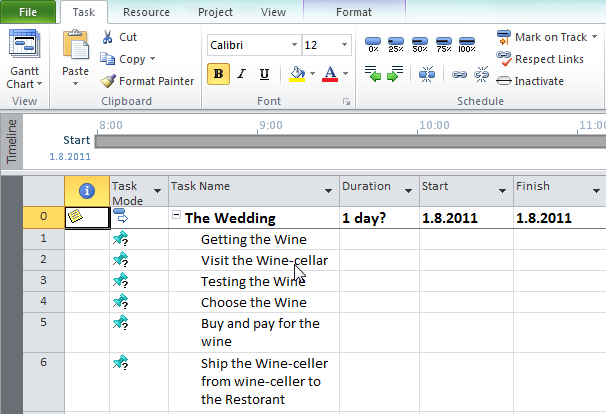
With the top down, you will first determine Phases. For example, you can have a “GETTING THE WINE” Phase. After that you will have tasks under that phase like: Visit the wine-cellars, Testing the wine, Choose the wine, Buy (and pay) the wine, arrange shipment for the wine (from the wine-cellar to the restaurant)

With the bottom up, you will do the same thing in the opposite way.  So, you will first determine the tasks, and then make a phase.

You can, and you SHOULD combine those approaches in your project. Why? Well, you will have enough information about the tasks for one phase (I mean for all, or almost all tasks), and for that phase you will take a bottom-up approach. For the other phase you will now that you need it (for example, Choose the cakes), but you will have only few information about the tasks for that phase (or none). You should take a top-down approach, and enter the tasks for that phase after you will have more and more information.

In my trainings, about MS PROJECT 2010, my students often asks me the same question: “What if we do not have ALL tasks for our Project? Should we wait, until we collect them all, and after that use the MS PROJECT?” The answer is “NO”! You should use MS PROJECT from the very beginning of your Project! Put everything you know as soon as you discover! With that approach, you and your team will have a better preview of your Project, and it will be much easier to find out if you forgot something.

Another question is: “When do we have to use Manually Scheduled tasks?”. The answer is: “When you are in early Planning stage, and when you do not have accurate data for the duration, start or finish date!”

In MS PROJECT 2010, you can write the name of the phase (it is called SUMARRY TASK), and then tasks for that phase:

image

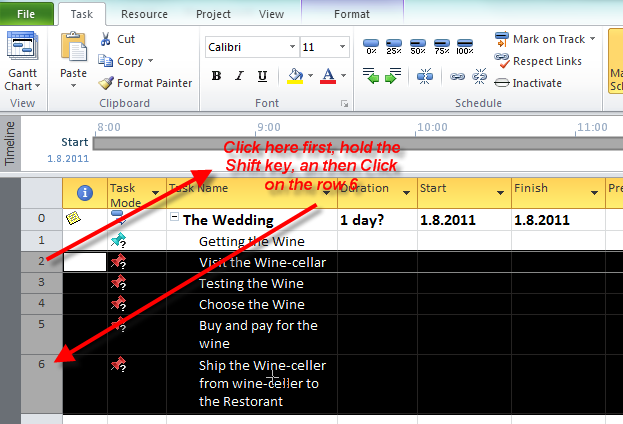
Now, I will make a phase from GETTING THE WINE task. First, I will mark (or highlight) all subtasks for that phase (to do that highlight the “Visit the Wine-cellar” hold the SHIFT KEY and click on the row six, in the row heading on the right side of the screen):

image

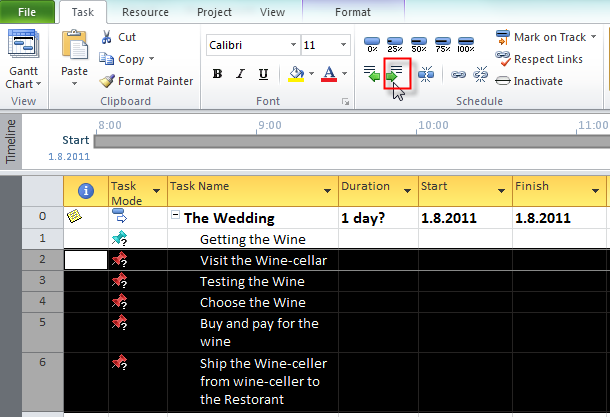
Then on the Task Tab, click on the “Indent Tasks” button:

image

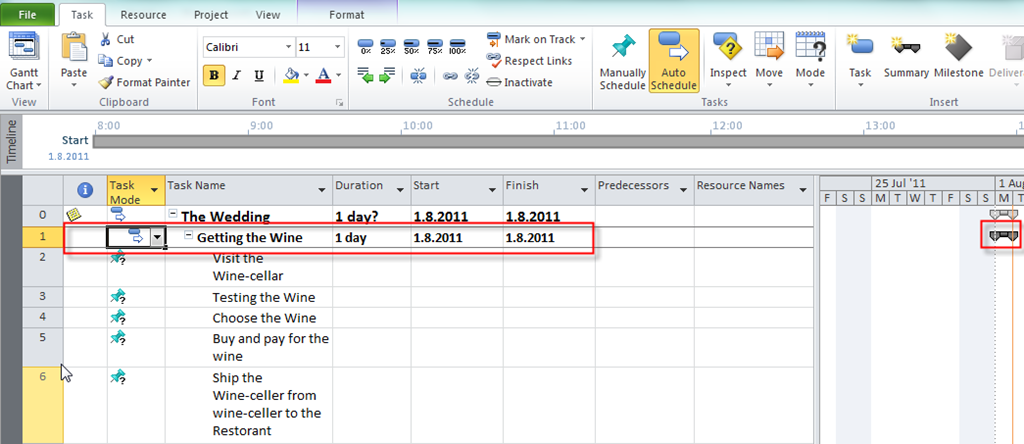
and you will get:

image

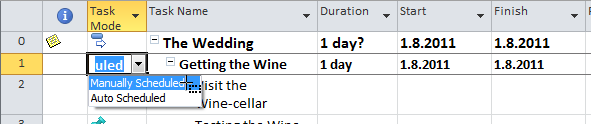
You can see that “Getting the Wine” is Phase (or Summary task) now, and it is converted from Manually to Auto scheduled! This is because MS PROJECT assume that it will do all the calculation for you. If you want to change it back from Auto scheduled mode to Manually scheduled mode you can do it:

image

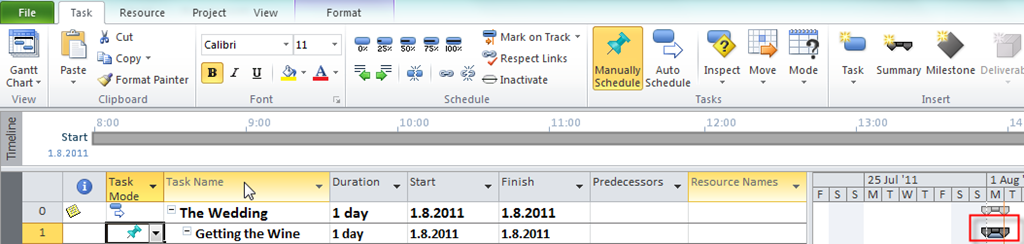
and you will get:

image

Now, you have a possibility to put Duration, Start and Finished date in your manually scheduled task. BUT, MS PROJECT 2010 will make calculation about duration, and other things for that phase, so you have a great possibility to compare planned vs. actual data for the Phase.

For the end of this post I will explain how can you insert a brand-new phase.

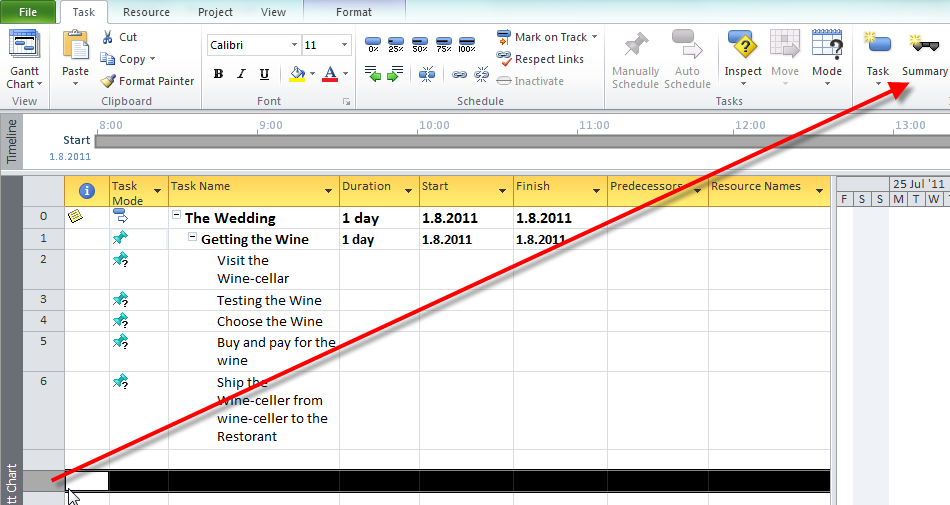
You should put the mouse cursor BELOW the row in which you want to make a new phase,and on the Task Tab click on the Summary button:

image

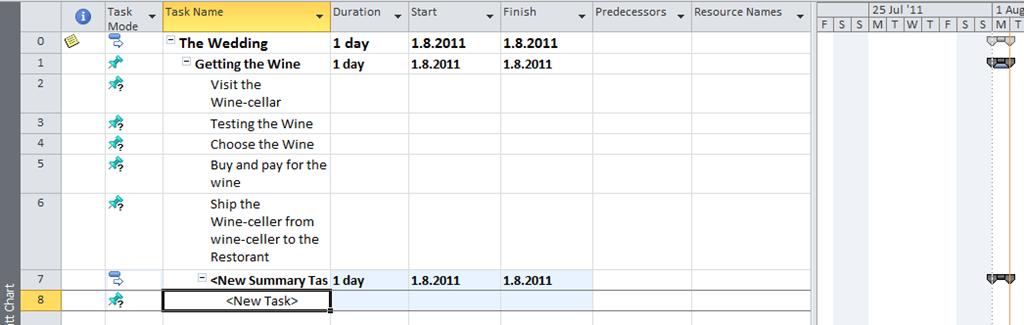
and you will get:

image

Now you should rename the summary task from “New summary task” to the right name for the phase.

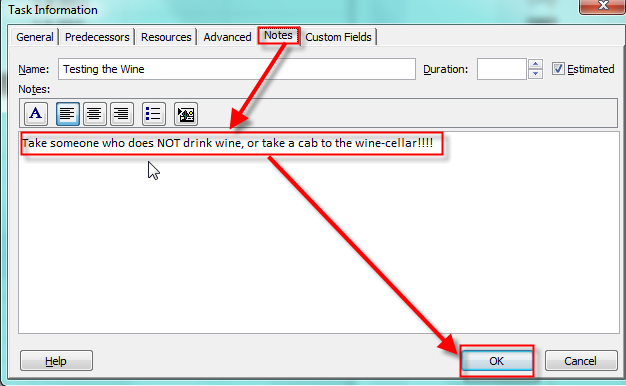
Do not forget: “DON’T DRINK AND DRIVE!” So, if you are going to taste a various wines in the wine-cellar, you should take a cab, or let someone who does not drink to drive. And you can put that information in the “Testing the Wine” task. The shortest way to do it is to double click on that task, and on the Task Information window, choose the Note Tab, write the note on then click on the OK button.

image

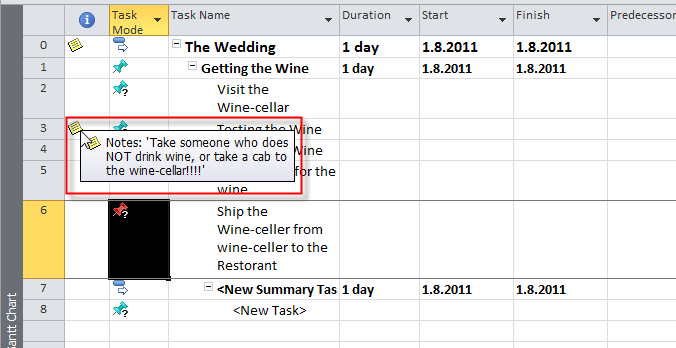
On the Information column, you will see the Information sign, and if you put the cursor on that sign you will see the information:

image

That’s all for this post. In my next post I will write about naming conventions, milestones, scheduling, risks in our project, what do we have to know about our tasks, and I will (maybe Smile with tongue out in the next or some other post) explain calendars.

Now, it is the time to swim in the Adriatic see Smile

So, BEST REGARDS FALKS!

Posted in MICROSOFT PROJECT, Microsoft PRoject 2010, MS PROJECT 2010, PMI, PRoject Management | Tagged , , , | Leave a comment

Develop a Scope for my Project! Is it easy or not?–PART 1


Hi,

In my last post I wrote about setting up the Project Environment. You can see that I did not set up any Calendar. Why? Well, there are different approaches to a Project Plan. My approach is to first make a task list (or Project Scope). Again WHY? From my point of view, the first thing in the Project is to find out “What is the project scope?” or “What do we have to do to achieve the Project Objectives and Goals?”, e.g, TASKS. 

After that we are going to discover who can do it, and what do we need for these tasks (e.g. RESOURCES), and after that we will discover the costs. Of course, we need the Calendar. In MS PROJECT 2010 you will find three types of calendars (Project, Resource, and Task). I will explain them in one of my following posts.

In this post I will start to write about a Project Scope! How to develop the Project scope? In the PMBOK 4th edition, there is a new process in the Scope Management Knowledge Area, and it is: Collect Requirements! Basically, in this process your are determining what do you have to do (TASKS!!!).

There are various techniques like:

  • Brainstorming: You will find out in group of different people what do they need
  • Focus group: Basically, the same technique like a brainstorming, but those people have the “same interest” (for example, first group is from the Marketing department, second from the Account department, and so on)
  • Interviews: “One to one” meeting to find out what each person mean about the project requirements.

Of course, there is a lot of other techniques. Regardless of technique, you should always have a magic “three  persons” when you collect requirements.

  • First person: He or She is asking questions
  • Second person: He or She is writing down the answers
  • Third person: Looking for reaction of others (“body language”)

This is especially important when you have a group, because when someone talks, the other person from the group can ruck, gape or just smile. That is very important because after the meeting you can call those persons in private and find out what do they think about that particular requirement (or requirements).

After that you must balance the requirements. Why? Well, suppose that you are the Project Manager of our Wedding Project. Now, suppose that the Bride and  the Groom want a 25 carat diamond rings. The Sponsors are their parents. They want to invest only 200$ for the rings. Can you buy two 25 carat diamond ring for just $200? NO WAY! The bad Project Manager will make a decision by his own. The great Project Manager will arrange the meeting between parents and wedding couple and they should solve the problem. They would buy the cheaper rings, or the Sponsors will give more money for the diamond rings.

Now, your stakeholders have those requirements. They should write it down. They can write it on the paper, MS PROJECT 2010, or in some other tool like MS EXCEL.

If they don’t have a MS PROJECT 2011, they can use a template from MS EXCEL. You can give them a template like this.

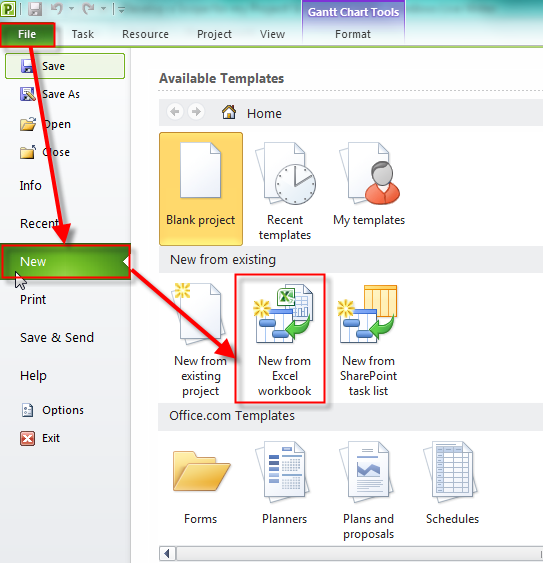
1. Open MS EXCEL 2010 and on the File Tab click New:

image

2. Click on the Sample Templates:

image

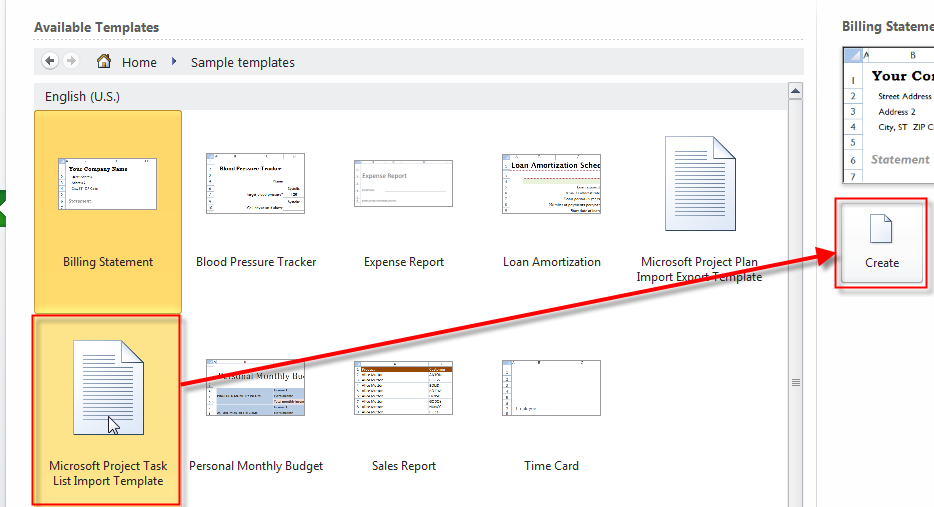
3. Click on Microsoft Project Task List Import Template and then click on the Create button:

image

and you will get:

image

Now you can save those template as Excel (xlsx) file and give it to your stakeholders. Of course, you will have to explain them how to use this worksheet.

You should encourage your stakeholders to feel the table and only Name and (if there is any) Notes field.

We are in early planning stage and we don’t know the duration, start or finish date, or Resource names.

Of course, if you know the duration, go ahead, fill it, but in most cases you don’t know it. You should NOT be considered about sequence (or order, whatever you like) of your task. Again you are at the early planning stage, and in this stage it is very important to find out what do you think you should do! Do not be concerned if you will forget something. When you will collect excel sheets from your stakeholders (all of them) you will arrange a meeting and discuss with them your complete task list and find out if something is missing.

But, you SHOULD BE CONCERNED about stakeholders. WHO ARE THEY? “Stakeholders are persons or organizations (e.g. customer, sponsors, the performing organizations, or the public), who are actively involved in the project or whose interests may be positively or negatively affected by the performance or competition of the project. Stakeholders may also exert influence over the project , its deliverables, and the project team members.” You should find them ALL As Soon As Possible. Why? Because if you find a new stakeholder latter, he or she will have some new requirements and you will have to re-plan your Project and that means that you will  have a new (usually LONGER) Schedule, you will need more Resources and more Money. So be very careful when you are discovering who are the stakeholders for your project.

Now I will show you how to import the task list from MS EXCEL.

1. Open your project plan in which you want to import your task list (our Wedding Project)

image

2. Now click on the File Tab, then New, and then New From Excel Workbook:

image

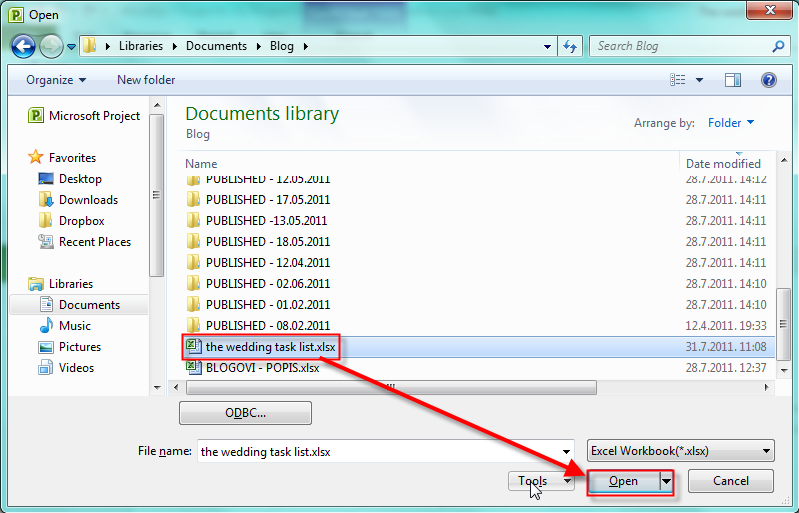
3. Find your xlsx file and click open:

image

4. You will get the Import wizard and click Next:

image

5. Choose New Map and click Next:

image

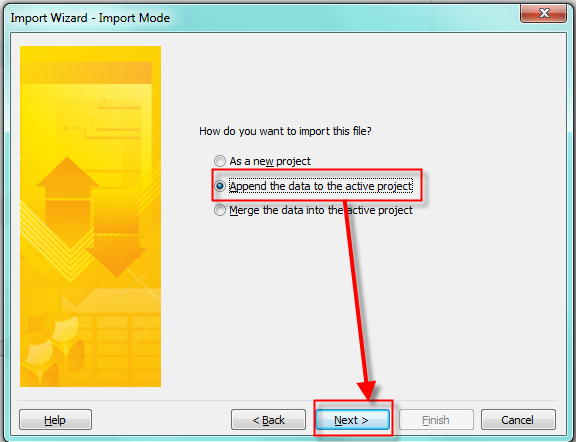
6.Choose Append the data to the active project and click Next:

image

7. Because I want only to import tasks from my excel choose Tasks and click Next:

image

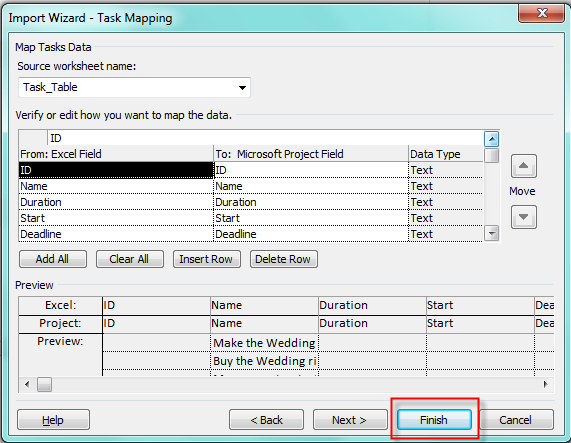
8. Finally I can choose which fields do I want to import. I will import all of them so I will    just click on the Finish:

image

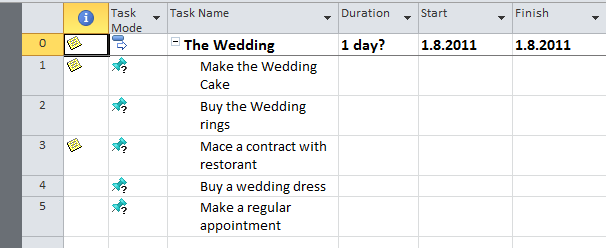
When I look at the Gant chart I will have all my tasks from excel file:

image

As you can see those task are in Manually scheduled mode because I said so (in my set-up). If I had set up for New Tasks in Auto Scheduled mode I will get new tasks from excel with 1 day duration, and start and finish date same as a Project start date.

Is it all about Project Scope? Of course not! I will continue in my next post.


Best  regards from the Adriatic see!

Posted in Microsoft PRoject 2010, PMI, PRoject Management | Tagged , , , , | Leave a comment

Setting up MS PROJECT 2010 for my Project and Creating the Project Plan


Hi,

Before planning, I will set up MS PROJECT 2010 for my Project.

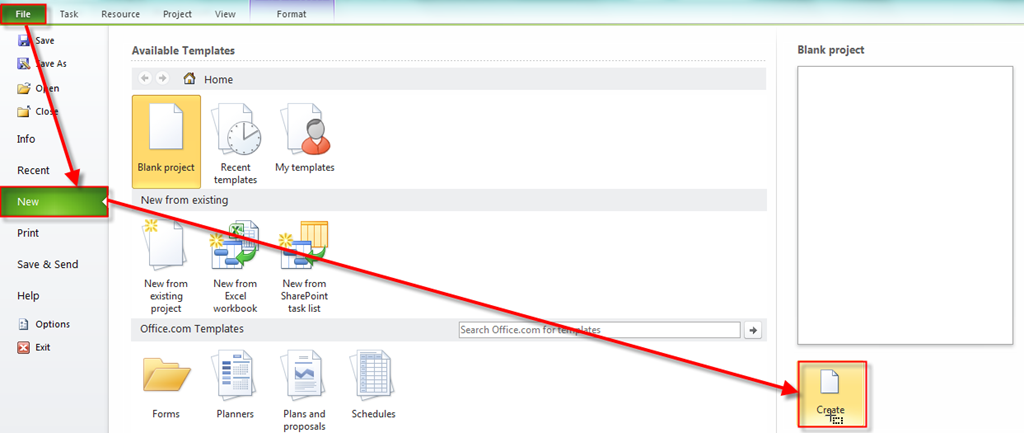
First I will open a brand-new Project.

image

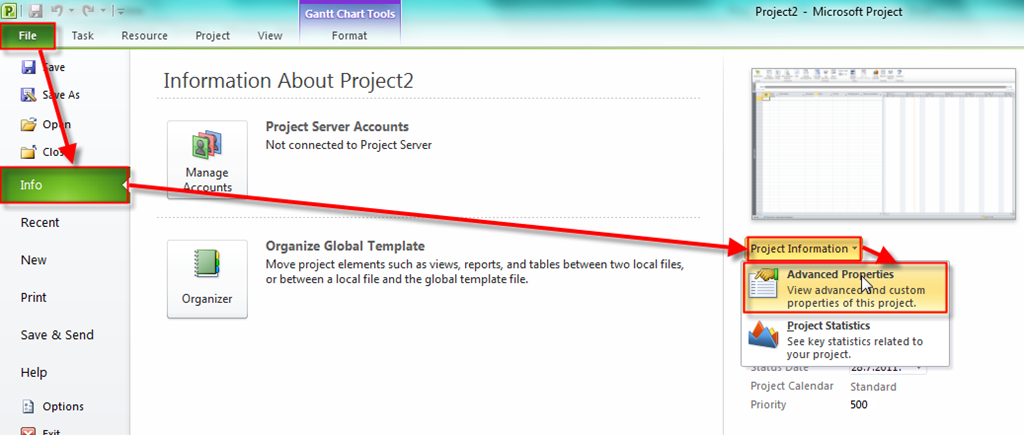
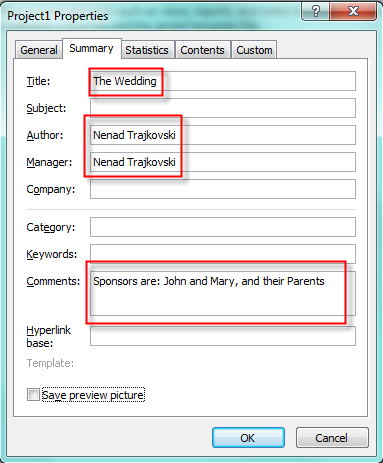
After that I will put some Basic information about my Project here:

image 

and then:

image


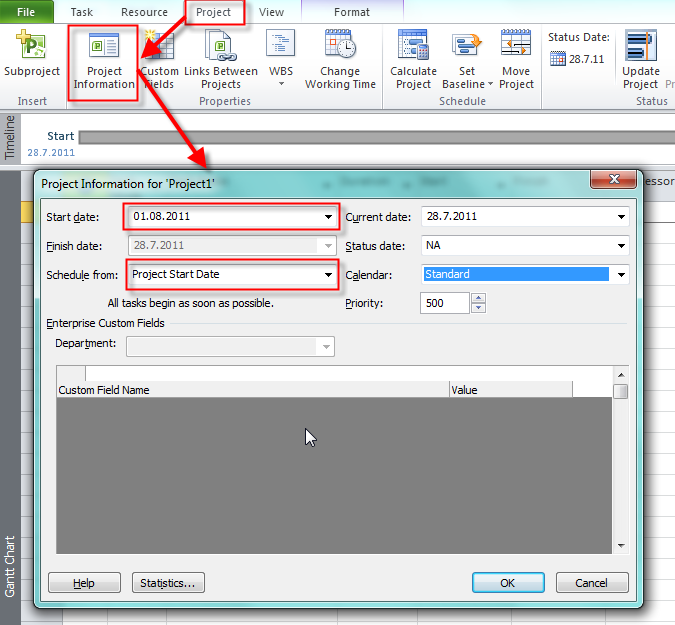
Now I will put some additional information for my Project here:

image

As you can see I choose to Schedule from: Project Start Date. Why? Well, because If I choose Schedule from: Project Finish Date, all of my task will be scheduled with Start As Late AS Possible constraint, and I don’t want that. And, John and Mary (my Sponsors) don’t have a specific date for their wedding.

Do you want an example of Project when you have to establish Schedule from: Project Finish Date? PREPARING THE OLIMPIC GAMES, or THE WORLD FOOTBALL CHAMPIONSHIP! Why? Because when you have such kind of event, you and the rest of the world know EXACTLY when this event will start. So this Start date of the event is your Finish Date of the Project!

Now I will setup default working time. If you want a know about scheduling problems in MS PROJECT 2010, and how to manage working time and calendars without getting in trouble read my post: https://ntrajkovski.wordpress.com/2011/04/12/scheduling-problems-in-ms-project-2010-2/

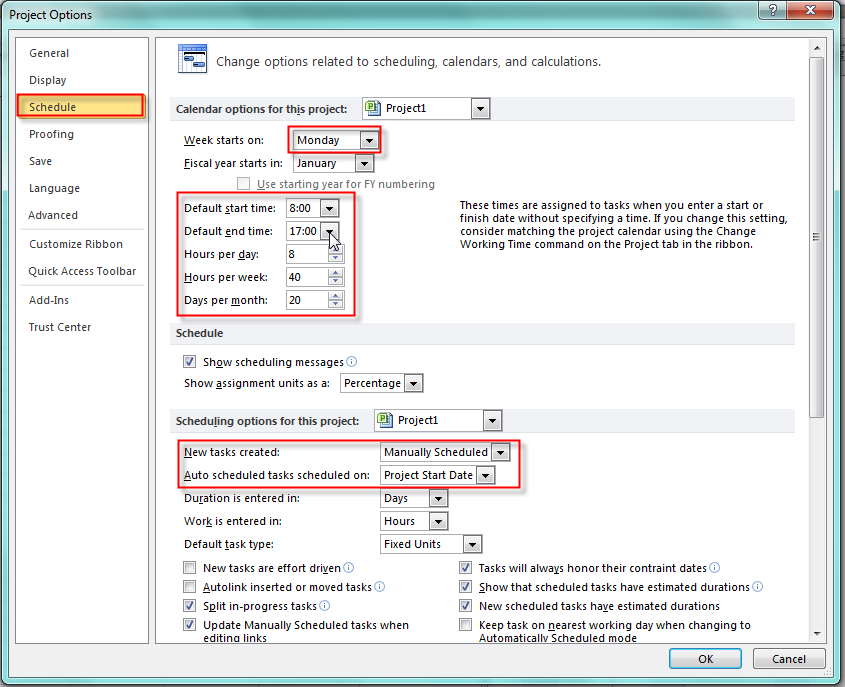
In the File Tab click on the Options  button and you will get:

image

I decide that regular working time will be from 08:00 to 17:00 with 8 hours per day, and that means that I will have 1 hour for lunch break. My week will have 40 working hours, and my month will have 20 working days.

I decided that every new task created will be in Manually Scheduled mode (an that is a brand-new feature in MS PROJECT 2010, and when I add new task in Auto scheduled mode it will have default Start Date same as the Project Start Date (which is 01.08.2011). The another option is Current Date.

You will se in my future posts how this working time is in correlation with Project, Task and Resource Calendars.

Why did I decide to have every new task in Manually Scheduled mode? Because I have no idea about task duration (for now!), when will it start or finish, and I do not want default duration of 1 day (which is in Auto scheduled mode). And, finally I want to write in Duration, Start Date and End Date field whatever I want (for now!)

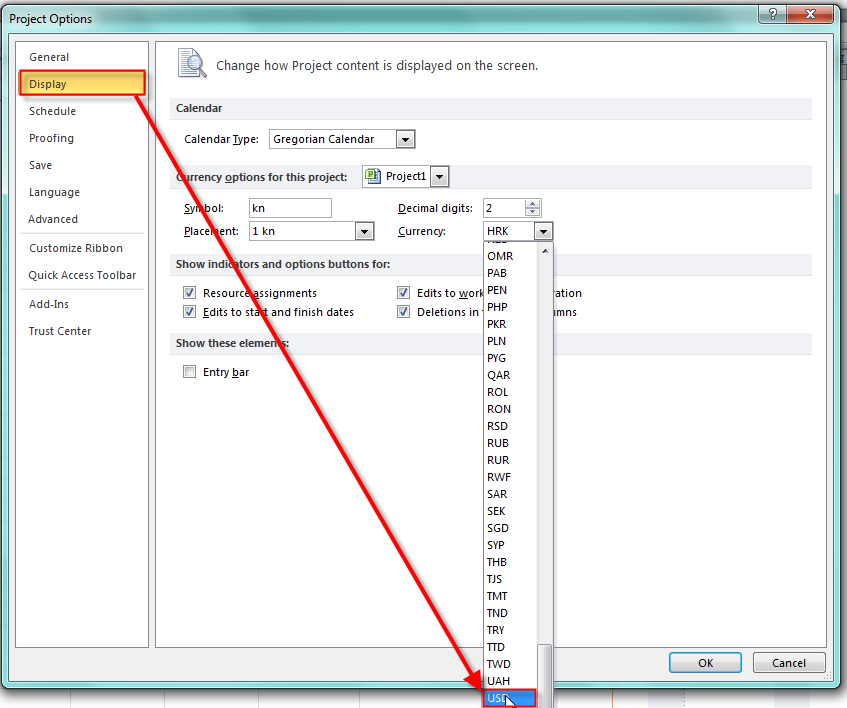
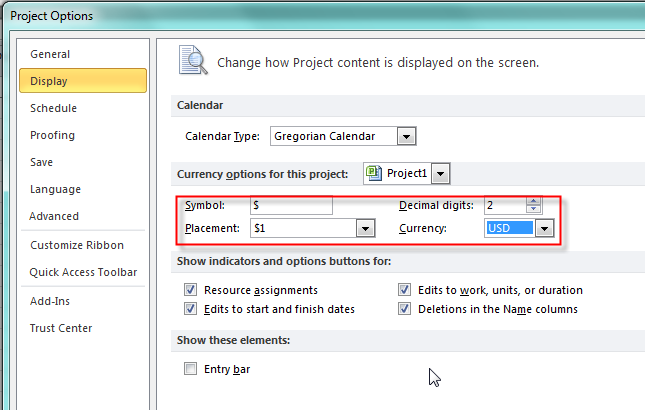
Now, I will set US dollar as currency. In the File Tab click on the Options button and you will get:

image

and I will get:

image

Before saving my Project I want to see Project Summary Task:

image

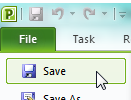
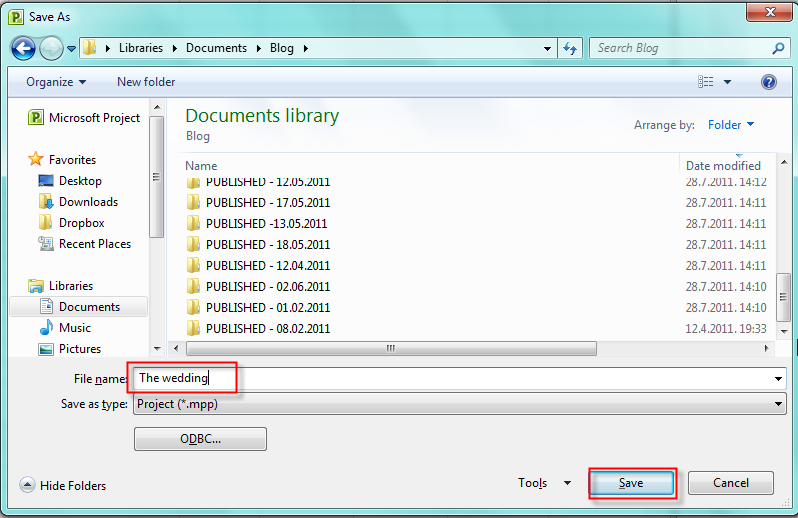
Finally, I will save my Project:

image

and then:

image

That’s all for initial set up!


Best Regards!

Posted in MICROSOFT PROJECT, Microsoft PRoject 2010, MS PROJECT 2010, PMI, PRoject Management | Tagged , , , | 7 Comments

OK! We have the PROJECT!! “The Wedding”!!!


Hi,

as I promised, I will start with a fictitious project. In fact, I will make two Projects. First Project will be “The Wedding”, and after I finish with this one I will continue with the second Project, and it will be “Home sweet home”. The Wedding Project is, as it says, to organize the wedding, and the second will be to build the brand-new house for the just married couple.

OK! What is the goal of The wedding Project? It is to organize wedding for the couple (John and Mary). John and Mary are dating for some time, they are in love, and they have decided that they want to live together in wedlock!

How will we start? With Planning, of course.

What do we have to plan? EVERYTHING, e.g.: Scope (what will be included in The Wedding), Time (when do we have to finish), Costs (how much money will we have to spend, or we intend to spend), Quality (will it be “Glamorous” wedding or not), Risks (where are the risks for the wedding, what can go wrong, which opportunities do we have), etc.

I have visited many countries and cities but I have never been in a wedding outside Croatia. So, I will make a plan for the Wedding like it usually is in Croatia.

I will not write The Project Charter. YES I KNOW that you will criticize me, because The Project Charter is basic document for the Project, and without it, I actually don’t have a Project, but I will suppose that I’ve got the Project Charter from my Sponsor, so it is actually done!

Who is Project Sponsor? In our Project it can be John and Mary (the wedding couple) or their parents (if they will make whole organization). In our Project John and Mary will be a Sponsor(s), and their parents will be also the Sponsor(s), because they will finance the whole project.

We also have to find out Project Constraints (or limitations). For example, the budget can be constraint (if you have $10.000, can you make a glamorous party for 350 people in “Burj Al Arab” hotel in Dubai?).

We have to find out and clear out Project assumptions. Those are things we consider to be true, but they might not be. For example, we assume that everyone from our guest list will come to the Wedding, because they are our good friends, and family, but on the other hand, maybe some of them will have some rapid obligation. So, we have to INVESTIGATE everything about our assumptions!

I will not make all the Planning today, nor I will  make a whole project Plan “on the paper” first, and then put it in the MS PROJECT 2010. I will do those things in parallel.

So, from my next post (Monday, 01.08.2011) I will start with using MS PROJECT 2010, and develop the scope!

Until then,

Best Regards!


P.S. In the next three weeks I will try to keep my posts regularly. I will be on the Adriatic sea cost, on my Vacation, so If I will be late for day or two please don’t be angry!

And, of course, give me your feedback!

Posted in MICROSOFT PROJECT, Microsoft PRoject 2010, MS PROJECT 2010, PMI, PRoject Management | Tagged , , | 3 Comments

HELP ME! I’M IN TROUBLE –MS PROJECT 2010 DOESN’T WORK

Hi,

as I promised, in this blog post I will explain Project Process Groups (according to PMI), and Knowledge Areas, and how suitable MS PROJECT 2010 is for those Process Groups and Knowledge Areas!

Project Process Groups are: Initiating, Planning, Executing, Monitor & Controlling and Closing.

In Initiating process group, you will make a decision which Project (or Projects) will you take. You should Develop Business Case, and after that, if you will decide to go on with the Project, you should Develop Project Charter. You have to reveal Assumptions, Stakeholders Expectations, Goals, Constraint, Global Risks etc. From my point of view, MS PROJECT 2010 is not suitable for this Process Group. Of course, you can use MS PROJECT 2010 as a central repository and you can put Project Charter and other documents in it.

Planning process group is crucial for successful Project. You need to plan EVERYTHING: Scope, Time, Costs, Quality, Human Resource, Communication, Risk and Procurement! MS PROJECT 2010 is VERY HELPFULL, and you should use it while you are planning your Project, but you CAN NOT DO EVERYTHING WITH IT! (For example: how will you plan the quality with MS PROJECT 2010?)

You can find in many books that MS PROJECT 2010 is very helpful in this Execution process group, and I think that is CORRECT. For example you can print To do lists, you can Mailing the task lists, etc.

In Monitor and Controlling process group you will: Monitor and control Project work, Perform Integrated Change Control, Verify Scope, Control Schedule, Control Costs, Control Quality, Report Performance, Monitor and Control Risks, etc. MS PROJECT 2010 is, again, very helpful here!

In Closing process group you can use MS PROJECT 2010 to Capture actual task duration Metrics, Capture Successful task Sequencing, and save a project as template, for further similar projects.

There are nine Knowledge Areas.

Integration Management

  • MS PROJECT 2010 is excellent for Develop Project Management Plan and Monitor and Control Project work
  • MS PROJECT 2010 is good for Change Management plan (you can track all changes, but for whole change request process MS PROJECT 2010 is not enough)
  • With MS PROJECT 2010 you can not  Develop Project Charter

Scope Management

  • MS PROJECT 2010 is excellent for Define Scope, Define WBS, and Control Scope
  • With MS PROJECT 2010 you can not Collect Requirements

Time Management

  • MS PROJECT 2010 is excellent for Sequence Activities, Develop Schedule , and Control Schedule
  • You can not Define Activities with  MS PROJECT 2010. It means  that MS PROJECT 2010 can not tell you which tasks you should have in your Project to meat the Project Objectives. However, if you have a template you can write the activities in a template and then simply import them to MS PROJECT 2010 . If you had a similar project and you have a template, then you can use it as a help when you are defining activities. The same thing is with Estimate Activity Resources, and Estimate Activity Durations.

Cost Management

  • MS PROJECT 2010 is excellent Excellent for Determine Budget, and Control Costs.
  • Cost estimation is complex job and MS PROJECT 2010 is good as a help.

Quality Management

  • Generally, MS PROJECT 2010 does not cover Quality management

Human Resource Management

  • MS PROJECT 2010 is good for Develop Human Resource Plan, Manage Project Team, but not for Acquire Project Team Process

Communication Management:

  • MS PROJECT 2010 is excellent for Distribute Information, and Report Performance
  • MS PROJECT 2010 is good for Plan Communication, and Manage Stakeholders expectation
  • You can not use MS PROJECT 2010 for Identify Stakeholders Process

Risk Management

  • MS PROJECT 2010 is Good for Plan Risk Management, Identify Risks (some of them, not all), and Monitor and Control Risks (not all of them)
  • Generally you can not Perform Qualitative and Quantitative Risk Analysis with MS PROJECT 2010

Procurement Management

  • MS PROJECT 2010 is, generally, excellent if you import the WBS from the Vendor

A lot of my colleagues told me that: „When I change something in MS PROJECT 2010, the whole schedule and resource and cost is ‘crashed’ and everything seems wrong”.

My answer is “DO YOU REALLY KNOW HOW TO USE MS PROJECT 2010??. TAKE YOUR TIME AND LEARN!!!”

MS PROJECT 2010 is strong and powerful tool, it can do a lot, but it can’t do everything, and it is is not a replacement for a proper project management.

If you don’t how to use it, do not use it, before you learn it!

Do not put data in MS PROJECT „for fun”. If you don’t have a reliable data, don’t put them in MS PROJECT 2010. If you do, you will have: „garbage in – garbage out”


Best Regards

Posted in MICROSOFT PROJECT, Microsoft PRoject 2010, MS PROJECT 2010, PMI, PRoject Management | Tagged , , | 7 Comments

Starting a new Project

OK, we will start our fictitious Project. But first we have to know some basic things about Project, Project Management, Project Manager, etc.

Do you know what the Project really is? According to PMI (www.pmi.org) “A project is a temporary endeavor undertaken to create a unique product, service, or result.”

What is Project Management? “Project management is the application of knowledge, skills, tools, and techniques to project activities to meet the project requirements”

Who is Project Manager? “Project managers are assigned by the performing organization to achieve project objectives. They are responsible for the project success or fail. 97% of successful projects were managed by experienced project managers”

Why should someone choose some Project? There are many reasons for choosing the Project, for example:

  • Business need (we need to build a new equipment, because we want to spread our market share)
  • Social need (we need a project, and it has one goal: TO REDUCE SMOKING IN OUR CITY)
  • For fun (I want to build the biggest house in my village)

Every Project must have a PROJECT OBJECTIVE, and it means “WHAT DO YOU WANT TO ACHIEVE”. Here is an example. You have a Project: “Building the new house for just married couple”. The Project Objective for that project is: Resolving so called “Housing need” e.g. to make a place for living for the just married couple.

What is MICROSOFT PROJECT 2010?  Again, and again, and again, you will find a definition that “Microsoft Project 2010 is PROJECT MANAGEMENT SOFTWARE!” I don’t share that opinion. In many relevant Project Management books you will find there is no such a thing like a “PROJECT MANAGEMENT SOFTWARE”.

Does it mean, that MICROFT PROJECT 2010 doesn’t take a significant place in Project Management? Of course, NOT!

According to Wikipedia “Microsoft Projects a project management software (IT IS NOT IT IS A TOOL) program developed and sold by Microsoft which is designed to assist project managers in developing plans, assigning resources to tasks, tracking progress, managing budgets and analyzing workloads. The application creates critical path schedules, and critical chain and event chain methodology third-party add-ons are also available. Schedules can be resource leveled, and chains are visualized in a Gantt chart. Additionally, Project can recognize different classes of users. These different classes of users can have differing access levels to projects, views, and other data. Custom objects such as calendars, views, tables, filters, and fields are stored in an enterprise global which is shared by all users.”

Although it is powerful tool it can not do everything. The most common, and the biggest mistake is that many people think: “If I have Microsoft Project 2010, and if I am a powerful user, I can skip a lot of project management activities, because MS PROJECT will do them for me!”. NO!!!!! You should always Manage a Project properly, and you should always apply your PM knowledge and skills no matter if you have a powerful tool like, for instance, MS PROJECT.

Here is an example. Is Microsoft Project suitable for Quality Management? From my point of view, it is not! Can you identify all risk in your Project with MS PROJECT? No, you can not. Can you communicate with your team only with MS PROJECT? No, you can not.

From no on, I will write this blog about using MS PROJECT 2010 PROFESSIONAL! After I finish (somewhere in the future), I will write about MS PROJECT SERVER, PROJECT WEB APP, and ENTERPRISE PROJECT MANAGEMENT!

In my next post I will write about Project Management Process Groups, Project Management Knowledge Areas, and how suitable MS PROJECT 2010 is for those Process Groups and Knowledge Areas!

And last, but VERY IMPORTANT, please give me a feedback! Tell me how do you like this blog, criticize me, tell me if you don’t agree, do whatever you want, but just give me a FEEDBACK, pleaseeeeeeeee Smile

Best Regards,

Posted in MICROSOFT PROJECT, Microsoft PRoject 2010, MS PROJECT 2010, PMI, PRoject Management | Tagged , , , | 3 Comments

WHAT DO YOU THINK?

Hi,

Instead of new blog post I have a question for you! I was thinking about this blog site. Until now I was writing some kind of “tips and tricks”! I pick up some subject (as it crossed my mind), and I wrote about it!

The question is: Do you want me to keep it that way? I have another idea. To start with blog posts “from the beginning”, and manage one “fictitious” project from the beginning to the end with MS PROJECT 2010.

Please give me an answer A.S.A.P. In the next 3 days I will make decision, upon your suggestions. Thanks’ a Lot!!!


Regards,

Posted in MICROSOFT PROJECT, Microsoft PRoject 2010, MS PROJECT 2010, PMI, PRoject Management | Tagged , , | 7 Comments