Resource vs. Task Calendar in MS PROJECT 2013 – PART 2

Hi,

If you red my previous Post, you learned how to create Task Calendar, and force Resource to work on it on weekend. Is there another way? Yes it is! Credits to my Blog Reader for this post.

Let’s say that we want to have a Task with 7 days duration. Of course I’ll use MS PROECT 2013.

Here is the Task:

image

As you can see it will Start on Monday (01.07.2013), and it will finish on next Tuesday (09.07.2013)

I will now define Mary as Resource:

image

and I’ll assign her to the Task:

image

As you can see the Start, and End date didn’t change!

Suppose that I want that this Task should start at Monday, 01.07.2013., and end at Sunday, 07.07.2013, and I want Mary to work on it, but I don’t want to assign any Task Calendar to the Task.

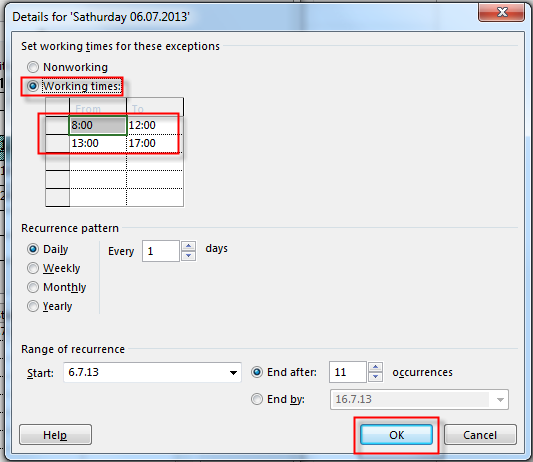
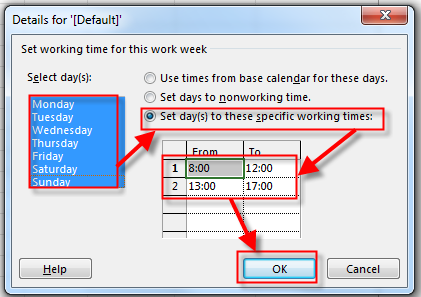
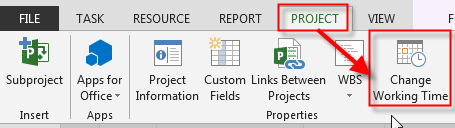
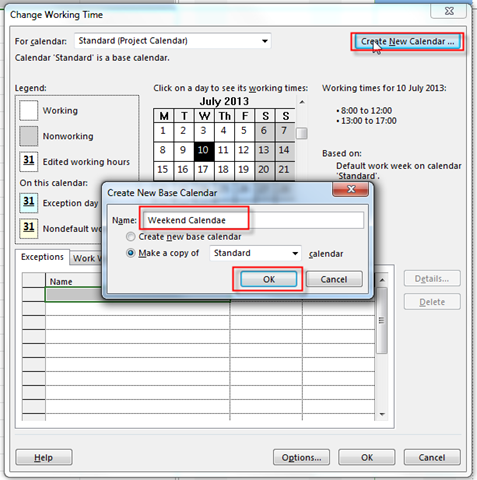
What can I do? I can change Working Calendar for Mary, just for the specific weekend, like this:

image

and:

image

and then:

image

I’ll do this for Sunday, 07.07.2013, as well. After that I’ll get:

image

I’ve got what I want! If I now add Task 2 with 7 days duration, and the Predecessor is Task 1, and Mary should work on Task 2, I’ll get:

image

As you can see, Mary will not work at second weekend for the Task 2.

Now you may ask: Why shell we use Task Calendar at all?.

Now suppose that I have Task 2 with 7 days duration, at the same time as Task 1, and Mary will work on both Task with 50% assignments.

image

As you can see Mary will works on both Tasks, and for both Tasks, she will work during the weekend. But, what if you want that she works during the weekend only on Task 1, but not on the Task 2?  Then you must use Task Calendar, because this kind of Calendar is tied to Specific Task (or more of them).

And finally, if you have a Resource pool, for example, and you Assign Mary to work on 5 Projects with 20% assignment on each Project, with Exception for Saturday 06.07.2013, and Sunday 07.07.2013, she will works on every project during that weekend!

Regards!
Posted in MICROSOFT PROJECT, Microsoft PRoject 2010, Microsoft Project 2013, MS PROJECT 2010, PRoject Management | Tagged , , , | 3 Comments

Resource vs. Task Calendar in MS PROJECT 2013

Hi,

another question from my Blog reader: “How do you determine whether to create a task calendar or a resource calendar?
For example I start off with setting up the project calendar as standard, and then I decide that a particular task needs to be worked on over a weekend.
If my resources normally work the standard hours, do I create a task calendar?

Or do I go into the resource calendar for that resource and create an exception for that weekend?

The answer is: It depends of your Task! Let me give you an example. Resource Calendar has purpose to establish working time, and non working time for some resources. So when  you assign Resources to some Tasks, Start and End Date depend of Resource Calendar.

Let me show you that in MS PROJECT 2013.

Let’ say that I have resource Nenad and that I’m freak, and I am going to work every day (including Saturday and Sunday).

I will arrange Standard Calendar for me:

image

and then:

image

If I add Task  to my Project with 5 days durations it will looks like:

image

As you can see it will start at 10.07.2013 (Wednesday) and it will finish at 16.07.2013 (next Tuesday). But, when I assign Nenad to the Task it will looks like:

image

As you can see now the Task will start at 10.07.2013 (Wednesday) and it will finish at 14.07.2013 (Sunday). Why? Because Nenad will work at weekend. But Let us suppose that we have another Resource, Mary, with Standard working Time (e.g. no work for weekend), and that she will work with Nenad on the same Task:

image

As you can see it will start at 10.07.2013 (Wednesday) and it will finish at 16.07.2013 (next Tuesday), like at the First example. Why? Let’s look at the Task Usage View:

image

As you can see, Nenad will work at Wednesday, Thursday, Friday, Saturday and Sunday, but Mary will work at Wednesday, Thursday, Friday, Monday and Tuesday.

And if you have this particular Calendar for Nenad it will be applied to all Tasks.

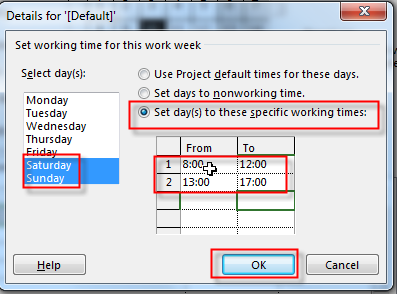
Let me now say that I have Task called Weekend Task. And it has to be done only at Saturday and Sunday.

image

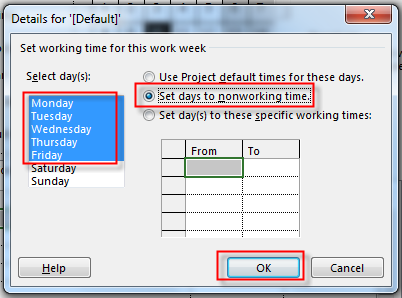
I’m going to cerate Task Calendar:

image

and:

image

and then:

image

and:

image

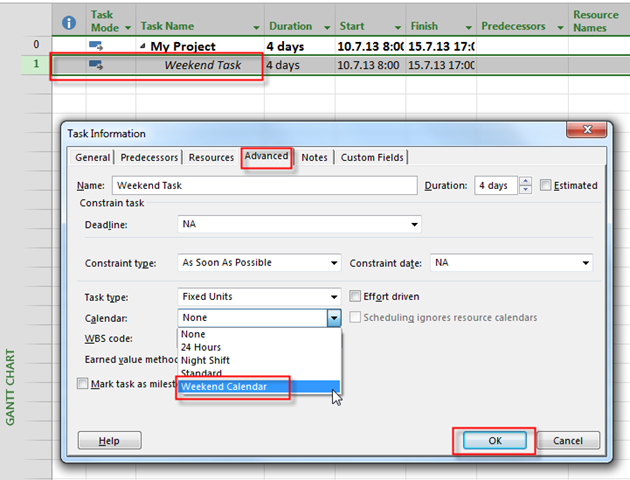
Finally I’ll assign this Calendar to the Task:

image

and I’ll get:

image

As you can see duration is 4 days, but it will spread across two weekends (13.07.14.07, and 20.07-21.07)

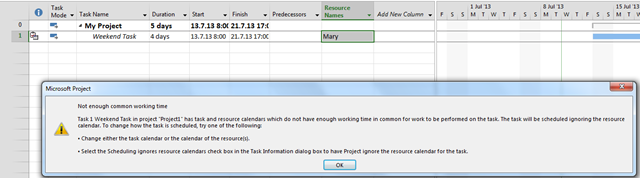
Now let’s suppose that we need Mary for that Task:

image

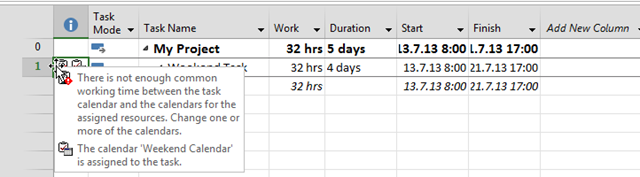
Huston, we have a Problem. Since Mary doesn’t work at weekends, we have a conflict. What Can we do?  We can leave it as is, and we will get:

image

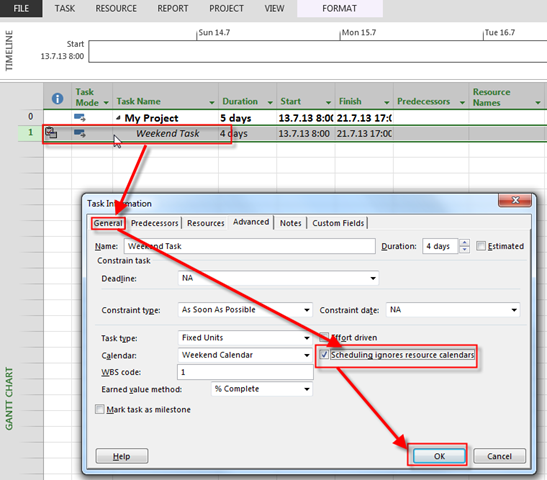
Or we can say that we don’t care about Mary’s working time for that Task like:

image

Now I can assign Mary and I will have no warning!

So, to conclude. If you want some Task to be done on Particular days of the week, no matter of Resources, then yes, use Task Calendar!


Regards!
Posted in MICROSOFT PROJECT, Microsoft PRoject 2010, Microsoft Project 2013, MS PROJECT 2010, PMI, PRoject Management | Tagged , , | 7 Comments

How to force Successor to start next working day in MS PROJET 2013


Hi,

as usual, I’ve got a question from one of my Blog Reader: “If I have two tasks, the second task’s predecessor is the first task, and the first task ends on 7/10, I’d like the second task to start the following day, 7/11, My project has tasks starting the last day of the predecessor task. I don’t want to add a constraint or lag time to the tasks to resolve the issue. Is there a setting for the entire project that sets all tasks to start on the following day as their predecessor?

I’ll show you that with MS PROJECT 2013.

First of all, how can a Successor begins at the same day as Predecessor finishes! Easy! Let me show you.

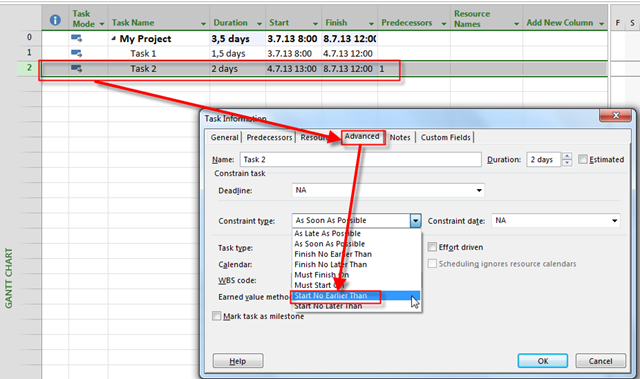
I will ads Task 1, and I will put 1,5 days in the Duration field. Then I’ll add Task 2, and I will put 2 days in the Duration field. Finally I’ll link them. And I’ll get:

image

Let me explain this picture a little bit! The working time is from 08:00 to 12:00, and from 13:00 (1:00 PM) to 17:00 (5:00 PM)Since first Task has 1,5 days duration it will take from 08:00 to 17:00 (with lunch break from 12:00 to 13:00) at 03.07.2013 (and that is 8 hours = 1 Day), and from 08:00 to 12:00 at 4.7.2013 (this is second day, but only half of it). Successor starts in Finish to Start relationship first available minute after predecessor. Since there is a lunch break between 12:00 and 13:00 at second day, it will start at 13:00 at second day.

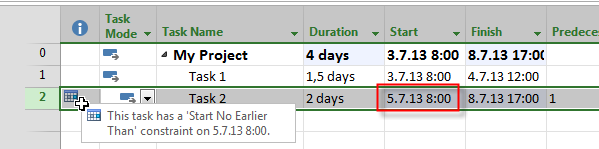
Now suppose that you have a demand that Task 2 should start at first available working day after predecessor finishes. The cleanest way is to put a constraint at the Task2 and that constraint is so called semi flexible, and it will be: Start no earlier than:

image

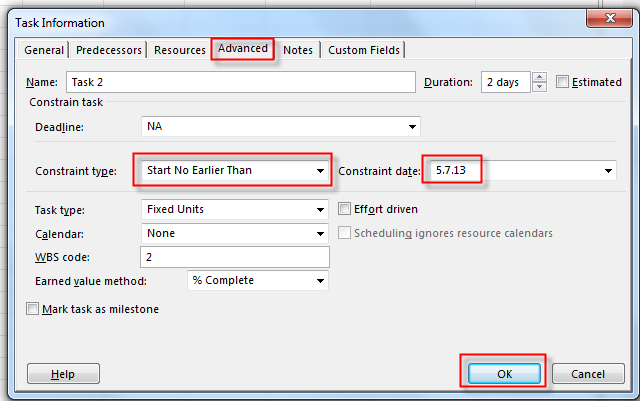
and then:

image

I’ll get:

image

I’ve got what I wanted, BUT! Suppose that I extend duration to 3,5 days instead 1,5 days for Task 1. I’ll get:

image

What happens? As you can see, Task 1 will finish at 08.07.2013, and Task 2 will start at the same day! Why? Well, because I told that Task 2 should Start no earlier than 05.07.2013. And it does not. It starts latter, at 08.07.2013, and the problem is same! It does not start next working day!

OK, now I’ll remove those constraints and I’ll get the “start” position:

image

What can I do! Workaround!

First I’ll insert so called Dummy Task with (for my example) 1 hour duration, between Task 1, and Task 2, and I’ll link them like this:

image

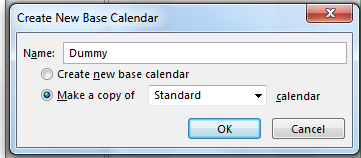
Now I am going to create new Calendar with name: Dummy, and I’ll tell that working time on this calendar is 1 hour per day from 01:00 AM to 02:00 PM.

image

and:

image

then:

image

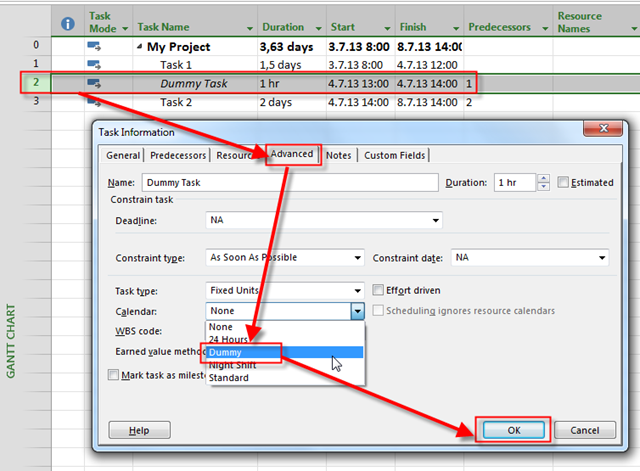
Finally, I’ll assign that new Calendar To the dummy Task:

image

I get this:

image

You can see that Task 2 will start at 05.07.2013 and that is exactly what I wanted – the day after Task 1 will finish. Again I’m going to extend duration to 3,5 days instead 1,5 days for Task 1. I’ll get:

image

As you can see, now Task 2 will start at 09.07.2013, and this is first working day after Task 1 finishes.

Do not forget this:

  • DO NOT assign any Resources to Dummy Task! Dummy task is Dummy, e.g no one will work on it
  • After you finish Task 1 (100%) do not forget to put 100% finished to dummy Task!

That’s it.


Regards,

Posted in MICROSOFT PROJECT, Microsoft PRoject 2010, Microsoft Project 2013, PMI, PRoject Management, Uncategorized | Tagged , , , | 4 Comments

How to manage multiple Projects in MS PROJECT 2013


Hi,

suppose that you have multiple Projects, and you do not have MS PROJECT SERVER. How can you see all Projects, Tasks, or Resources in MS PROJECT 2013?

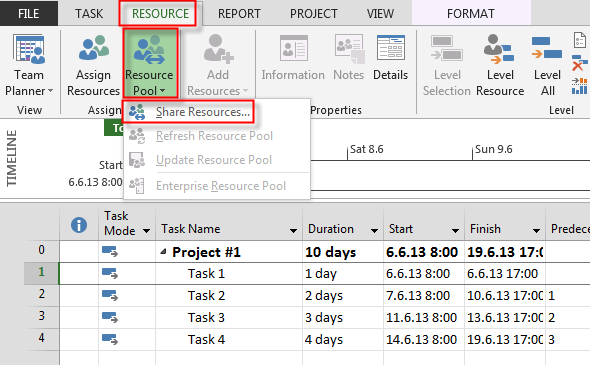
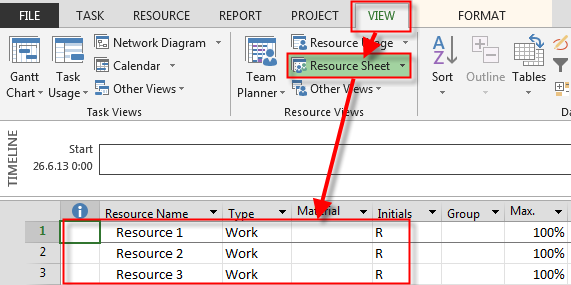
First what I’m going to do is to create Resource Pool:

image

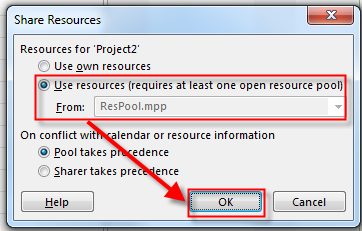
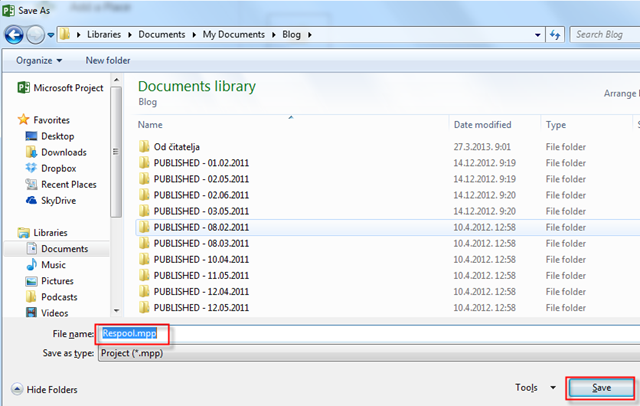
and I’m going to save that file:

image

and then:

image

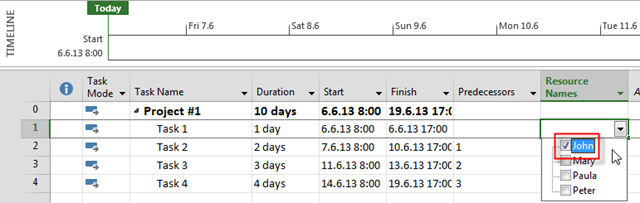
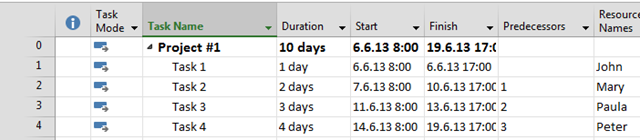
I’ll now Create two Projects, and I’m going to assign Resources to the Tasks of those Projects:

Project # 1. (PROJECT A):

image

Project # 2. (PROJECT B):

image

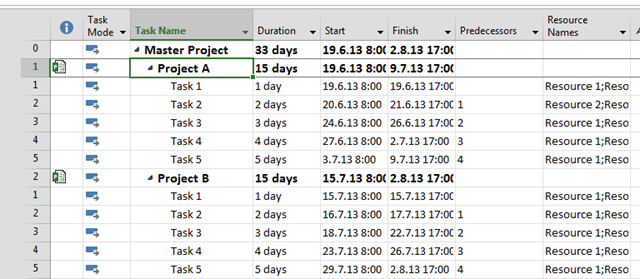
After Saving this Projects, I’m going to create brand new so called MASTER PROJECT:

image

and I’m going to add my two Projects as Subprojects:

image

and then:

image

After I do the same thing for my Second Project I’ll get:

image

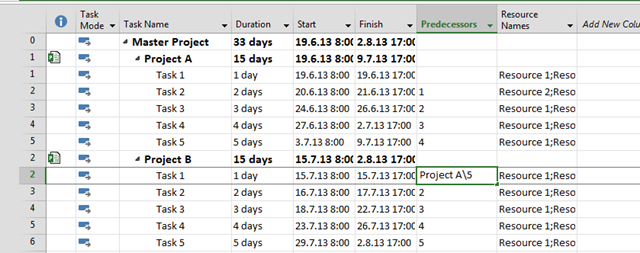
Now suppose that I want that Task 5 from Project A is predecessor of Task 1 from Project B. I can do that by typing:

image

and I’ll get:

image

Now let’s take a look in PROJECT A:

image

and Project B, as well:

image

You can see both Tasks from “outside” Projects in your Project. I recommend that you use Project column to see from which project come this (ore those) Tasks!

Do not forget to save your Master Project.

Finally, if you have a large number of Projects, and you want to see them all, use Project Server.


Regards!

Posted in MICROSOFT PROJECT, Microsoft PRoject 2010, Microsoft Project 2013, PMI, PRoject Management | Tagged , , , | 7 Comments

Autolink inserted or moved Tasks in MS PROJECT 2013


Hi,

if you are working with MS PROJECT 2013 (or 2010), you may want auto linking Tasks! First I’ll show you what’s happening if you do not turn on this feature. I will create 3 Tasks and I’ll link them:

image

I’ll insert New Task between Task2 and Task 3:

image

As you can see this new Task is without Predecessors. Now I’ll go back to my first three Tasks:

image

and I’ll turn on this feature:

image

then:

image

and then:

image

Now, I’ll insert New Task and I’ll get:

image

As you can see this New Task has Task 2 as Predecessor, and Task 3 has this New Task as predecessor!

OK. Now I’m going to move New Task behind Task and I’ll get:

image

Now this New Task has the same Predecessor (it is Task 2), but Task 3 has two Predecessors, Task 2, and New Task.

Now I’ll add a brand new Task ad the end of the Project:

image

As you can see, it doesn’t have any Predecessors, not it is Predecessor to any Task. So, that feature is only for moved or inserted Tasks.

And, for the end, let’s suppose that we have, for example two Tasks with Start to Start relationship:

image

I’ll get:

image

Now, I’m going to insert New Task between Task 1, and Task 2:

image

As you can see, nothing happens! So this feature works only for Finish to Start relationship!

Regards,

Posted in MICROSOFT PROJECT, Microsoft PRoject 2010, Microsoft Project 2013, MS PROJECT 2010, PMI, PRoject Management | Tagged , , | 11 Comments

Task Type in MS PROJECT 2013

Hi,

again one question from my Blog Reader:

“When looking at the Gantt chart with all my tasks it is hard to tell the difference between the tasks. Some as you described are for writing a document, some are for “doing” and others are workshops. It would be nice if I can highlight or categories the tasks.
For now I have highlighted all document creation tasks with a yellow background and the “doing” tasks with Green background, workshop tasks have a blue background. This is only visible in the Gantt chart but not in Task usage and Task sheet and Team planner and Tracking Gantt.
I could also just add a prefix to each task name such as: “Document – Quality checklist” and “Workshop – Accounts Payable Requirements gathering”
Is there a standard MS Project way of categorizing the tasks? The categories I need are: Document, configuration, Meeting and Workshop.”

This can be done with Custom field in MS PROJECT 2013! I will not complicate, I’ll just show you the easiest way to do it.

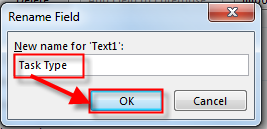
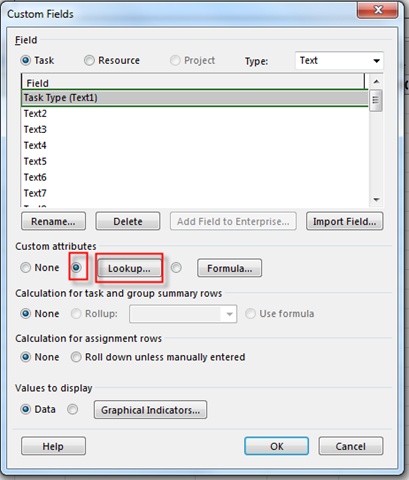
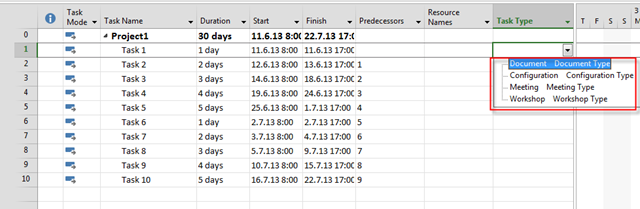
I will create one Custom field with four lookup values: Document, Configuration, Meeting, and Workshop!

image

and then:

image

I want to have lookup Values:

image

and then:

image

I do not want to enter new Values directly so I’ll leave the Last option on the screen unchecked!

Now I will add few Tasks to my Project:

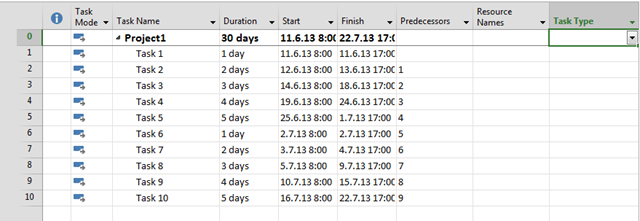
image

For each Task I want to assign Task Type:

image

and then choose:

image

and I’ll get:

image

I’ll choose Task Type for each Task:

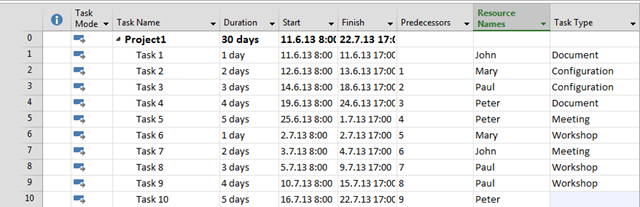
image

and after I’m done I’ll get:

image

I will add some Resource to the Project:

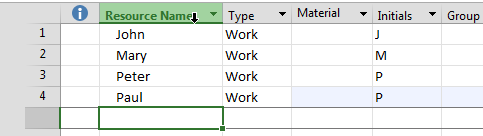
image

and I’ll assign them to Tasks:

image

Now I’ll use, for example, Task Usage View, and I will add Task Type column to it:

image

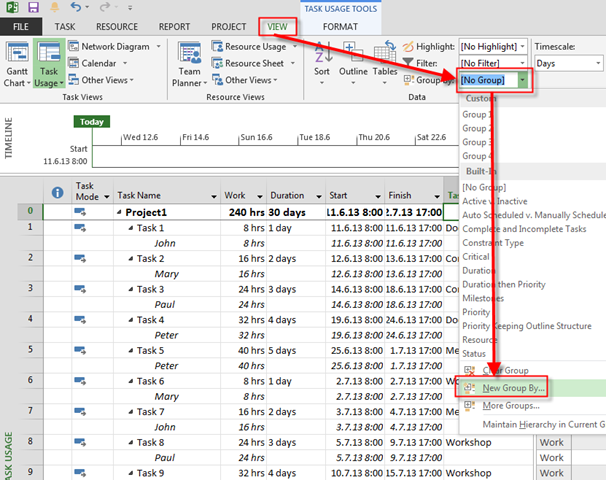
Finally, I’ll group my Tasks by Task Type:

image

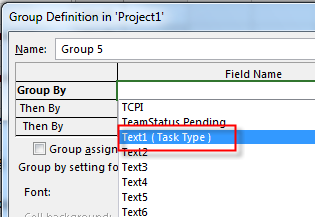
and then:

image

and I’ll get:

image

Finally I’ll get:

image

Be careful. If you want that for all your new Project you must copy this custom filed to the Global Template. If you don’t do that, that Custom field will be only visible for the current Project, and for other Project you should recreate it, and that is annoying.

So you should go to the Organizer:

image

and after that I’ll have this field in all new Projects.

Regards!
Posted in MICROSOFT PROJECT, MS PROJECT 2010, PMI, PRoject Management | Tagged , , , | 1 Comment

Resource Pool and Tasks in MS PROJECT 2013


Hi,

as usual, I have a question from one of my Blog readers.

“Dear Nenad,
Today it’s real tough for me to manage my projects (2010)
hope you’ll find the solution for my head break
1. my question is weather i can share the resources between multiple projects
2. If do,can i get the resource tasks (i.e. pending tasks, completed tasks and ongoing tasks) of all projects in a single sheet of particular resource.
Please provide me the solution in your window it will be so help full.
Best regards,”

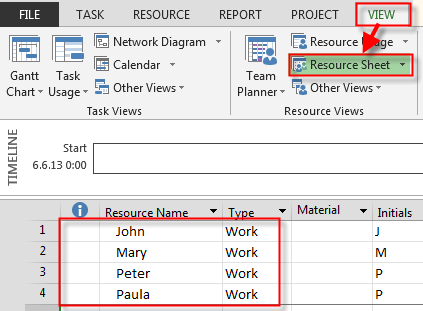
With a little effort You can have all data in one place. First, I will create Resource Pool in MS PROJECT 2013.

image

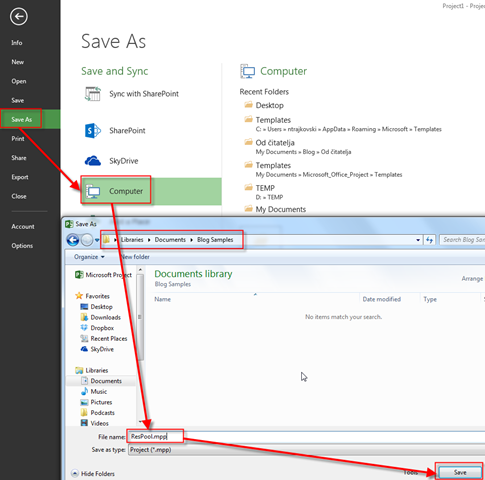
Now I will save this File with name ResPool!

image

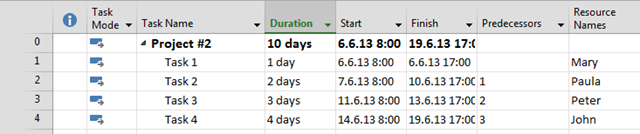
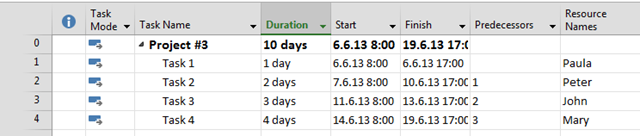
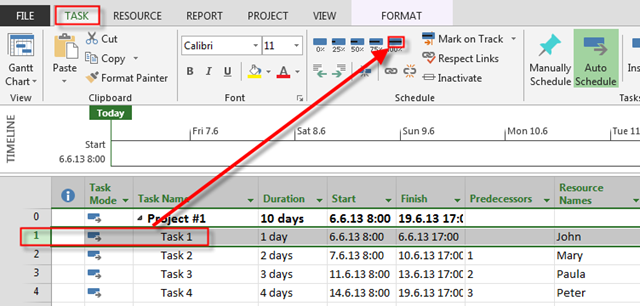
Now, I am going to create three Project with four Tasks for each project, and I will assign different Resource per each Task. I’ll show you that only for Project #1, because there is the same Procedure for other Projects:

image

and:

image

and then:

image

So I will have Three Project and they will look like this:

Project #1

image

Project #2

image

Project #3

image

Project #4

image

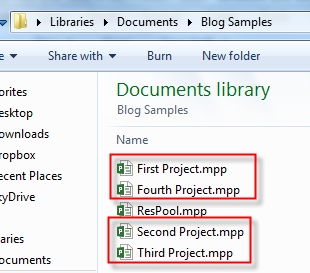
I will save them, as you can see:

image

Now suppose that Task 1 of Project #1 is done 100%, Task 1 of Project #2 is done 75%, Task 1 of Project #3 is done 5o%, and Task 1 of Project #4 is done 25%. I will show this only at First Project (for the rest there is the same Procedure):

image

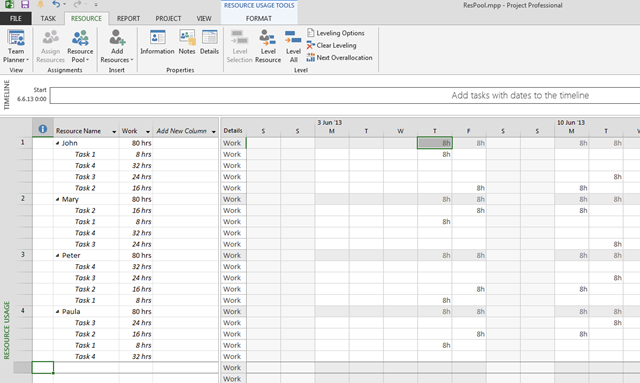
OK! I want to see all Task for all Resources for all Project in one view. I will use Resource Usage View in ResPool (Resource Pool):

image

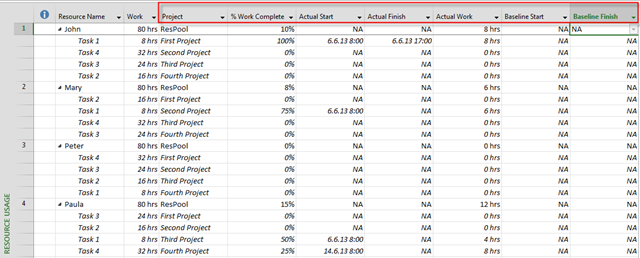
But that is not what you want!!!! Of course it isn’t. Now I’ll modify this View by adding New Columns I need:

image

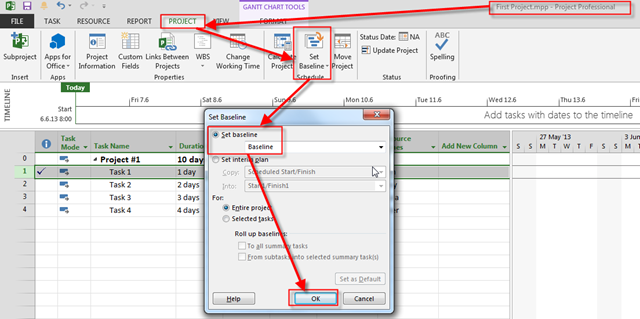
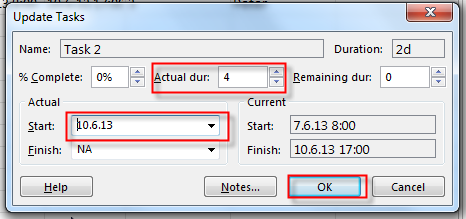
Much better now, isn’t it? Now I’m going to save Baseline for the First Project, and I will say that Task 2 is completed but it took 2 days more, and it started 2 days after planned:

image

and then:

image 

and:

image

and I will get:

image

Back to the Resource Pool:

image

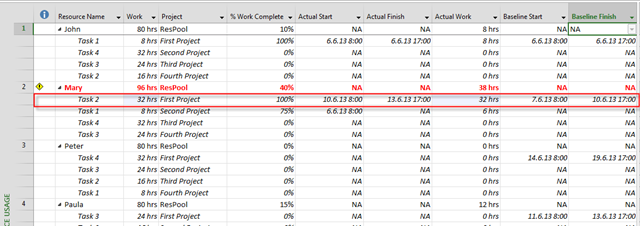
As you can see, Mary is over allocated now, and you can see difference in Task 2 of Project #1 with Baseline Start and finish, and Actual Start and Finish.

To conclude, you can see a lot of information about your Resources, and their Tasks in Resource Pool. You just have to adjust Resource Usage View as you want.

Regards,

Posted in MICROSOFT PROJECT, Microsoft PRoject 2010, Microsoft Project 2013, PMI, PRoject Management | Tagged , , | Leave a comment

Fiscal Year and MS PROJECT 2013

Hi,

some of you told me that there is something wrong in MS PROJECT 2013 when displaying dates in Gantt Chart.

Well, the solution is in Fiscal Year Settings.

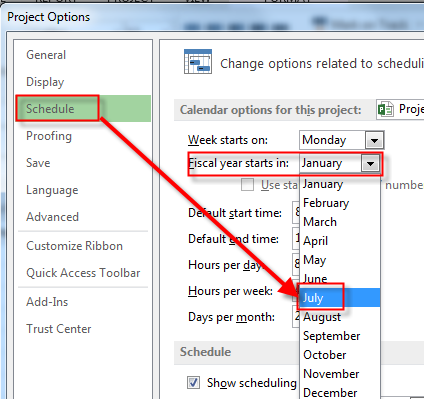
For  some companies Fiscal Year is equal to Calendar Year (e.g. it starts at 01.01, and it ends at 31.12). On the other hand some companies ha Fiscal year from 01.07 (First of July).

I will now set this date ad fiscal year:

image

and then:

image

and then:

image

OK!

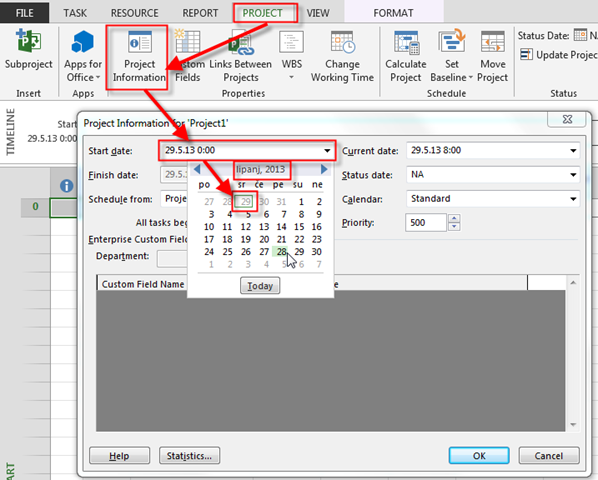
Now I’m going to set the Start date for my project:

image

Lipanj is Jun in Croatian language! Here is what I get:

image

I will now add one Task with 5 days duration:

image

Everything looks fine! The Task will start at Friday, 28.06.2013, and it will end at Thursday 04.07.2013.

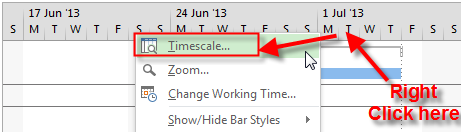
Now I am going to the Timescale:

image

and I’ll get:

image

After I check Use fiscal Year, and then OK, I’ll get:

image

As you can see on the Left side of the Screen, Start Date is 28.06.2013, and End Date is 4.7.2013! But on the Gantt Chart (Right side of the Screen) Start Date is 28.06.2013, and End Date is 04.07.2013, because it is another fiscal year. So, there is no bug in Gantt Chart, it is way of displaying or not data with, or without Fiscal Year!

Hope this helps!

Regards,

Posted in MICROSOFT PROJECT, Microsoft PRoject 2010, Microsoft Project 2013, PMI, PRoject Management | Tagged , , , , | 2 Comments

Cost Resources and Actual value in MS PROJECT 2013


Hi,

I have a question about Cost Resources and Actual value in MS PROJECT 2013:

“Dear Nenad,

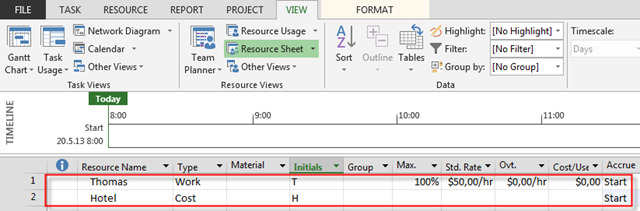
I defined a cost resource “Hotel” and a work resource “Thomas” with hourly rate of 50 USD. For both of these resources I selected the accrue at “Start”. I defined a task of 1 day duration and assigned Thomas to it. I also assigned 200 USD of Cost Resource “Hotel” to this task. Then I saved the baseline with baseline cost of 600 Dollars. When I make the task 50% complete, the Actual Cost only shows the Cost of work resource. Even when the task is 100% complete, the actual cost only reflects the cost of work resource. The behavior remains same even if the accrual method is changed to “Prorated” or “End”.

Can you suggest a work around?”

I wrote about this issue long time ago. From Microsoft point of View this is not a bug! From mine, it is. But, guess what. There is a workaround.

OK, let me make the same Scenario as my Reader has. I will make a Task so called Trip:

image

Now, I am going to make Thomas, and Hotel as resources.

image

I’m going to assign those Resources to the Task:

image

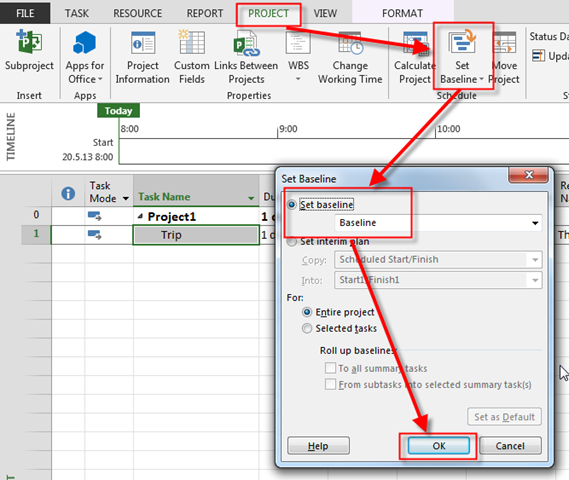
Now I am going to save the Baseline:

image

I will show you the Cost Table:

image

Now I’m going to tell MS PROJECT that Task is, for example 50% finished:

image

You can see that Actual Cost is $400!. Why? Because Tomas has Accrue at = Start, and that means that when the Task is completed even 0,1% MS PROJECT calculates 1 day = 8 hours = 8 hours * $50 = $400.

Why MS PROJECT does not calculate that for Cost Resource? Because it does not! So what do you have to do. You can use Resource Usage, or Task Usage View. I will, for this example, use Task Usage View:

image

And Now Back to the Cost Table:

image

Everything looks fine now. Boring? Yes it is I know.

The interesting thing is that if you assign only Cost resource to the Task, everything works fine. Tri it!

Regards!

Posted in MICROSOFT PROJECT, Microsoft PRoject 2010, Microsoft Project 2013, PMI, PRoject Management | Tagged , , , | 2 Comments

Resources and Over allocation in MS PROJECT 2013!


Hi,

very often there is a question: “When is Resource over allocated, and how MS PROJECT 2013is dealing with it?”

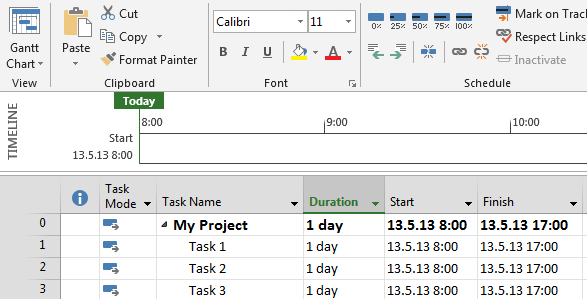
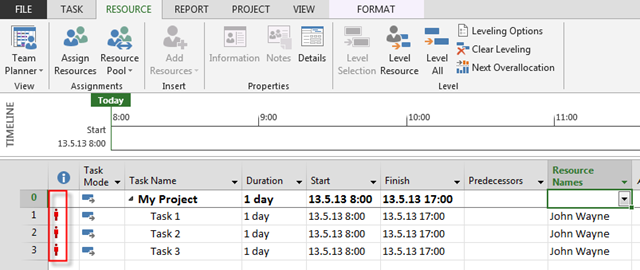
That is very easy to explain. First I will ad the three Tasks:

image

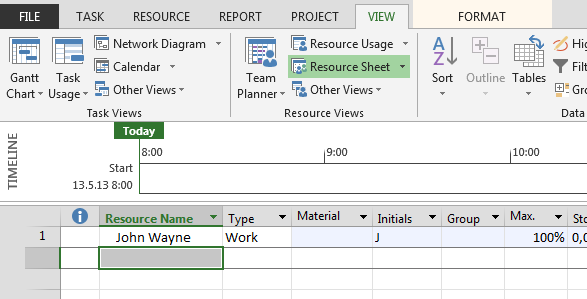
and my Resource will be John Wayne:

image

Of course that I will assign John Wayne to all three Tasks:

image

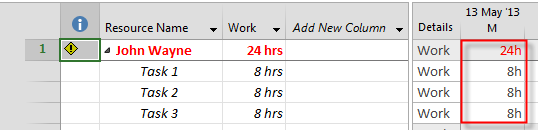
As you can see, John Wayne is over allocated in all three Tasks. Let’s see Resource Usage diagram:

image

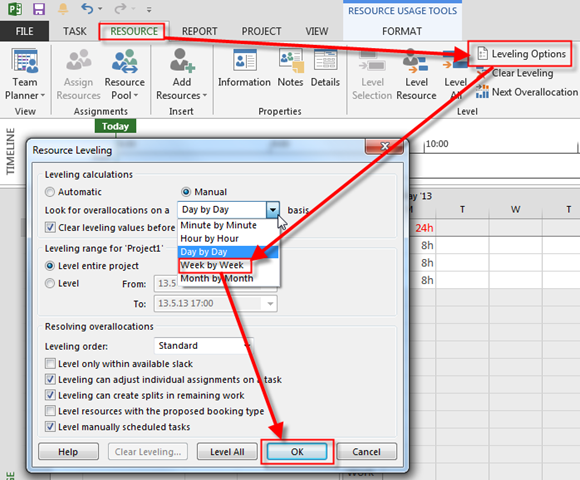
Now, suppose that John Wayne is a Superman! He can work 24 hours at Monday, so you do not want him to be marked as over allocated. You can do it here:

image

and I will get:

image

WHY? The answer is easy! I told MS PROJECT 2013 that Over allocation is calculated on Week by Week Basic. What dose it mean? It means that MS PROJECT 2013 is making calculation: 5 days * 8 house per day = 40 hours. John Wayne is occupied on 3 Tasks (Monday) * 8 hours = 24 hours, and that is less than 40 hours.

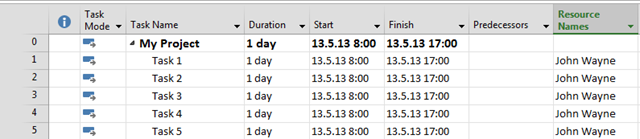
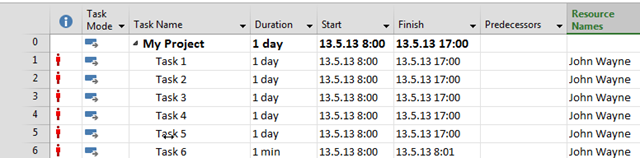
I will add Task 4, and Task 5, and I will assign John Wayne on it, and I will get:

image

John Wayne is now occupied 40 hours!
Finally I will add Task 6 with 1 minute Duration, and I will assign John Wayne to it, and I will get:

image

Tralaaaaaaaa! John Wayne is Over allocated now because he is working 40 hours + 1 minute on six Tasks, and that is larger than 40 hours.
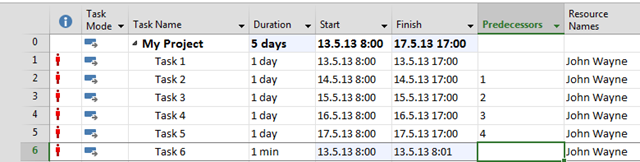
Finally, does it make a sense to put one Resource to work 40 hours + 1 minute on various Tasks at the same day? Of course not. So I will make predecessors for those Tasks:

image

John is still over allocated because in a week he is working more than 40 hours (even 1 minute more makes him over allocated)!

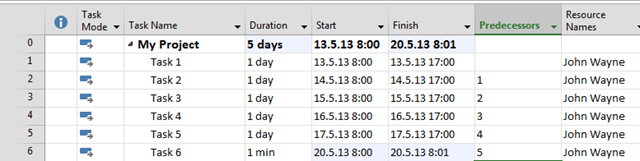
But what if John will work on Task 6 after Task 5?

image

He is not over allocated any more? WHY? Because Task 6 is scheduled on the next week!

You got the point, didn’t you!


Regards

Posted in MICROSOFT PROJECT, Microsoft PRoject 2010, Microsoft Project 2013, PMI, PRoject Management | Tagged , | 12 Comments