Resource Calendar and weekend!


Hi,

Again, I have a question from one of my Blog readers:

“Nenad,

I’m new to MS Project and really appreciate information on this site. I have a question regarding your post “Resource vs. Task Calendar in MS PROJECT 2013” posted on July 10, 2013.
Please explain how were you able to schedule the Task for your resource Nenad for Sat. 10/13 and Sunday, 10/14 even though both of those days were his working days?
Isn’t the MSP scheduling rule states that in order to schedule a task for an assigned resource, the task and the resource should have COMMON working days, unless the option to ignore resource calendar is selected.
In this case Saturday and Sunday of 10/13 and 10/14 respectively were set as working days for Nenad, bot set as non-working days for the task as it was using a Standard calendar with non-working Saturdays and Sundays.

Thank you,
Alex”

First I’m going to create Scenario for this Case in MS PROJECT 2016, and then I will explain it.

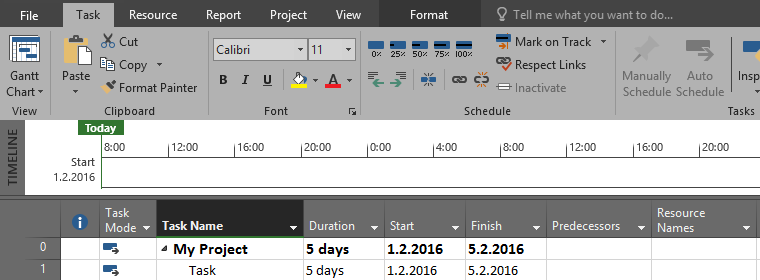
I will create brand new Project with one Task:

image

As you can see Task will start at Friday 11.03.2016, and since duration is 5 days it will end at Thursday 17.03.2016, because Standard Calendar is used, and weekend is non working time. You can see that here:
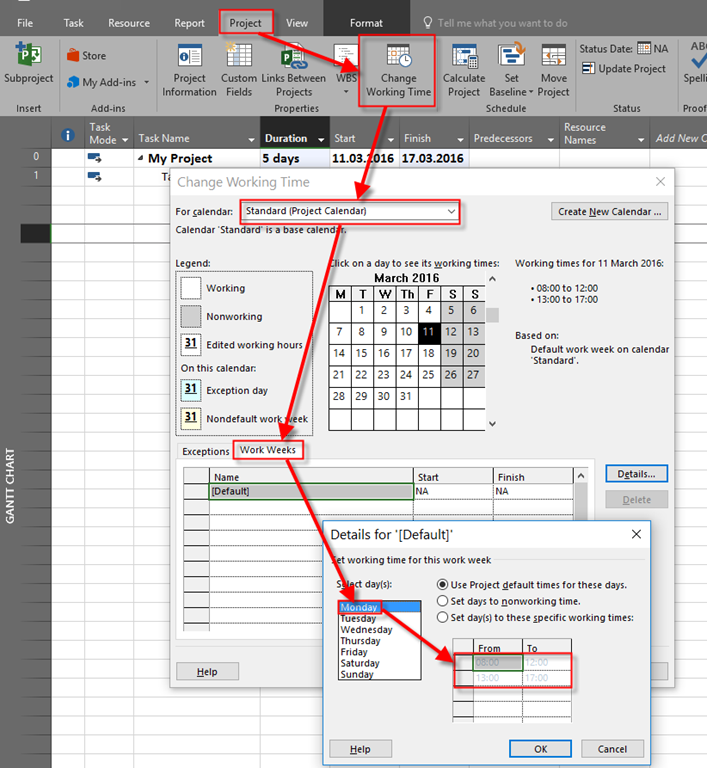
image

If you click on Saturday or Sunday, you will find that From and To field are empty, because those are non working days.

Now I will create John as Resource, and I will assign him to the Task:
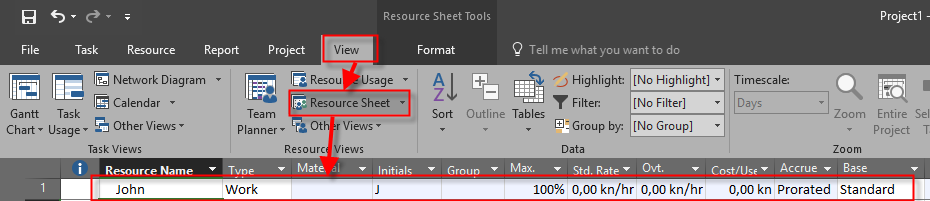
image

and:

image

As you can see nothing has changed in Start and finish date. Now suppose that John is hard worker and he is supposed to work at Saturday, 12.03.2016, and Sunday 13.03.2016:

image

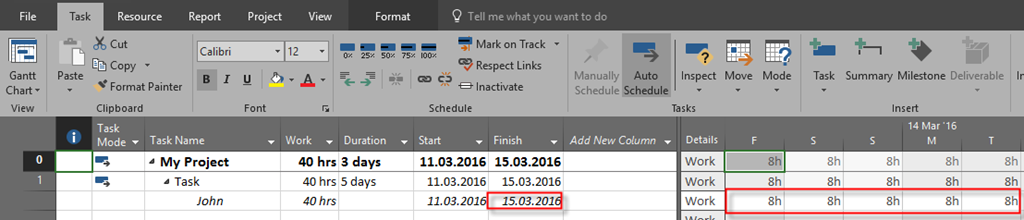
Now let’s see Task Usage View:

image

as you can see Finish date is now Tuesday, 15.03.2016, and John will work during the weekend.

Now, the question from my blog Reader is: WHY? Yes, Standard Calendar is set in a way that each and every Saturday and Sunday are non working days. BUT! If you create Resource in MS PROJECT, and you set a calendar for it (like I did, or in any other possible way), then RESOURCE CALENDAR has higher priority that Project Calendar. And it does make a sense. So, in my example, Project calendar says: “During weekend, work on Tasks will not be performed!”, but since John will work on the Task with exception (he can work on this particular weekend), MS PROJECT Says: “No matter on Project Calendar which says that during weekend  work will not be performed on Tasks, for this particular Task John will work at weekend, because that is written in his instance of Project Calendar, and Task will end sooner!”

Remember: Resource calendar setup has higher Priority than Project calendar setup.

Hope this helps.

Regards Smile

Posted in MICROSOFT PROJECT, Microsoft Project 2013, Micsrosoft Project 2016, MS PROJECT 2016, PMI, PRoject Management | Tagged , | 2 Comments

Task 0 in MS PROJECT 2016


Hi,

This post will be short, but very useful. I have a question from one of my Blog Readers: “Hi Nenad,
I discovered hat my task number usually starts from 1 instead of 0.
Kindly assist on this.”

I will show the Solution using MS PROJECT 2016.

Very often when you open MS PROJECT you will se this screen:

image

Well, blank screen is not user friendly at all. I will put three simple Tasks and I will get:

image

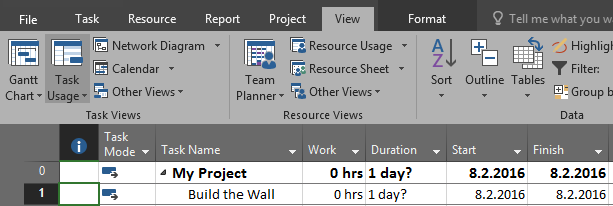
I see my Tasks, but I do not see Project Summary Tasks. To see this Task (and it as always Task with ID = 0), I can choose:

image

When I check this Checkbox, I will get:

image

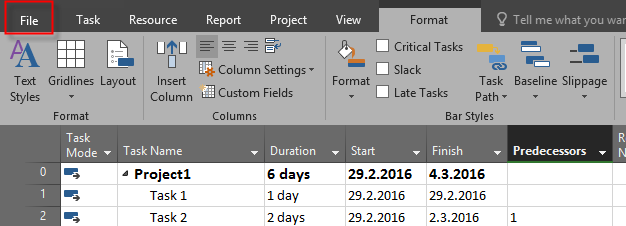
So, at Task 0 (Project Summary Task) I can see Total Duration of my Project, Start date, End date, Total work (if I add this column in my view etc.). So I strongly recommend that you always have this Task turned on. And to avoid clicking to the Checkbox about over and over again you can follow this steps:

image

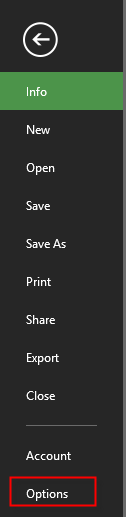
and then:

image

and finally:

image

With that option you will always have Task 0 displayed when you open new Project.

And, remember, keep this option, always on!

Regards!

Posted in MICROSOFT PROJECT, Microsoft Project 2013, Micsrosoft Project 2016, MS PROJECT 2010, MS PROJECT 2016, PMI, PRoject Management | Tagged | 4 Comments

Work assigned to Tasks vs. Work assigned to resources and Task Types in MS PROJECT 2016

Hi.

Today I will show you what happens when you put work in hours to the Tasks, and then assign Resources to the Task, using MS PROJECT 2016. Firs II ‘m going to create new Project:

image

As you can see, I have modified the Gantt Chart View in a way that I added Type, and Work fields. For all three Tasks I know that 40 hours are needed to complete this work.

I have three Resources in My Project:

image

Now I will switch to Task Usage View:

image

I have modified this View too, and I added Resource Names field. Now I am going to assign Resources to each Task:

image

As you can see, now the Magic Formula takes a place: Work = Duration * Units, e.g. Duration = Work / Units.

Fixed Units Task Type, and Fixed Work Task Type has Duration 5 days, because Duration = 40 / 100% (8 hours per day) = 5 days. But, Fixed Duration remains 1 day, because it is Fixed, and Mary should work 40 hours in one day which is impossible. So, when you have Fixed Duration Task Type DO NOT put hours in Task, but in Resource assignment. Why? Because when you have Fixed Duration, you should tell MS PROJECT how many hours in that duration should each Resource work, and in a Task put Duration instead of work. Then MS PROJECT knows Duration for that Task you want. It doesn’t make a sense to have Fixed Duration Task Type, and do not put that Duration in Task, does it?

Regards.

Posted in Microsoft Project 2013, Micsrosoft Project 2016, MS PROJECT 2010, MS PROJECT 2016, PMI, PRoject Management | Tagged | 2 Comments

Duration, Work and Units relation with no Resources assigned

Hi,

I have a question from my Blog Reader: “If you are not using resources in the scheduling, should you always just leave the Effort Driven box unchecked?”

I will answer this question right away: “”It doesn’t matter. Effort driven is always about :”More hands less work!”. Since you do not have resources you will get same results with effort and non effort Tasks.

But, I’m going to show you what will happens if you enter Work and Duration for The Task, and you do not assign Resources to them.

I will use MS PROJECT 2016, and I will create a simple Project with three resources:

image

As you can see, I put two extra Columns: Work and Type, and I have created three Tasks with different Types. All of them have 5 days Duration.

Now I am going to put 16 hours for Task 1, 32 hours for Task 2, and 8 hours for Task 3 in work field:

image

As you can see, Duration remains same for all three Tasks, no matter of their Type, and Work is spread equally through Duration.

Now I will put 3 days in Duration field for all three Tasks, and I will get:

image

As you can see Finish date is changed, but work remains same for all three Tasks, no matter of their Type, and it is spread equally through Duration.

To conclude, Magic formula: WORK = DURATION * UNITS does not work here because UNITS are zero. And they are zero because we do not have Resources assigned to Tasks.

So, when you have work and Duration in Tasks with no Resources assigned to them it doesn’t matter what kind of Task Type you have, nor if the Task is or is not effort driven.

Regards!

Posted in Microsoft Project 2013, MS PROJECT 2010, MS PROJECT 2016, PMI, PRoject Management | Tagged | 4 Comments

How to calculate work, and then fix it in IN MS PROJECT 2016

Hi,

friend of mine has a Specific problem. He wants MS PROJECT. I will show you this problem with MS PROJECT 2016!

Project has one Task:

image

Resources are:

image

As you can see there are Workers with 800% capacity, Laborers with 200% capacity, and Crane and Concrete mixer with 100% capacity.

Workers are supposed to work 300 hours, Laborers 50 hours, Crane 10 hours, and Concrete mixer  20 hours.

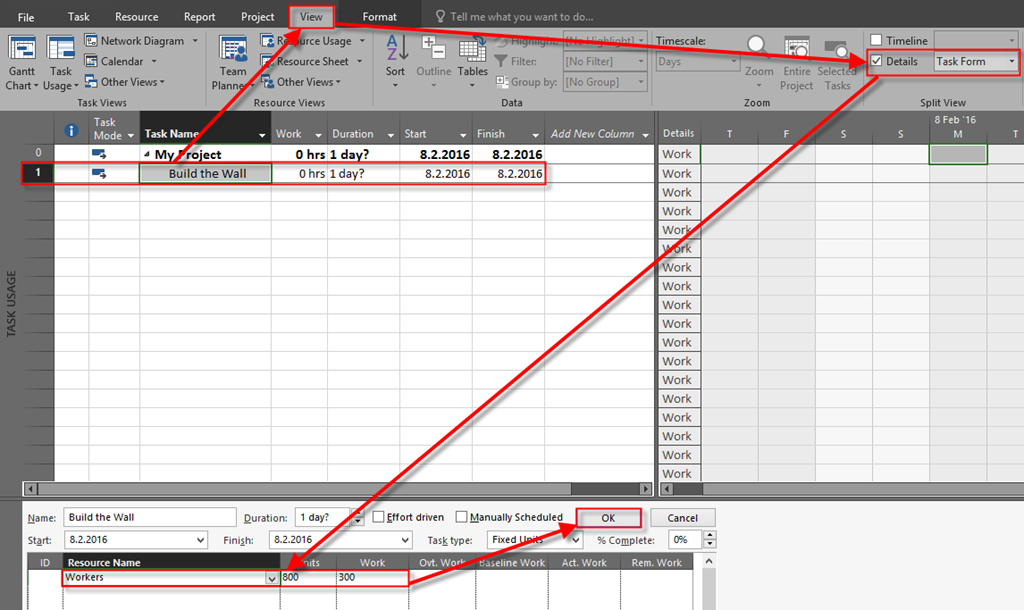
Duration of this Task should be calculated by MS PROJECT using workers. SO I will assign Workers to the Task, and I will put 800% for Units, and 300 hours to get Duration:

image

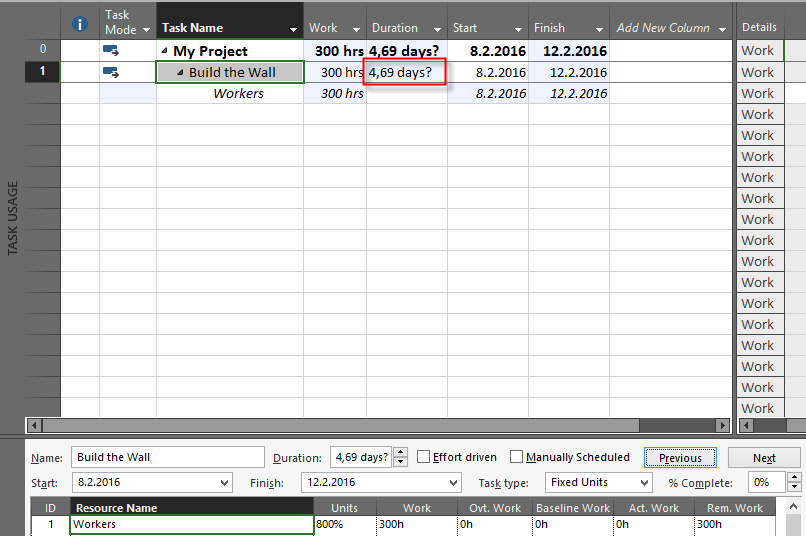
and I will get:

image

Now I want to assign remaining Resources like this:

  • Laborers 200% 50 hours
  • Crane 100 % 10 hours
  • Concrete mixer 100% 20 hours

but I want to spread the work during all days of Duration.

First I will assign them as-is:

image

and I will get:

image

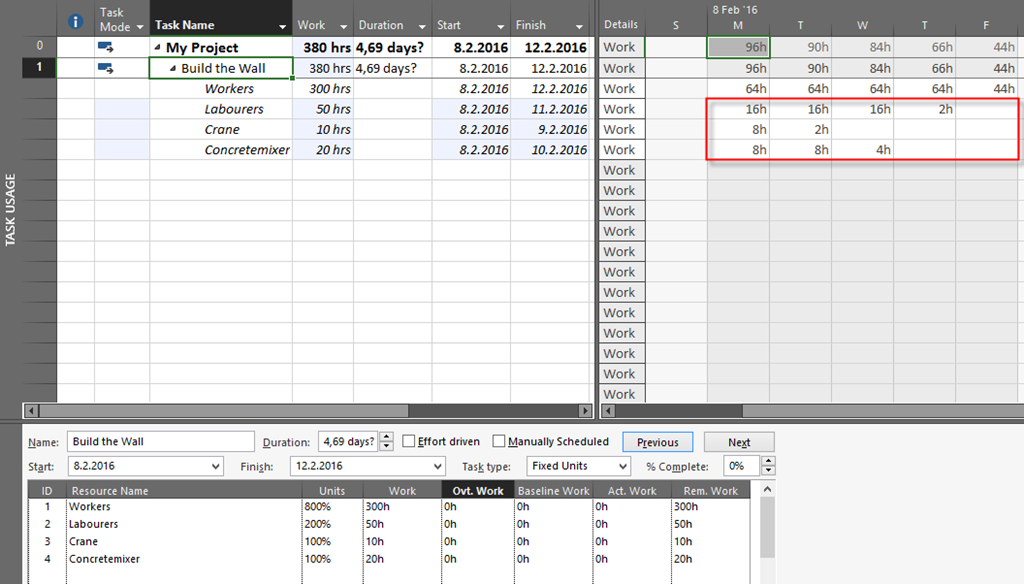
As you can see, I didn’t get what I wanted. Laborers will work only fist four days, Crane only first two days, and Concrete mixer only first three days. What Can I do? Well, before assign those resources I will switch Task to the Fixed duration mode:

image 

Now I am going to assign those resources in the same way:

image

Finally, I will get:

image

As you can see, all resources are used all days (Duration days). Of course they will not spend same amount of hours, as expected.

To conclude, if you want to calculate duration according to one Resource, and then spread the work through duration for rest Resources, follow this steps:

  1. Use fixed units or Fixed work and assign first resource. Duration will be calculated.
  2. Switch the Task to Fixed Duration Type
  3. Assign remaining resources to Task.

Regards.

Posted in Microsoft Project 2013, Micsrosoft Project 2016, MS PROJECT 2010, PMI, PRoject Management | Tagged | Leave a comment

Task Duration and Resource additional day off in MS PROJECT 2016

Hi,

today I will show you what happens if you assign resource to the Task, and afterwards put, for example, day off for that Resource in MS PROJECT 2016

First, I’m going to create simple Project:

image

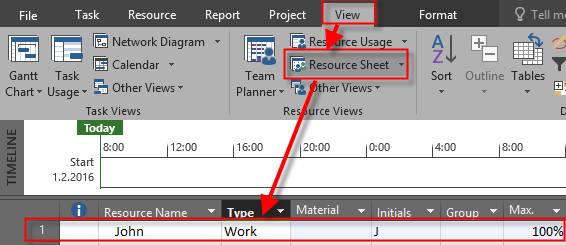
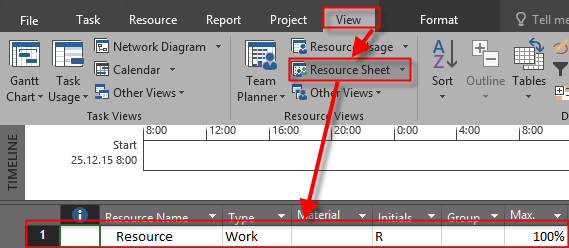
I will now create John, as Resource, with 100% Max.units:

image

Finally I will assign John to the Task, and I will show Task Usage View:

image

Now I’m going to show additional Column, Type:

image

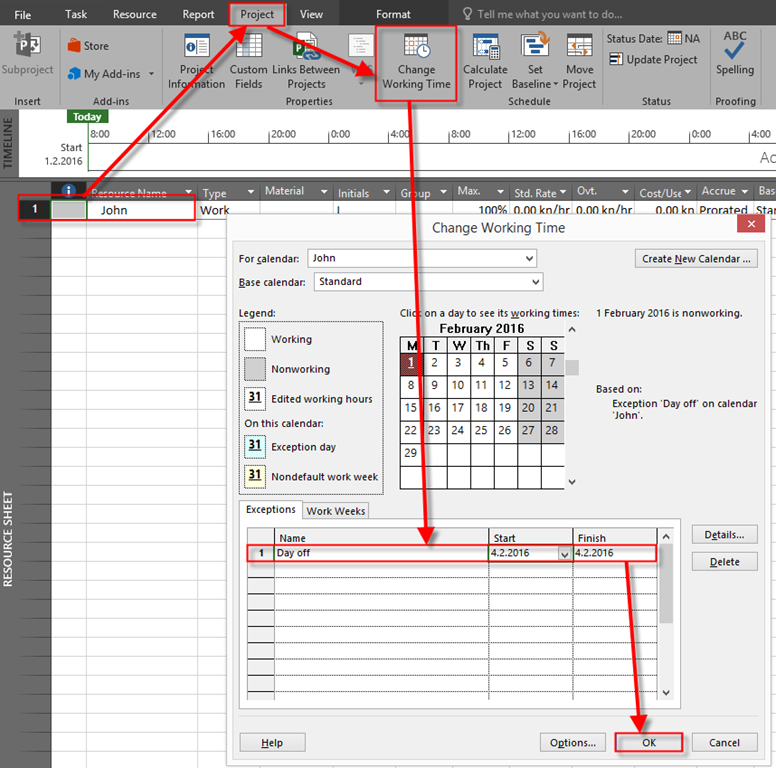
Now, everything is set. Suppose that at Thursday John can’t work at the Task. I will now put Day off:

image

and I will get:

image

So, with Fixed Units, End date will be Monday, 8.02.2016, and Work will remain 40 hours. The same thing will happens if you use Fixe Work Task Type, so I’m not going to show you that. If you do not believe me, try it Smile

Now I am going to put it all back and set Task Type as Fixed Duration:

image

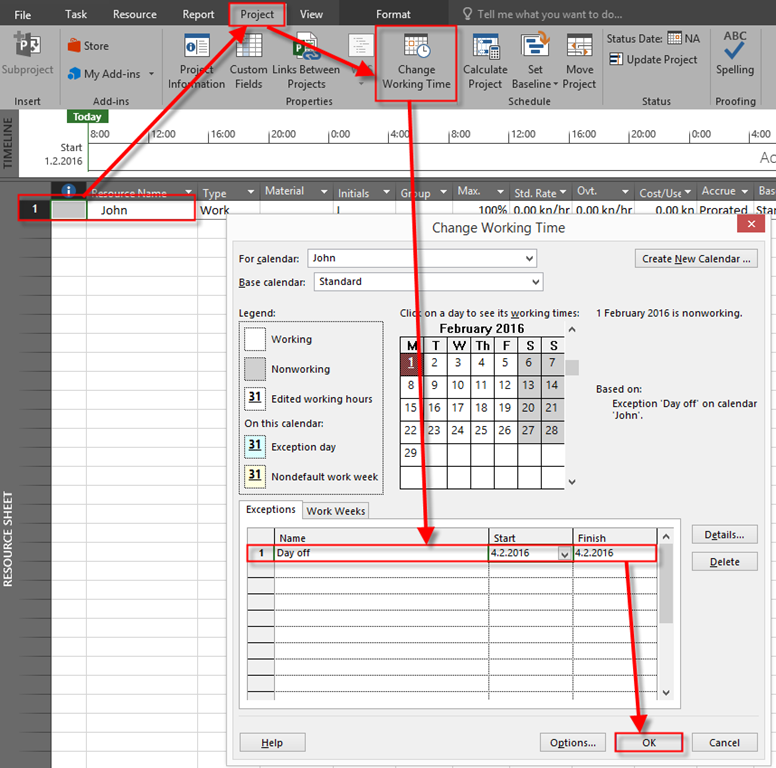
Now I’m going to set Thursday, 04.02.2016, as a Day off for John:

image

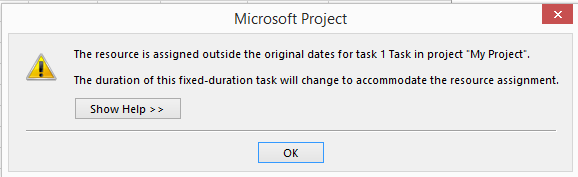
and, after I will click at OK button I will get:

image

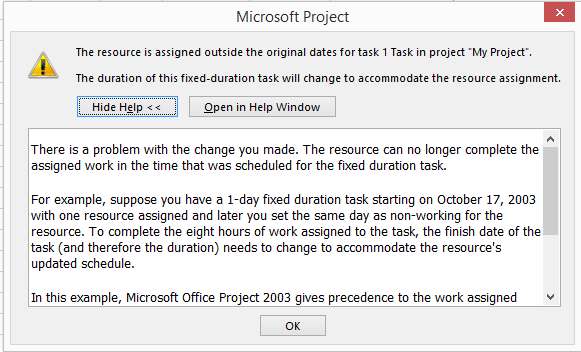
If I click on Show Help button, I will get:

image

The final result is:

image

So, what it this post all about? About warning! As you can see with Fixed Duration, and Fixed work Task Type, there is no warning that Duration will change. If Task Type is Fixed Duration then, and only then, you will get warning that Duration is going to change.

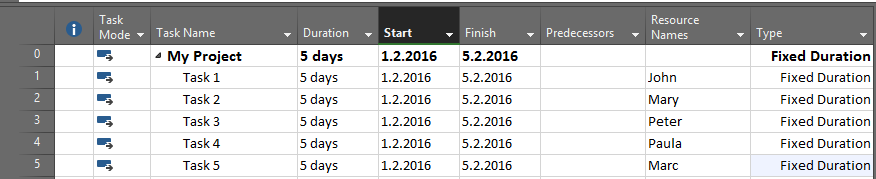
But this is not all. Let’s say that I have five Tasks, all Fixed Duration and five different Resources assigned to those Tasks:

image

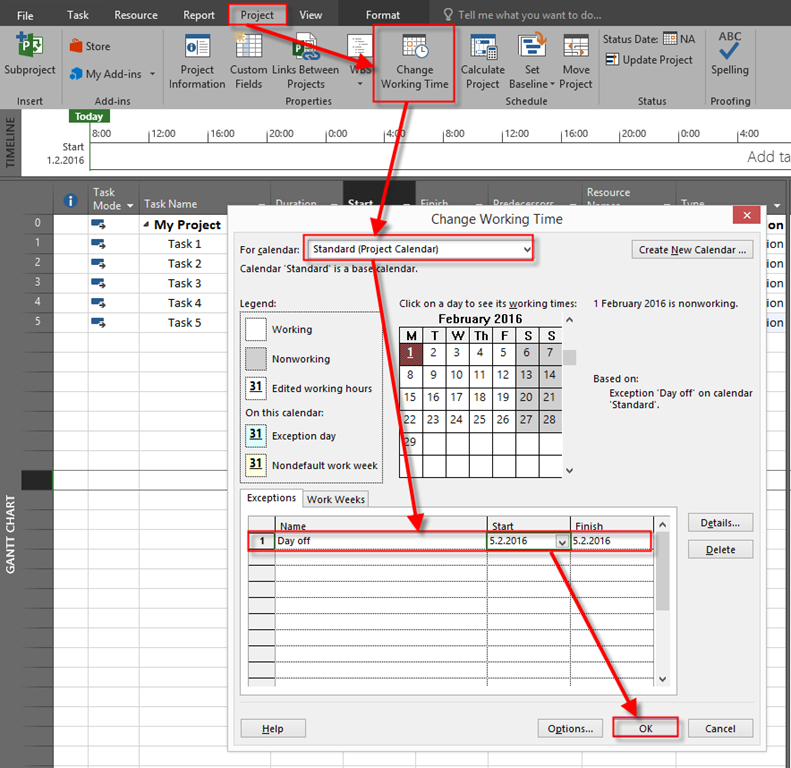
Now, suppose that, for some reason, Thursday is day off for all Resources, e.g. for whole company:

image

After I click at OK button I will get:

image

As you can see, in this scenario there is no warning at all. So, you have to be very, very careful when you are adding exceptions to your Calendars because the whole Schedule can “dance”, e.g. change, without warning. My suggestion is: Always have Test instance of your Project, and only after you are 100% sure that you get result which is acceptable, do changes at real Project file.

Regards!

Posted in MICROSOFT PROJECT, MS PROJECT 2016 | Tagged | Leave a comment

How to change Task Finish date when Task has fixed amount of Actual work in MS PROJECT 2016


Hi,

friend of mine got a problem. He has Task in which he wants to put Actual work and Actual Finish date for the Task, but he got odd result. Let me show you a problem with MS PROJECT 2016. firs I am going to create a simple Project with one Task:

image

I will create a Resource with 100% availability:

image 

and I will assign Resource to the Task:

image

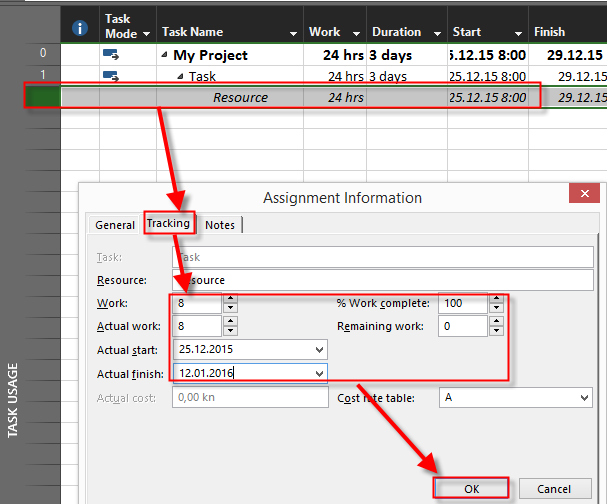
Now suppose that Task is finished at Tuesday, 12.01.2016, and Actual work is 8 hours. Simple, Resource worked only 8 hours to finish the Task during period from 25.12.2016 to 12.01.2016.

I will use Task Usage View:

image

and I will get:

image

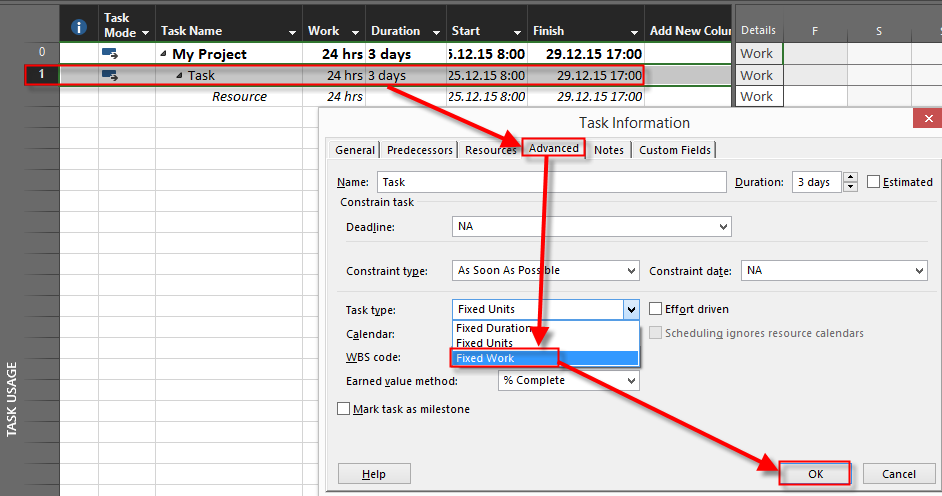
As you can see work is 104 hours, not 8. Is it a bug? Not at all. Because from 25.12.2015 to 12.01.2016 is 13 working days and 13 * 8 hours per day is 104 hours. If you want to have fixed period (Start and Finish date), and fixed hours,  you should have Fixed work Task Type:

image

Now I will put same values here:

image

and I will get:

image

To conclude, if you want to have fixed hours, and Fixed Actual Start and End Date, use Fixed work Task Type!

Regards!

Posted in MICROSOFT PROJECT, Microsoft Project 2013, MS PROJECT 2016, PMI, PRoject Management | Tagged , | Leave a comment

Resource availability and Tasks in MS PROJECT 2016

Hi,

I’ve got a question from one of my Blog readers:

“How can I schedule a resource onto a task when it becomes available. For example, there are two tasks that start at the same time and the duration on the first is 1 week, and the second task is 3 weeks. I assign task 1 to Resource1 and task 2 to both resources.
What I would like to automatically occur is for Resource 1 to be assigned task 1 in the first week and task 2 in weeks 2 and 3; and Resource 2 be assigned task 2 for weeks 1 through to 3. This meets the task hours required and utilizes the resources efficiently. Thanks in advance for any assistance.”

I will explain that in MS PROJECT 2016.

First I am going to set up the brand new Project as my readers told me:

image

and two Resources:

image

Now I’m going to assign Resources to Tasks using Task Form:

image

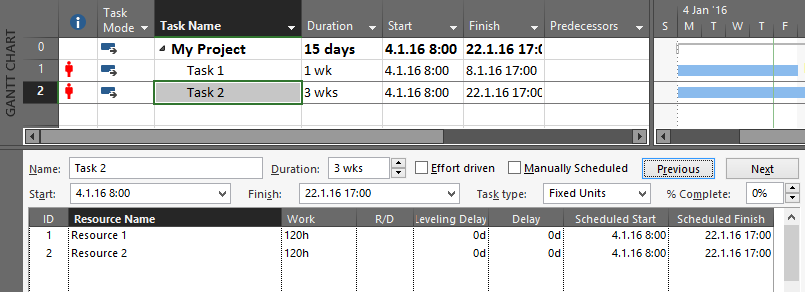
I will assign Resource 1 to Task 1 and Task 2, and Resource 2 to Task 2, and I will get:

image

As you can see in Info column, Resources are over allocated (e.g. Resource 1 is over allocated). Microsoft Project will not, and can not decide for you when do you need resource for specific Task. Since you told to Microsoft Project that Resource 1 should work on both Tasks, Microsoft Project can only help you with over allocation sign. Why? When you assign Resource 1 to Task 1 it means that Resource 1 should work 5 days (8 hours per day, because it will work with 100% capacity), and that is 40 hours! On the other hand, to complete Task 2, both Resources should work on it for 3 weeks, e.g. 15 days (8 hours per day), and that is 120 hours per Resource. And yes, Resource 1 is over allocated, and Microsoft Project will not move Resource from Week 1 on Task 2 to Week 2, and Week 3 just because it is over allocated. 

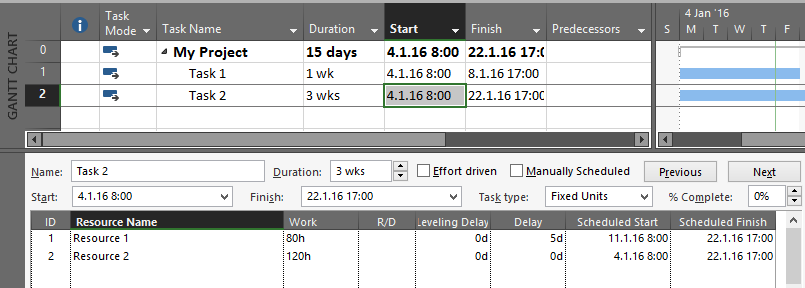
What can you do in this situation. You can manually set Scheduled Start date, and hours. That means, in this example, if you want that your Resource 1 to work only 2 weeks (and this is 80 hours (10 days * 8 hours per day), and you want it to work after Task 1 is finished, then you should make this change:

image 

and you will get:

image

Now, Resource 1 is not over allocated any more. BUT! Be aware of this:

  1. The total work for Task 2 is now 200 hours, not 240 hours! Ask yourself: Is it enough? Well yes, Resource 1 was over allocated, but does it mean that if he or she will work when he / she is available, and you do not extend Duration for the Task, the total amount of work will be enough to finish it in 3 weeks?
  2. If you extend duration of Task 1, or you add another Task in the same period when Task 2 should be done, Resource 1 will become over allocated, again. For example I will extend Task 1 from 1 to 2 weeks, and I will get:

image 

And what if you have many Tasks (for example 345), and Resource 1 will work on 100 of them. You will get hard time.

To conclude, if you want to have a Project with not over allocated Tasks then you should use Leveling, but Microsoft project will never decrease work by itself in example like this. Ever!

Regards

Posted in MS PROJECT 2016, PMI, PRoject Management | Tagged | Leave a comment

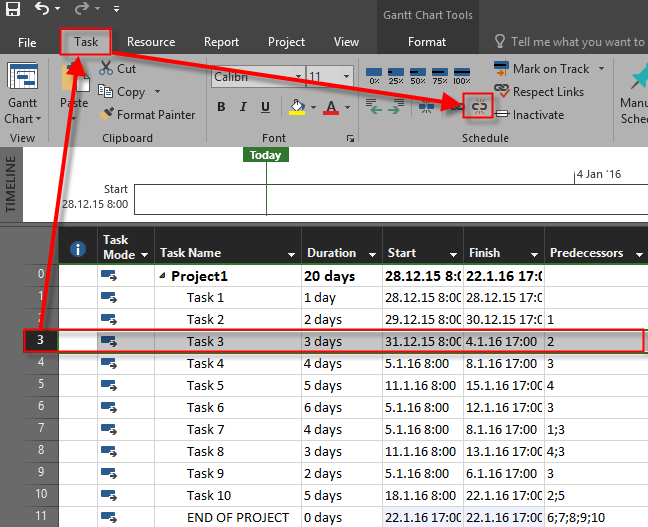
How to delete all dependencies for one Task in MS PROJECT 2016

Hi,

for the last post in this year I choose to show you a very simple Trick. What if you have one Task with multiple Tasks dependencies, and, for some reason you want to remove those dependencies in one step. How to remove those dependencies in Microsoft Project 2016?

First I will build a simple Project with 10 Tasks, and I will set dependencies between them:

image

Now for some reason I want to keep all dependencies, except dependencies for Task 3, which I do not need any more, so I am going to remove them before I build new one. I have to remove all dependencies for it. Imagine that you have a Project with 1753 Tasks, and Task 3 has many dependencies. You can easily forget to remove dependencies. If you want to be sure that you have remove all dependencies, for example, on Task 3, follow this steps:

image

and you will get:

image

As you can see, Task 4,6,7,8 and 9 are not dependent on Task 3 any more.

Easy and effective, isn’t it.

Dear readers, thank you very much for you participation, questions and suggestions.

I wish you all the best in New Year! Smile

Nenad Trajkovski

Posted in MICROSOFT PROJECT, Microsoft PRoject 2010, Microsoft Project 2013, MS PROJECT 2010, MS PROJECT 2016, PMI, PRoject Management | Tagged , , | Leave a comment

Manually Scheduled Tasks and Resource Calendar in MS PROJECT 2016!

Hi,

today I’ll show you how Manually scheduled Tasks are affected by Resource Calendars in MS PROJECT 2016!

First I will create a simple project with only one Task in manually scheduled mode:

image

Now I’m going to create John as Resource:

image

Now, suppose that he has day off at Wednesday, 09.12.2015:

image

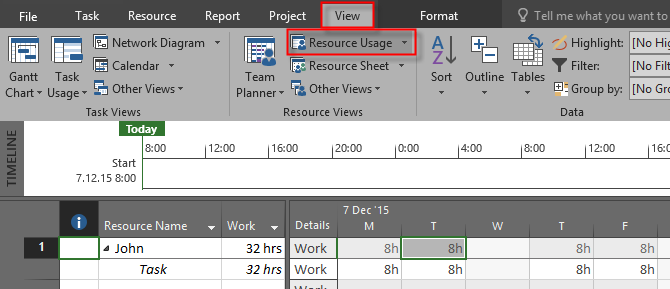
Finally I will assign John to the Task, and I will take a look at the Resource Usage View:

image

As you can see, End date  didn’t change, and John will work only 32 hours to Complete his work, because he is at his day off at Wednesday.

I will now create Same Task in Auto Schedule Mode;

image

and I will assign John to the Task:

image

As you can see, end date is now 14.12.205! Let’s look at the Resource Usage View, again:

image

As you can see, John will work only 40 hours to Complete his work, because he is at his day off at Wednesday, an because of that, he has to wok on Monday, 14.12.2015

So, when you use Auto Scheduled Tasks, End date will extend, and Work = Duration * Units e.g. Work =5 days (8 hours per day) * 100% = 40 hours, and the end date is not fixed!

But, when you use Auto Scheduled Task Work = Available days for resources (Duration) * Units, e.g Work = 4 days (because one day off) (8 hours per day) * 1’00% = 32 hours.

So, be careful when you use Manually scheduled Tasks and Resource Calendars!

Posted in Microsoft Project 2013, MS PROJECT 2016, PMI, PRoject Management | Tagged | Leave a comment