
Hi,
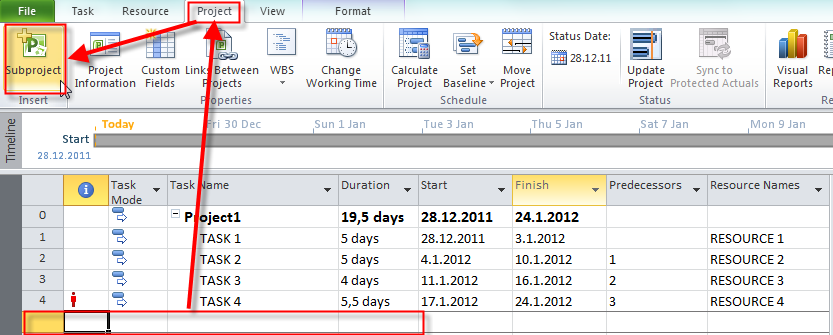
In my previous post I have described how to put subprojects in a Project, and how to make “Master-Slave” Relationship in MS PROJECT 2010. It looks like this:

I want to see Critical Path:

and I will get:

Notice, that you can see the Critical Path only for Master Project. If I want to see Critical Path for Master, and all other Project I should remove check box from: Projects Are Calculated Like Summary Tasks:

and then:

and I will get:

Notice that you can see critical path for Master, and Slave Projects on the Gantt Chart.
As you already know Projects are linked, and any change to the Sub Project in Master Project is recorded to the Slave Project, and vice versa. If you want to unlink the Sub Project you can do it like that:

and I will get:

Notice that Project2, and all its Subtasks are still in the Master Project, but there are no more linked to it, so if you open Project2.mpp and you change something there Master Project remains the same, and vice versa!
If I want to unlink and delete complete Sub Project from my Master Project I should select Summary Task for the Project I want to delete, and the hit the Delete key. I will get:

and after that:

The Project3 is gone!
A Master Slave relationship is one way of managing multiple Projects in MS PROJECT 2010. This is good way of managing RELATED PROJECTS!
But what if you want to manage UNRELATED PROJECTS in MS PROJECT 2010.
They are several ways to do it.
I will open a blank Project first, and then:

and I will get:

If you have already open all of your Projects, you can use a blank project and then:

and you will get:

For the end of this Post I will show you how to make a Project Workspace. Suppose that you always open set of Project files. You can put them in the workspace, and then when you open the workspace file all Projects will be opened, without creating Master Slave relationship or making Consolidated Project.
Firs I have to find the button for saving the workspace:

and then:

and I will get:

Now I will open all Projects I want to save in a Workspace, and I will click on Save Workspace button:

Whenever I will open the Workspace file all Project files will be opened:

and then:

and all my Project will be opened!
Regards,



























































 Nenad Trajkovski